
 Updated : October 13, 2026
As messaging platforms evolve, users are no longer limited to a single digital identity. In 2026, more people are choosing to maintain separate accounts for work, business, and personal communication, and Telegram is leading this shift with built-in multi-account support.
From freelancers and marketers to business owners and community builders, the ability to manage multiple Telegram accounts has become essential for staying organized and productive.
In this blog, we’ll break down everything you need to know, from setting up additional accounts to managing them efficiently across devices.
Can You Have Multiple Telegram Accounts on One Device?
Yes, you can have multiple Telegram accounts on one device. Telegram has built this feature directly into its desktop, web apps, and mobile devices. This way, you do not need extra software to make it work.
Free Telegram users can add up to 3 accounts per device, while Telegram Premium users can add up to 4 accounts. The crucial thing to note here is that each account must be linked to a unique phone number, and switching between them takes two taps.
So if someone asks, “Can you have two Telegram accounts on the same app or phone?” the simple answer is yes. Not just two, but up to three or four, depending on your plan.
- Telegram's multi-account feature has been available since 2017. It was one of the first major messaging apps to support multiple Telegram accounts natively, which is why so many users choose it to keep work and personal chats separate.
How to Set Up a Second Telegram Account?
Setting up a second Telegram account takes under two minutes. The steps are slightly different depending on your device, but the core process is the same. Here is how to make a second Telegram account on every platform.
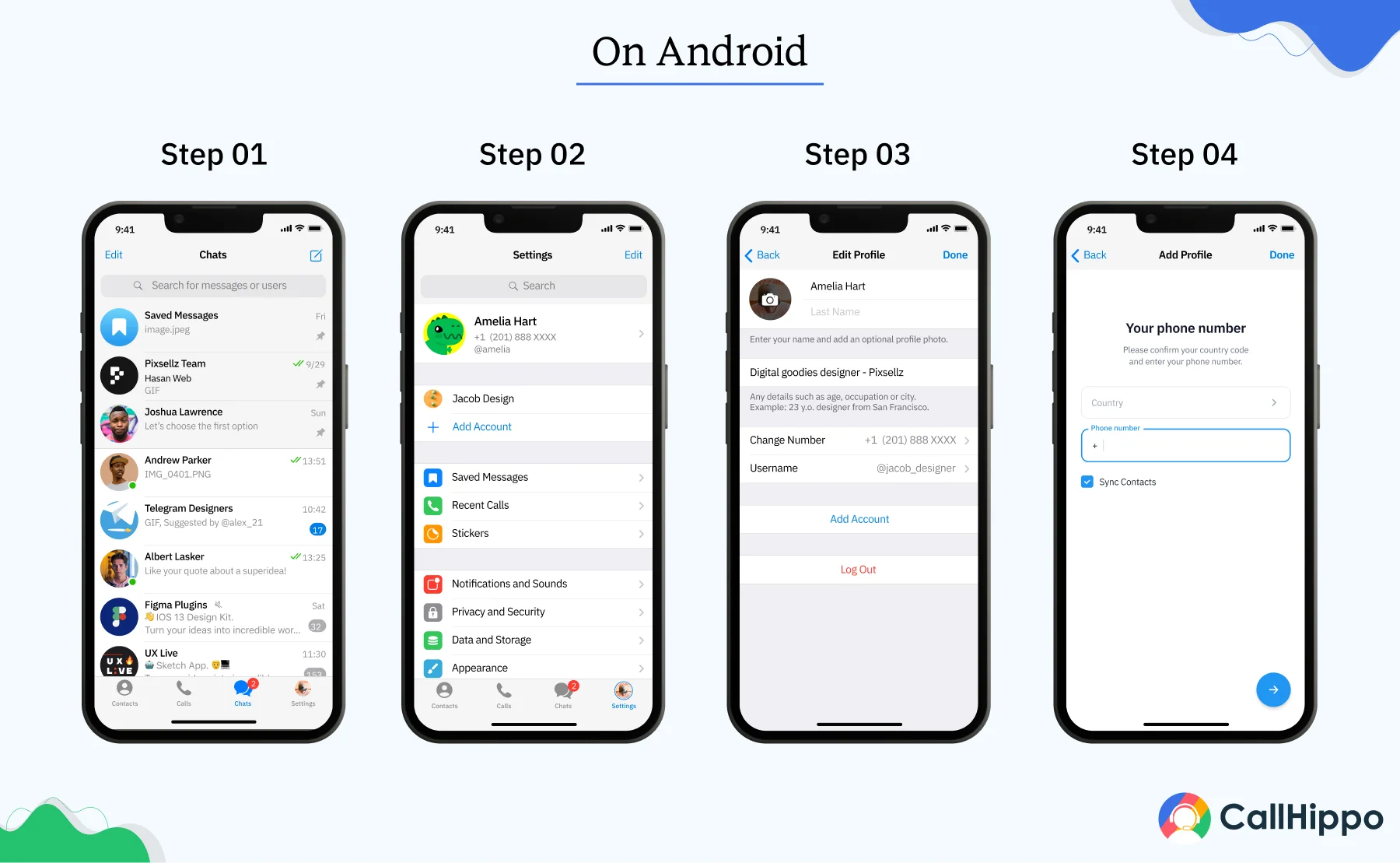
1. On Android
- Open the Telegram app and go to the “Settings” section.
- Tap on the “Account” tab. Then, tap “Add Account” inside that section.
- Enter a different phone number and verify it with the SMS code you receive.
- Switch between accounts on your Telegram mobile app anytime by going back into the same Account section.
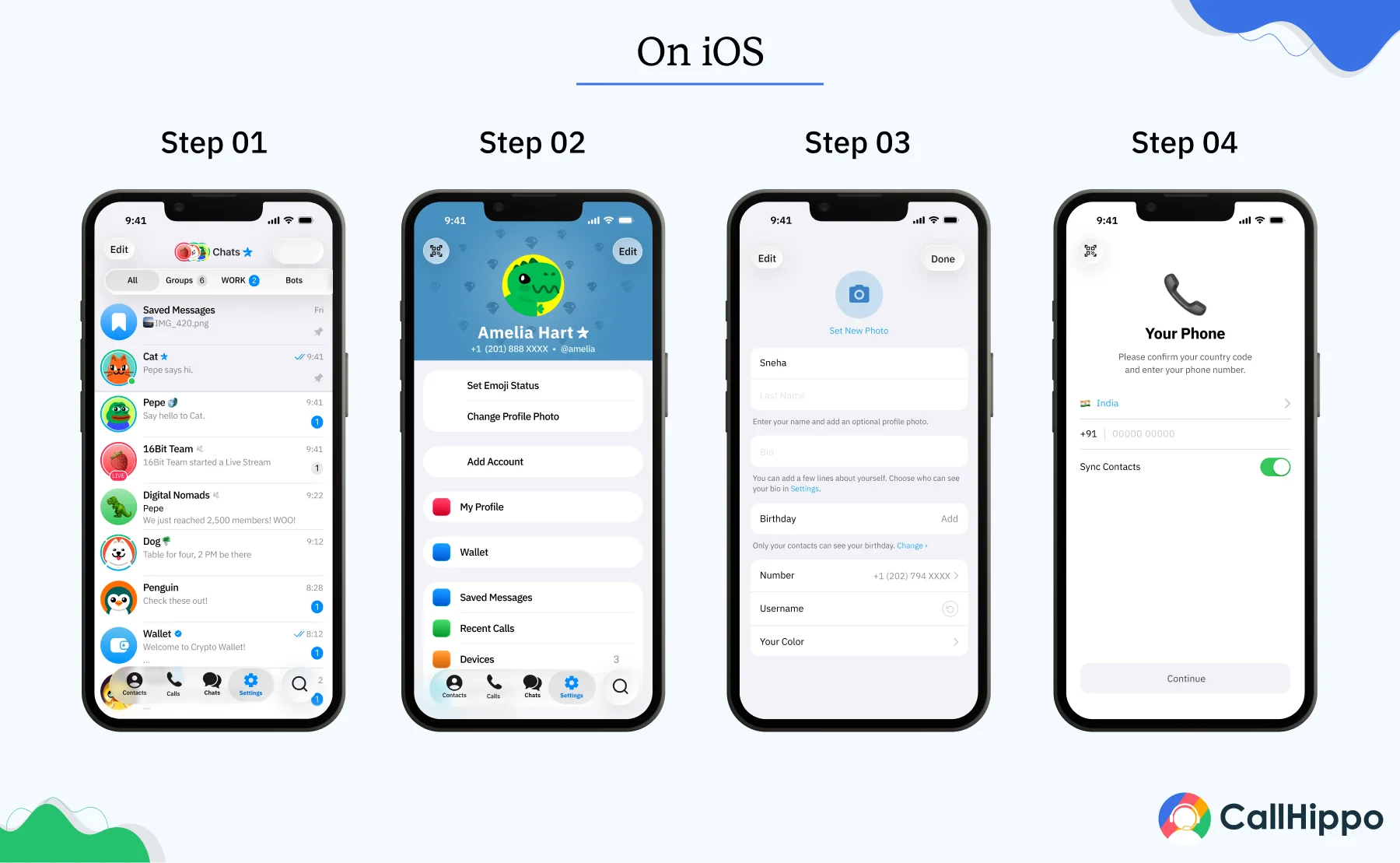
2. On iPhone and iPad
- Open Telegram and go to the “Settings” tab at the bottom.
- Tap on the “Edit” button in the top-right corner.
- Then, select “Add Account” and enter the new phone number and verify through the SMS code.
- Switch accounts directly from the Settings tab whenever you need to.
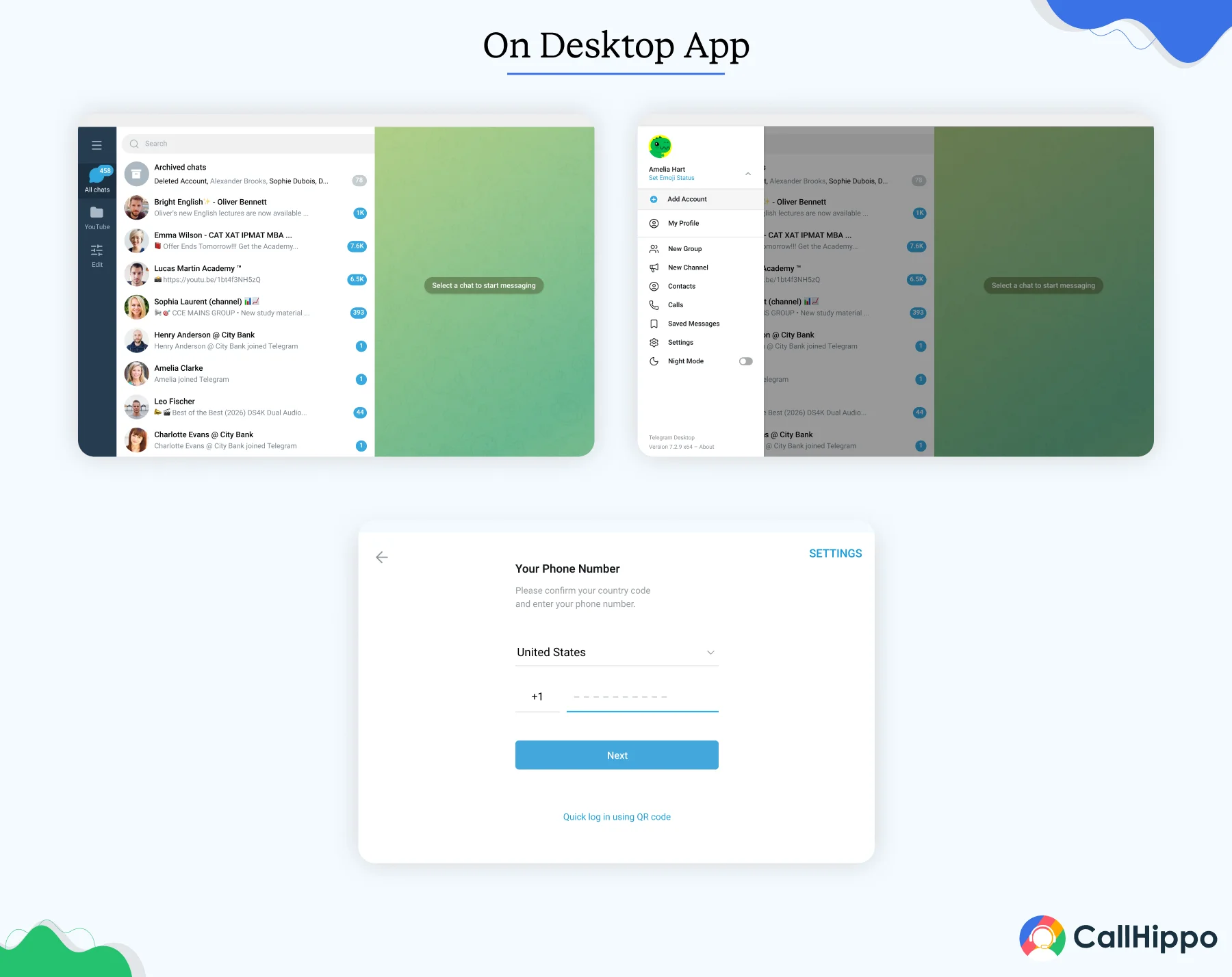
3. On Desktop (Windows, Mac, Linux)
- Open the Telegram desktop app. Click the hamburger menu in the top-left corner and select “Settings”.
- Then, tap on “My Account”.
- Next, click on “Add Account” at the bottom.
- Enter the phone number and verify with the code.
4. On Telegram Web
- Open web.telegram.org and click on the hamburger menu.
- Then, tap on the “Add Account”.
- Enter the phone number and verify with the code.
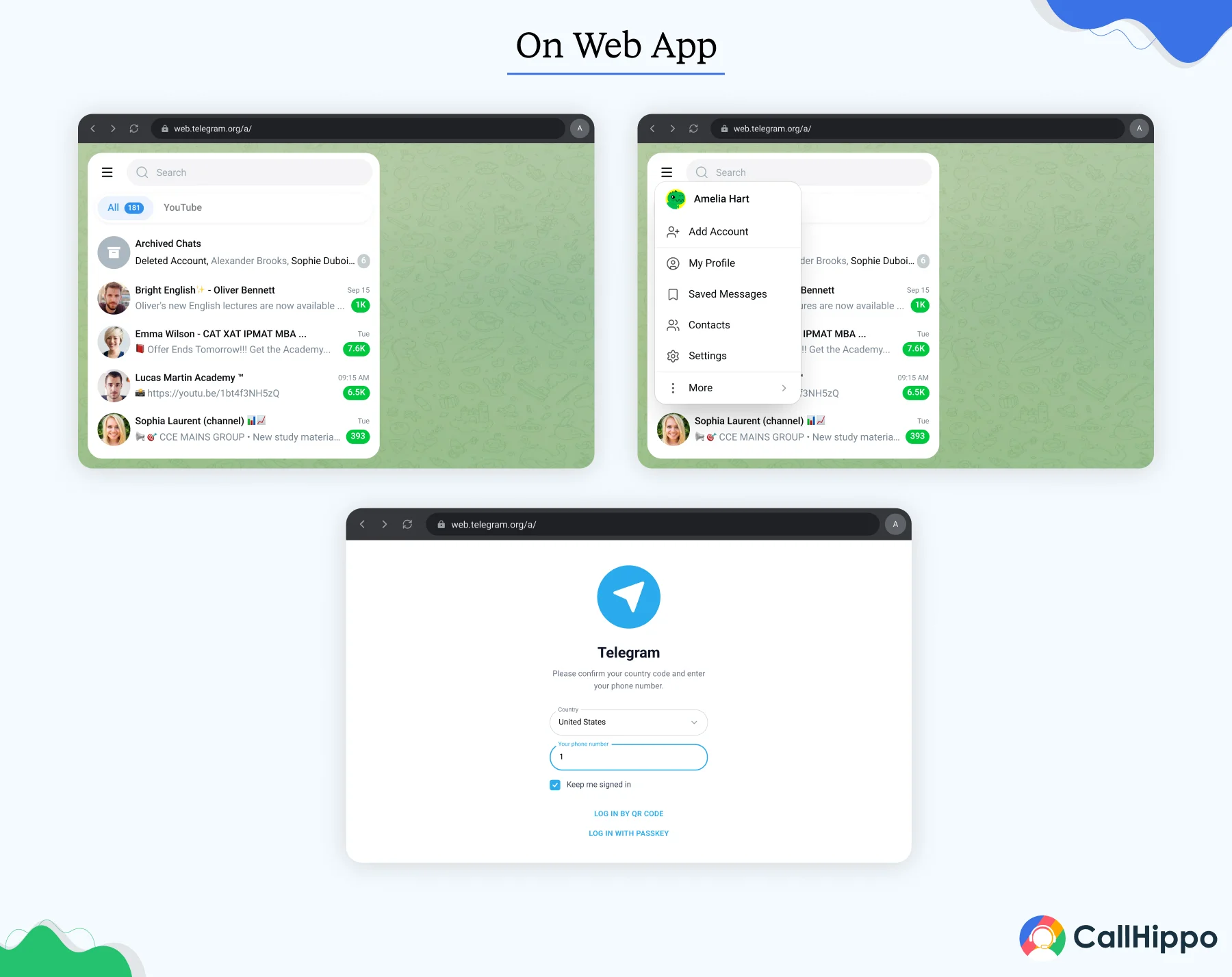
Note: In the Telegram web version, there is no 3-account limit.
These are the official steps to manage multiple accounts. Telegram makes it straightforward, and you can repeat the process until you hit the device limit.
- Users spend an average of 3 hours and 45 minutes monthly on Telegram. It is the 8th highest amount of time among all the social media platforms.
How to Get Virtual Numbers for Telegram Accounts?
Every Telegram account needs its own phone number for verification. If you do not want to use your personal or work number, CallHippo virtual numbers are the cleanest way to set up multiple Telegram accounts. These numbers receive SMS verification codes just like regular phone numbers, and you can pick numbers from any of the 50+ countries CallHippo supports.
Here is how to get a virtual number from CallHippo for your separate Telegram accounts:
- Sign up for CallHippo: Visit callhippo.com and create a free account. The signup takes just a few minutes, and no credit card is required to access the free trial.
- Choose your number: Once you are inside the dashboard, select the country you want a number from. CallHippo offers local and toll-free numbers across 150+ countries, so pick one that fits the Telegram account you are setting up.
- Activate SMS on the number: Make sure SMS receiving is enabled on the number you chose. This is what lets the Telegram verification code come through during signup.
- Enter the number into Telegram: Open Telegram, start the “Add Account” flow, and enter your new CallHippo number. Telegram will send a verification code by SMS.
- Get the code from CallHippo: The verification code arrives in your CallHippo inbox. Copy it and paste it into Telegram to complete the account setup.
Keep the number active. Telegram may ask for re-verification later for security reasons. Keep the CallHippo number active in your plan so you can receive future codes without issues.
CallHippo virtual numbers are one of the simplest ways to create multiple Telegram accounts without buying extra SIM cards. The same number can also be used for making and receiving business calls, so you get double the value from a single subscription.
- Not every virtual number provider supports Telegram SMS. Some services filter out messaging app codes.
- Before signing up, check whether the provider explicitly supports SMS from Telegram, WhatsApp, and similar apps. This saves you from paying for a number that will not work for account verification.
How to Manage More Than 3 Telegram Accounts?
Telegram caps free users at 3 accounts and Premium users at 4 per device. But for agencies, small teams, and creators, three accounts is often not enough. You may run separate accounts for clients, regions, or different brands, and managing them one by one becomes a real burden.
Here is how to get around the device limit when you need to run multiple Telegram accounts at scale:
- Use separate browser profiles: Open Telegram Web in different browser profiles (Chrome, Firefox, Edge). Each profile holds one account. There is no 3-account limit here.
- Use multiple devices: Keep some accounts on your phone, others on a tablet, and more on your desktop. Each device respects its own 3-account cap.
- Use a unified inbox platform: Tools like CallHippo’s Telegram inbox let teams manage multiple Telegram accounts from a single dashboard. Messages from every account flow into one view, and team members can respond without switching accounts manually.
For teams handling customer chats, sales inquiries, or community management across several brands, a unified inbox solves the problem that the native app was not built to solve.

CallHippo brings every conversation from multiple Telegram accounts into one dashboard.
Take a 10-Day Free Trial 150+ Countries · No credit card · Setup in 3 minutesTelegram Multi-Account Security Checklist
Running Telegram multiple accounts comes with a security risk. Each account is another door into your data, and weak security on one account can affect the others. Use this checklist to keep every account locked down from the start.
- Two-Step Verification: Enable Two-Step Verification on every account. Go to Settings > Privacy and Security > Two-Step Verification.
- Create a Strong Password: Use a strong/unique password for each account’s 2FA. Never reuse the same password.
- Add a Recovery Email: Set a separate recovery email for each account so recovery paths stay isolated.
- Warm Up New Accounts Gradually: Do not mass-join groups immediately. Give each new account 7 to 14 days of normal activity first.
- Avoid Automation: Do not automate fresh accounts. Telegram flags bot-like behavior aggressively and can ban young accounts quickly.
- Use Proxy: Use one proxy or IP address per account if managing several at scale, ideally an ISP proxy for consistency. Shared or same IPs can trigger security reviews.
- Custom Notification Tones: Set custom notification tones per account so you know which account received a message without looking.
- Proactive Evaluation: Review active sessions weekly. Go to Settings > Devices. Terminate any sessions you do not recognize.
- Keep Separate Recovery Path: Do not link multiple accounts to the same email. Keep recovery paths separate at all times.
- Back Up Important Chats: Do not forget to set up a backup before any account experiments. Export them through Settings > Advanced > Export Data.
Following this checklist keeps all your multiple Telegram accounts safe from bans, lockouts, and suspicious activity flags.
Conclusion
Setting up multiple Telegram accounts is easier than most people expect. Whether you are separating work from personal chats or running business communities, Telegram’s built-in support for 3 to 4 accounts per device covers most use cases. For anything beyond that, browser profiles, multiple devices, and unified inbox platforms fill the gap.
The one thing that stays the same across every method is the phone number requirement. Every account needs its own verifiable number, which is where virtual numbers become the fastest, most reliable solution. CallHippo gives you virtual numbers in 150+ countries, team collaboration features like group chats, multi-user access, etc., and also works with Telegram’s SMS verification. This helps your team manage all conversations from one unified inbox.
Get a CallHippo virtual number today and have your second Telegram account live in minutes
Schedule a Free Demo Now No credit card required · Set up in 3 minutes · Full access to SMS and callingFrequently Asked Questions
1. Is it safe to use virtual numbers for Telegram?
Yes, using virtual numbers for Telegram is safe as long as the number is from a reliable provider. Virtual numbers receive SMS verification codes normally and work just like regular numbers. However, for better services, it is advised to stick with established providers.
2. Will Telegram ban me for having multiple accounts?
No, Telegram does not ban users for using more than one account. In fact, the platform supports the feature officially. It lets free users create up to three accounts, and Premium users create up to four.
3. Can you use the same phone number for two accounts?
No, Telegram requires a unique phone number for every account. This is why many people ask how to create multiple Telegram accounts using virtual numbers. CallHippo offers virtual numbers in 150+ countries that receive Telegram SMS verification codes without issues, making it simple to set up unlimited accounts.
4. Why do people need more than one Telegram account?
People run multiple accounts for many reasons. Keeping work and personal accounts separate is the most common one. Others include managing a business community, running multiple Telegram channels, separating client conversations, etc. Telegram makes managing several accounts/multiple profiles on the same device easy, so users take advantage of the flexibility.
Published : April 23, 2026
Shubham Nikam, Senior Product Marketing Specialist, brings 5 years of experience in VoIP demand generation and lead generation. He specializes in B2B SaaS, focusing on cloud telephony and CCaaS. Shubham excels in developing go-to-market strategies, optimizing product messaging, and leveraging AI tools to drive growth and customer acquisition.

Subscribe to our newsletter & never miss our latest news and promotions.
 24k+ people have already subscribed



