
 Updated : September 30, 2026
A single lead should hear from one rep, not two. Yet on busy teams, the same prospect gets dialed twice within hours.
It looks disorganized, wastes rep time, raises compliance risk, and, worst of all, creates a poor customer experience.
The fix is routing outbound leads by ownership. Here is why this error happens, what it costs, and how to stop it.
Why the Same Lead Gets Called by Two Reps
The same lead gets called by two reps when leads are worked off a shared list without clear ownership. Two reps both see the number as open and dial it before either logs a call. Nothing links the second rep to the first rep’s activity in the moment.
1. What it Signals to the Prospect
It signals chaos. They wonder if the left hand knows what the right is doing. Trust drops before the real conversation even starts. A second, uninformed call often undoes the first rep’s progress.
2. Why This is More Common on Inbound-Heavy or High-Volume Teams
It happens most on high-volume teams working large, shared lead lists. One rep dials from the top while another works the same lead hours later. The bigger the list, the more the overlap.
Where the Duplicate-Call Gap Actually Comes From
The root cause is simple. Your tools track ownership in two different places that never sync fast enough.
1. The Phone System and the CRM Track Ownership Separately
The CRM knows who owns the lead. The dialer only knows which numbers are on the list. These two systems rarely share ownership in real time. So a rep dials a number without seeing that a teammate already owns it.
2. The Shared List Doesn’t Enforce Who Owns Each Lead
On a shared outbound list, no rule ties a number to one rep. Whoever reaches it first dials it, even if a teammate already owns or worked that lead. The list tracks numbers, not ownership. So two reps pull the same record hours apart, without either one knowing.
What Duplicate Outreach Costs the Team
The cost is higher than a bit of awkwardness. It shows up in trust, time, and compliance.
1. The Prospect Loses Trust Before You Even Get a Real Conversation
A duplicate call makes your team look uncoordinated. The prospect grows guarded and shares less. You spend the call rebuilding trust instead of moving the deal forward.
2. Reps Waste Hours Doing the Same Work Twice
Two reps on one lead means two sets of notes, two follow-ups, and two logged attempts. Multiply that across a week, and the wasted hours add up fast. That is time neither rep spends on fresh, winnable leads.
3. Calling the Same Number Twice Fast Can Trip Compliance/Consent Rules
Rapid repeat calls can also brush against calling rules. In the US, the TCPA and do-not-call standards limit how and how often you contact people. Two quick calls to one number raise unnecessary risk.
How Assigned Dialing and CRM Sync Stop Duplicate Calls
The reliable fix is to assign each lead or campaign a single owner, then keep that ownership in sync. Two CallHippo features make that simple.
1. Assign Each Lead/Campaign to One Rep with Campaign-Based Dialing
CallHippo’s power and predictive dialers run on campaigns. You upload a lead list, then assign it to a specific rep. Each lead/campaign sits in one agent’s queue, so two reps never dial the same number off a shared pile.
2. Sync Lead Ownership Between Your CRM and Your Dialer
The deeper fix is connecting your CRM. CallHippo syncs lead ownership and call outcomes both ways. The dialer respects who owns a lead, and every rep sees who called last before they dial. The gap between the two systems finally closes.
Setting Up Assigned Outbound Dialing
Setting this up takes only a few minutes. Here is the sequence.
1. Upload your contact list, or sync it directly from your CRM.
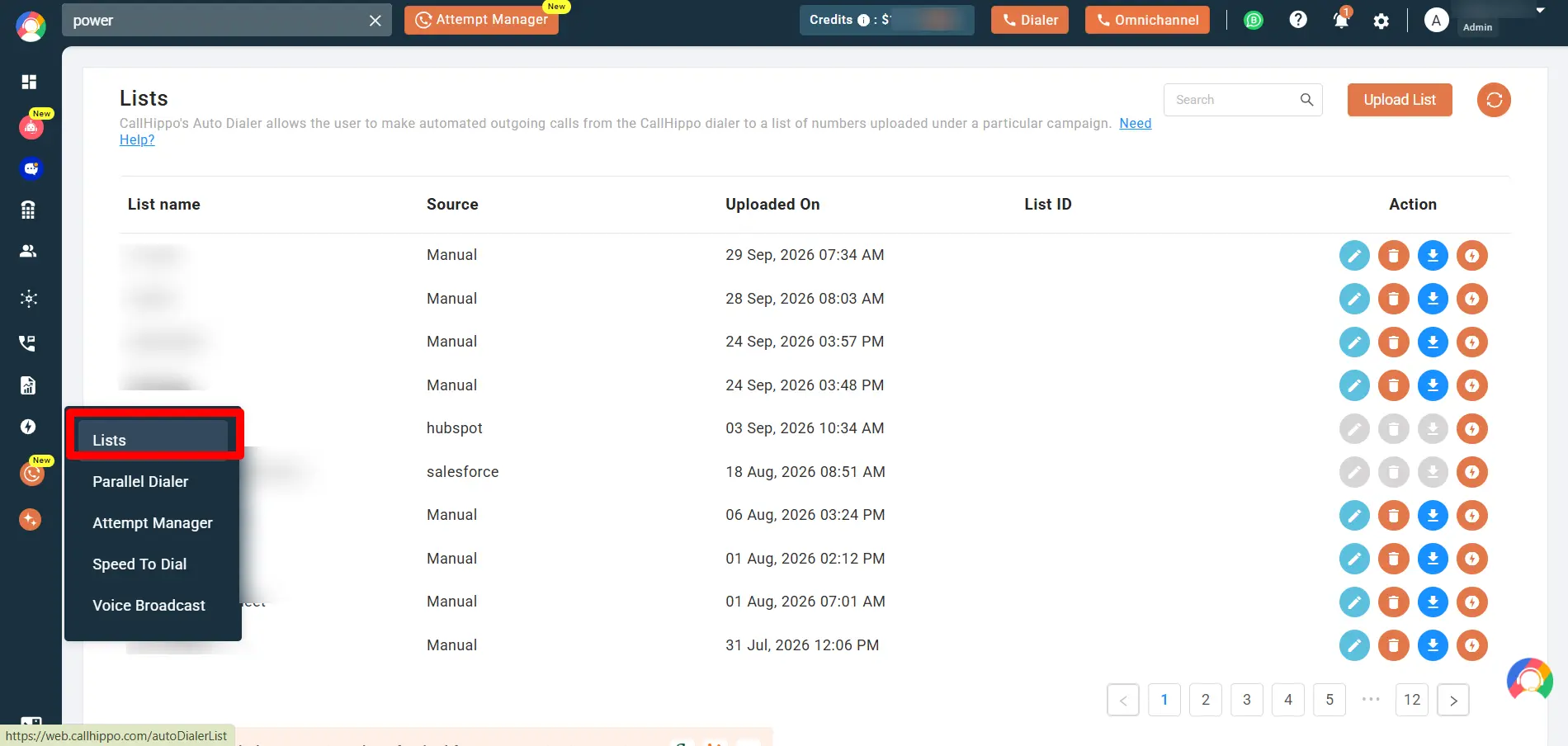
2. Click on the lightning action icon to use the list with Parallel Dialer/Attempt Manager.
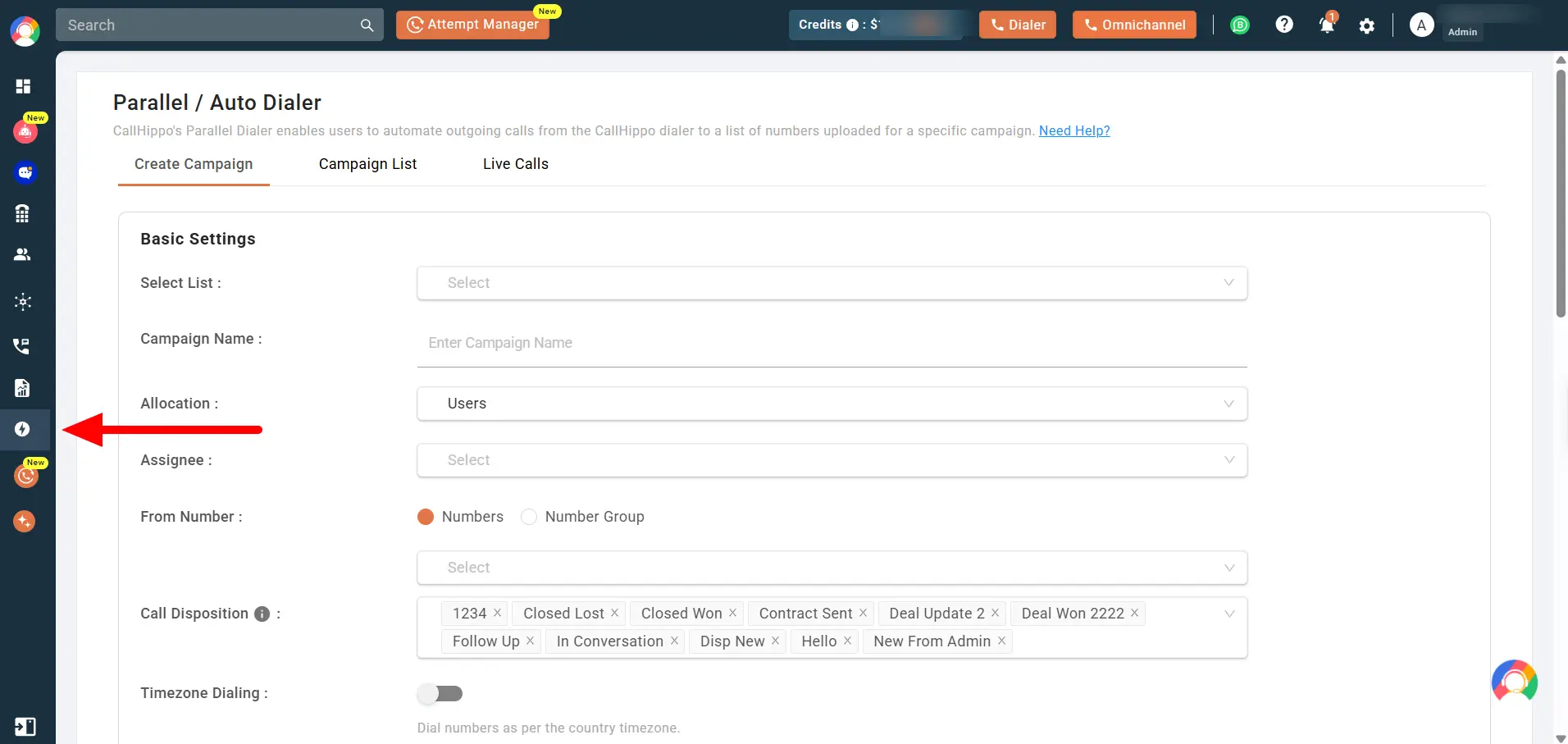
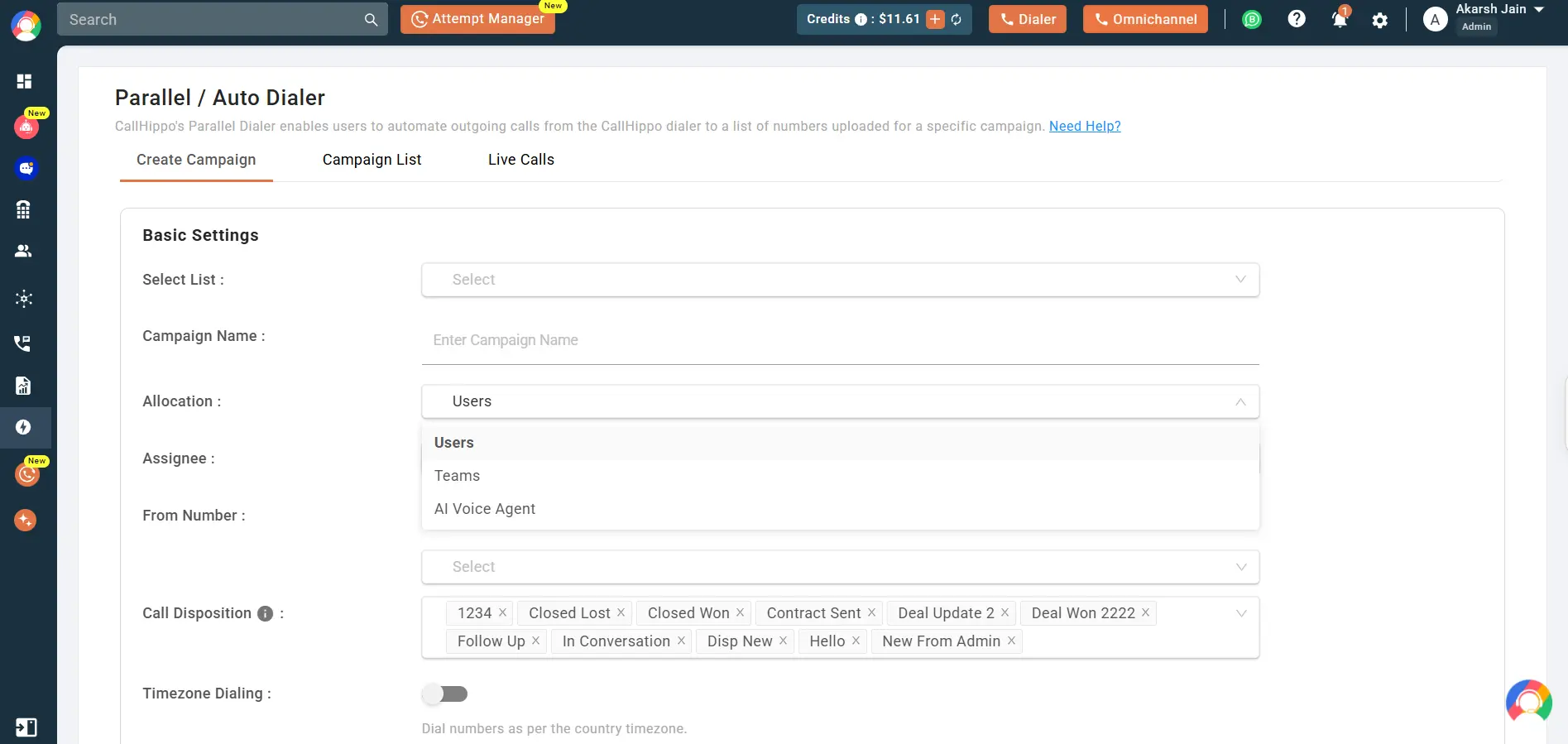
3. Use the Parallel/Auto Dialer. Select a list, then create a new campaign and name it for the outreach.
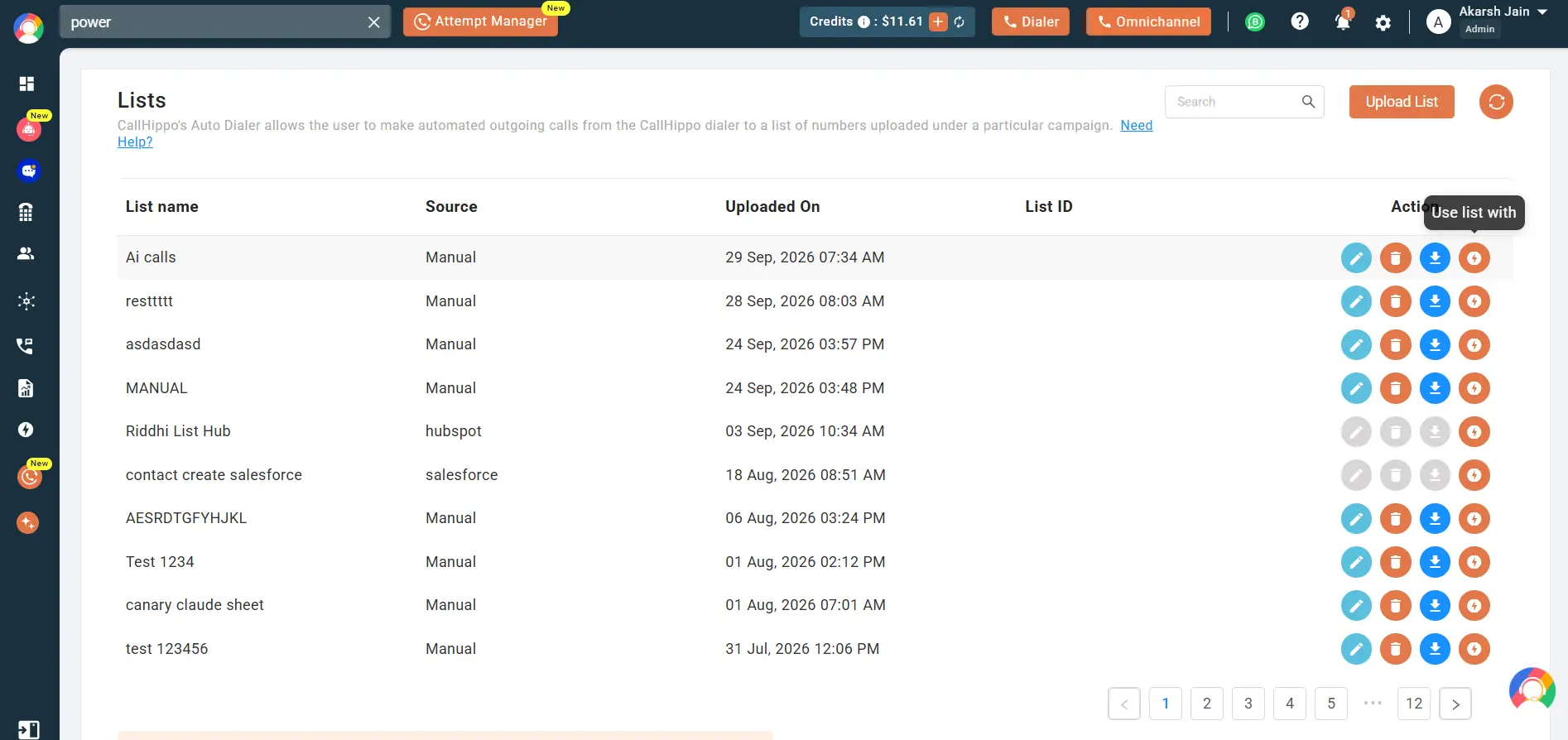
4. Click on the box beside “Allocation” and assign the campaign to a single user or team.
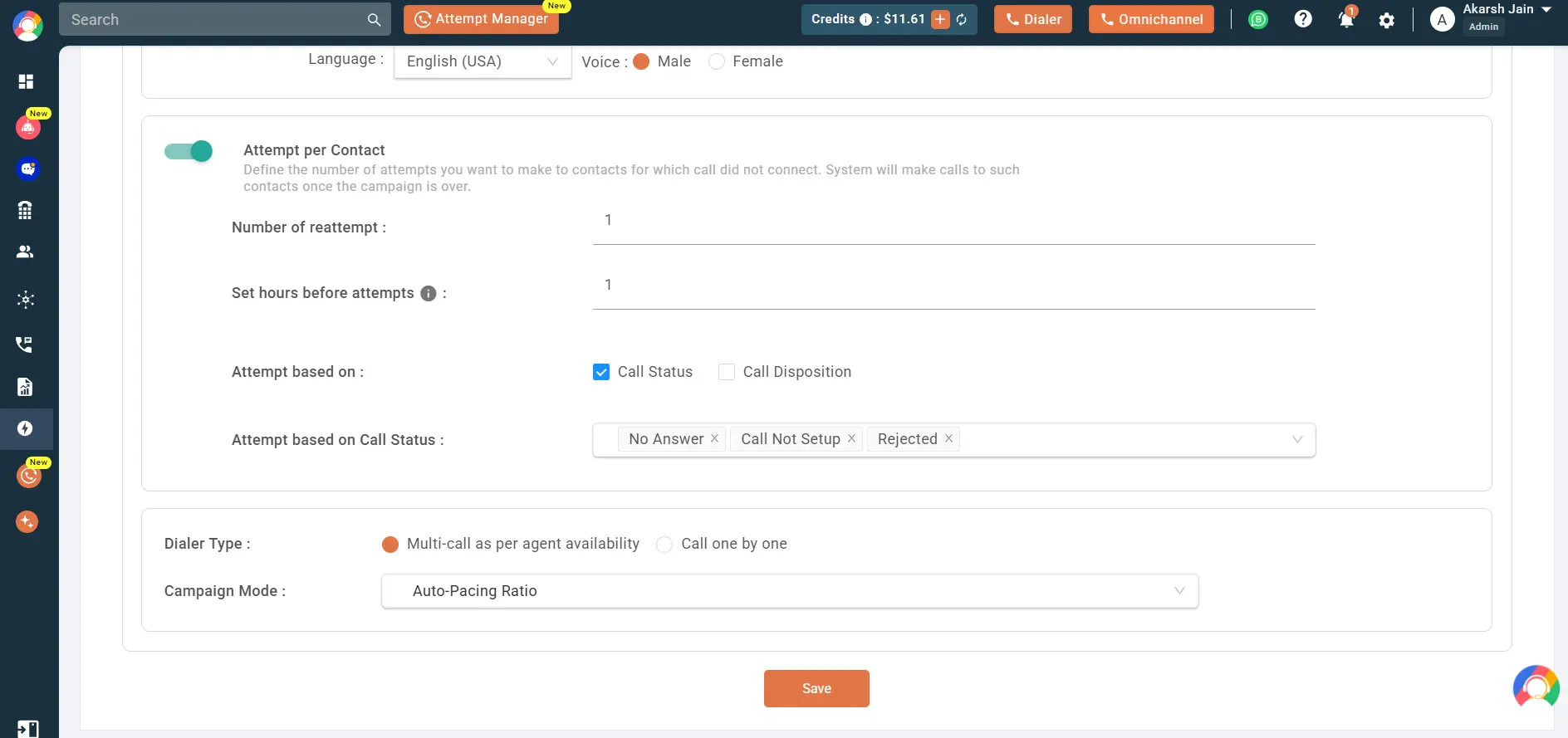
5. Save and start the campaign, and let the dialer feed leads to the assigned rep only.
Conclusion
Duplicate calls are a routing problem. When every lead has one owner and that ownership is synced between your CRM and dialer, double-dialing stops. Assigned campaign dialing gives each lead to one rep, and CRM sync keeps it that way. Your prospects get one clear point of contact, and your reps stop repeating each other’s work.

Frequently Asked Questions
1. Can I still split new leads across reps automatically?
Yes. You can segment a campaign by region or priority, so new leads spread across reps while each number stays with one owner.
2. What happens if the rep who owns a lead is on another call?
The lead stays in that rep’s queue and waits. It is not handed to a second rep, so the number is never dialed twice.
3. How long should a lead stay assigned to one rep before reassigning?
It depends on your cycle. Many teams reassign after a few days of no contact, so leads never go cold.
4. Can I run assigned dialing across multiple campaigns or numbers?
Yes. You can run several campaigns at once. Just keep each lead in a single campaign to avoid any overlap.
5. Does assigning leads slow reps down on a big list?
No. The dialer still moves through the list automatically. Assignment only controls who dials which leads, not how fast.
6. How do you find out how many leads got double-called last month?
Check your call logs for the same number dialed by different reps within a short window. Your analytics can flag them.
Published : September 30, 2026

Shantanu Thakur is a Product Consultant at CallHippo with expertise in B2B software sales. With a background in sales development, he brings strong skills in client prospecting, negotiation, and business growth to help companies find the right solutions for their needs.

Subscribe to our newsletter & never miss our latest news and promotions.
 24k+ people have already subscribed