
 Updated : March 23, 2026
Businesses get calls every day. Some are simple questions. Others need detailed support. If your team answers each one manually, it takes time and effort. This is where an IVR service provider helps.
IVR stands for Interactive Voice Response. It is the system that answers calls automatically. For example, when you call your bank and hear, Press 1 for balance, Press 2 for card services, that is IVR.
In this guide, I will walk you through some of the best IVR solutions, and we’ll also discuss some important considerations before using the system.
- The Interactive Voice Response market jumped to $5.53 billion in 2024 and is heading toward $7.68 billion by 2029: a steady 6.7% annual growth that shows just how much businesses are embracing smart automation.
- Companies are discovering that good IVR systems don't just save money, they actually improve customer experience by handling routine stuff quickly, letting their teams focus on conversations that really need a human touch.
What is IVR and How it Works?
Interactive Voice Response (IVR) interacts with callers through pre-recorded voice messages. It allows customers to navigate menus and provide information using their keypad or voice commands. With IVR, customers do not need to speak to a live agent.
For example, when you reach out to an ecommerce business, many times you hear,
- Press 1 for order-related query
- Press 2 for payment-related query
- Press 3 for return-related query
That’s the Interactive Voice Response system in action. It caters to basic queries that otherwise consume a lot of time for customer service reps.
Let’s explore the step-by-step process of how CallHippo’s IVR software works:
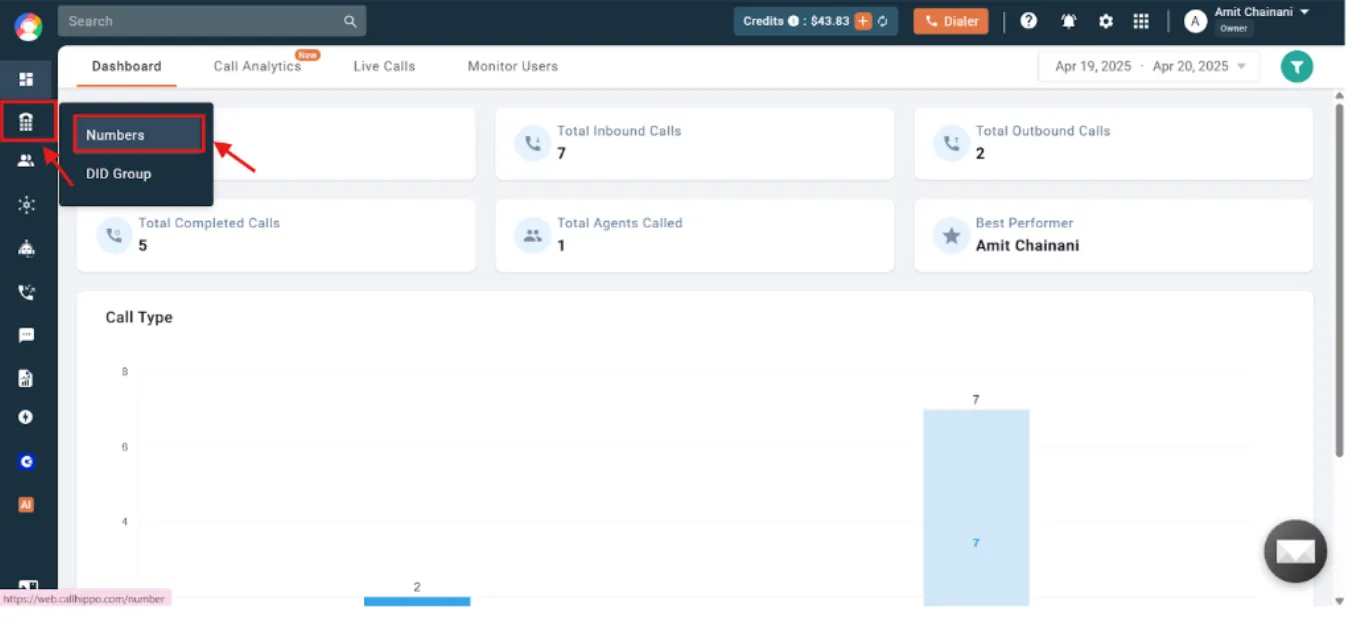
- Log in to your “CallHippo dashboard” and access the “Numbers and DID” section. Then, click on “Numbers”.
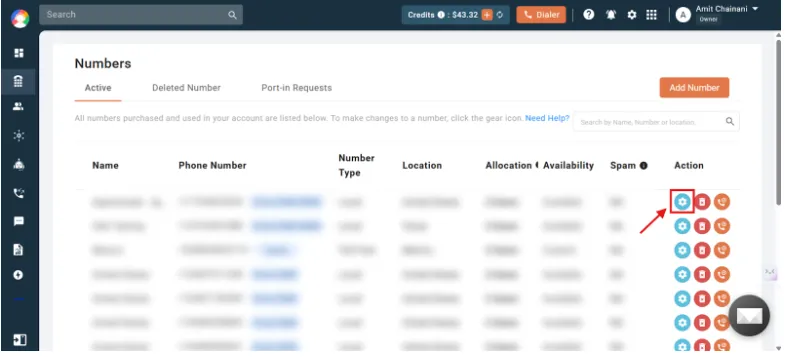
- The next step is to click on the “settings” icon.
- Then, access the “IVR/Welcome message” settings.
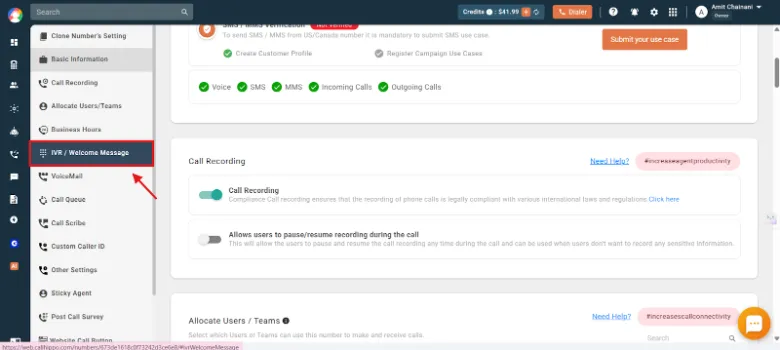
- Then, turn on the “IVR mode”. Once you enable the IVR, you will see an IVR message bar, enter your tailored welcome message there.
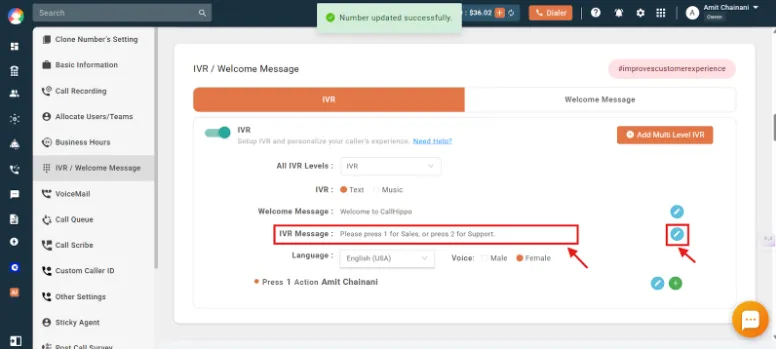
- Assign routing actions (add or remove the inputs).
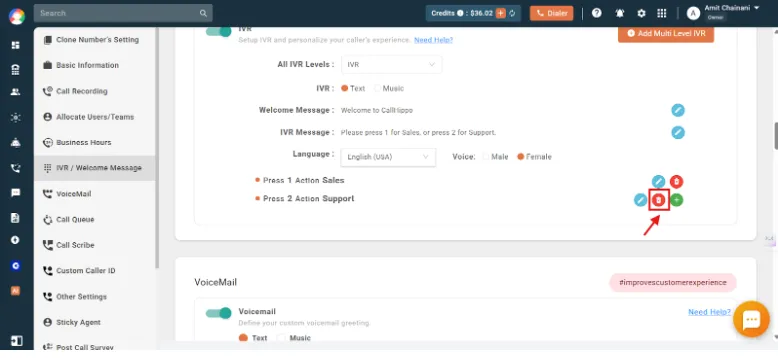
- At the end, save your settings, and your IVR system is set up.
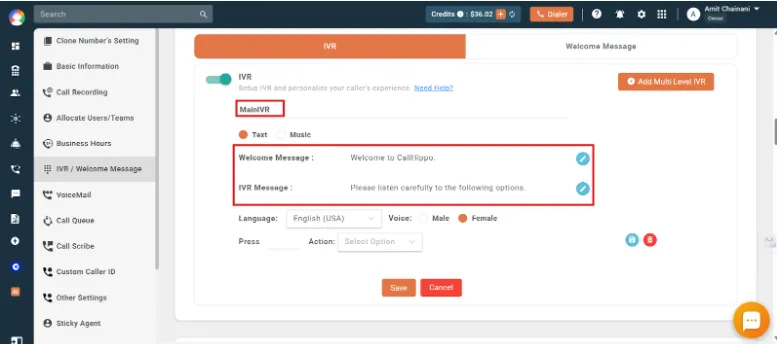
With these few easy steps, you can setup an IVR menu system tailored to your requirements and manage basic customer queries with ease.
What are the Best IVR Service Providers?
There are many IVR providers in the market. Each one offers different features, pricing, and support. Choosing the right one depends on your business size, goals, and industry. Let’s look at some of the best IVR software options available today.
| Provider | Features | Free Trial | Basic Pricing Plan | |
|---|---|---|---|---|
| 1 |  Nextiva | Conference Calling, IVR, Business Text Messaging, Voicemail, CRM integrations, Auto-attendants | 14-day free trial | Core Plan: $52/user/month |
| 2 |  CallHippo | Power Dialer, Answering Machine Detection, Smart Call Forwarding, Call Conferencing, Call Center Analytics, IVR, Predictive Dialer | 10-day free trial | Basic: $1/user/month |
| 3 |  Twilio | Answering Machine Detection, SIP Trunking, Programmable SMS | 30-day free trial | Contact for More Details |
| 4 |  CloudTalk | Smart Dialer, Call Transfers, Voicemail, Personalized Messages, Call Tagging | 14-day free trial | Starter: $25/user/month |
| 5 |  RingCentral | Automatic Call Recording, Business SMS, Multi-way Conference Call, Call Screening, Unified Inbox | 14-day free trial | Core: $20/user/month |
| 6 |  AirCall | Voicemail, Call Routing, Shared Call Inbox, Call Queuing, Call Recording, Click to Dial | 7-day free trial | Essentials: $30/license |
| 7 |  TalkDesk | Automatic Call Distributor, Voicemail, Seamless Integrations, Automated Workflows, Call Monitoring, Real-time Dashboards | 15-day free trial | CX Cloud Digital Essentials: $85/user/month |
1. Nextiva (best for, pricing, one user review)
Nextiva is a unified customer experience platform that offers both basic and advanced IVR. Its drag-and-drop call flow builder makes it easy for teams that do not have technical expertise. Nextiva is designed for multilevel IVR menus. It also integrates seamlessly with CRMs.
Why We Recommend Nextiva?
Nextiva’s combination of conversational AI, no-code call flow design, and seamless integration means you get a smarter IVR that actually learns from customer interactions. It helps businesses that need a scalable, fully managed platform.
Best For
Nextiva is the strongest all-around interactive voice response software solution for businesses that want enterprise-grade features without enterprise-level complexity.
Pricing
- Core Plan: $52 /user/month
- Engage Plan: $38 /user/month
- Power Suite Plan: $100 /user/month (Up to 100 Agents)
2. CallHippo
CallHippo is a cloud-based business communication system and an IVR solution provider for small and medium businesses. It offers a simple setup so that you can get started quickly. With CallHippo, you can create a custom call flow, route calls using intelligent call routing, and distribute calls with automatic call distribution to the right agent or team. This business phone system also allows integration with popular CRM tools like HubSpot, Zoho, or Salesforce.
Why We Recommend CallHippo?
CallHippo’s affordable pricing tiers, quick setup, and international number availability make it one of the most effective options for businesses. It’s the right pick when ease of use and cost-efficiency are the top priorities.
Best For
If you’re a startup or small business that needs a reliable IVR system on a tight budget, CallHippo is the best option available.
Pricing
- Basic: $1 per user/Month
- Starter: $19 per user/Month
- Professional: $29 per user/Month (Popular)
- Ultimate: $45 per user/Month
3. Twilio
Twilio offers businesses the tools they need to build highly customized IVR systems. It also supports speech recognition, text-to-speech in hundreds of languages, call recording, etc. It combines these features to create exactly the IVR experience businesses need. Twilio also easily connects with CRM, database, etc., to help teams work more productively.
Why We Recommend Twilio?
No other platform other than Twilio gives developers the flexibility to build deeply integrated voice workflows. If your business has unique routing requirements and complex data integrations, Twilio is a great platform.
Best For
Twilio is the go-to choice for tech-forward companies that want complete control over their IVR logic and customer experience.
Pricing
(Contact for More Details)
4. CloudTalk
CloudTalk is a cloud-based contact center solution designed primarily for sales and customer support teams. It offers multi-level IVR, intelligent call routing, etc., features to make communication hassle-free. CloudTalk also supports multi-language IVR menus, allowing businesses to cater global client base.
Why We Recommend CloudTalk?
CloudTalk stands out for its combination of advanced IVR customization and strong international capabilities. Its AI-enhanced analytics give teams meaningful insight into call center performance to help them improve the support quality.
Best For
CloudTalk can be a good option for businesses that operate across multiple markets globally.
Pricing
- Started: $25 user/month
- Essential: $29 user/month
- Expert: $49 user/month
5. RingCentral
RingCentral offers a comprehensive business phone system with built-in IVR. Its visual IVR editor makes it easy to configure complex call flows. RingCentral offers end-to-end encryption, making it a dependable choice for businesses of all sizes.
Why We Recommend RingCentral?
RingCentral offers omnichannel capabilities and multi-site management tools, making it particularly well-suited for enterprises that need consistency across locations.
Best For
RingCentral is the best option for businesses that want a mature, feature-rich communications platform with built-in IVR.
Pricing
- Core: $20 per user/Month
- Advanced: $25 per user/Month
- Ultra: $35 per user/Month
- Customer engagement bundle: (Contact for More Details)
6. Aircall
Aircall is built specifically for sales and support teams. Its IVR setup is straightforward and intuitive, allowing teams to create call routing menus without technical expertise. Aircall also offers features like call queuing, call whispering, etc., to help managers train agents effectively.
Why We Recommend Aircall?
Aircall’s polished user experience and deep CRM integrations help your sales and support teams work more productively. It allows businesses to adopt IVR without disrupting existing workflows.
Best For
Aircall is best for teams that prioritize ease of use and seamless tool integration above all else.
Pricing
- Essentials: $30/license
- Professional: $50/license
- Custom Pricing: (Contact for More Details)
7. Talkdesk
Talkdesk’sIVR capabilities include skills-based and language-based routing. It also provides real-time call monitoring and voice/screen recording features for quality assurance. It also automates complex workflows and assists agents in real time.
Why We Recommend Talkdesk?
Through real-time guidance, sentiment monitoring, and workforce management, Talkdesk helps businesses to focus on agent performance. It also helps teams serve customers better once those calls are connected.
Best For
Talkdesk is the ideal choice for businesses that need industry-specific functionality and AI-driven automation working together in one platform.
Pricing
- CX Cloud Digital Essentials: $85 per user/per month
- CX Cloud Voice Essentials: $105 per user/per month
- CX Cloud Elite: $165 per user/per month
 : Best Free IVR Software & Open Source Options
How to Choose the Right IVR Provider?
Not every business has the same needs. The right IVR service provider for a hospital may not be the best fit for an online store. That’s why it’s important to check a few things and have an IVR vendor comparison before deciding. Let’s go through the main factors step by step.
1. Industry-Specific Needs
First, think about your industry. A healthcare provider may need IVR to handle patient calls and appointment bookings. A bank may need secure systems for account details. A retail company may want order-tracking options.
- The use of cloud-based IVR systems has gone up by 51%, driven by the growing demand for smarter and more automated ways to handle customer interactions.
2. Ease of Setup And Use
Then, look at how easy it is to get started. Some advanced IVR solution providers offer ready-to-use templates. Others may require more setup work. If your team is small, a provider with a simple dashboard and drag-and-drop call flows is better. It saves time and reduces training needs.
3. Pricing And Value for Money
After that, compare the costs of the cloud phone systems. Some interactive voice response service providers charge monthly, while others bill based on usage. Low cost is good, but don’t focus only on price. Ask what you’re getting in return. For example, does the plan include call recording software, analytics, or CRM integration? A slightly higher price may give you better value.
4. Customer Support & Reliability
Finally, check how reliable the provider is. An IVR system is often the first touchpoint for your customers. If it fails, your reputation suffers. Look for IVR providers with:
- 24/7 technical support.
- High uptime (close to 99.9%).
- Good reviews from other businesses.
- IVR technology traces back to the 1930s when Bell Labs’ Voder machine first produced synthetic speech, paving the way for today’s automated phone systems.
What are the Key Features to Look for in IVR Solution Providers?
Choose features that solve real human problems easily, not just impressive technical specifications. Here are some key features of an IVR system:
- Call Routing & Forwarding: Effective routing connects each incoming call with someone who can actually help them. The system considers caller history, inquiry type, and agent expertise to prevent transfers and repeated explanations.
- Language Support: Serving diverse communities means communicating in customers’ preferred languages. Quality multilingual support sounds natural and welcoming, not robotic.
- CRM and Helpdesk Integration: When systems connect with customer databases, agents see who’s calling before answering, their history, preferences, and any ongoing issues.
- Real-Time Analytics & Reporting: Analytics reveal where people struggle, which menu options confuse, and when calls are abandoned in frustration.
- Customizable Call Flows: Systems should reflect how customers think about problems, not how departments are organized.
- In 2024, the U.S. National Institute of Standards and Technology (NIST) reported that over 7 in 10 new IVR systems are built with Natural Language Processing (NLP). In simple terms, this means calls are handled faster and customers get a better, easier experience.
Common Use Cases of IVR Solutions
IVR systems are useful in many ways. They save time, organize calls, and give customers quick answers. Let’s explore how interactive voice response service providers help businesses with common tasks.
1. Customer Support Automation
IVR service providers help automate basic customer queries. Callers can get answers without waiting for an agent. For example, a telecom company using an IVR solution provider can let callers check their data balance or recharge options directly through the system. This reduces wait time and frees support agents to handle more complex issues. So, customers get quick responses, and teams work more efficiently.
2. Appointment Scheduling
IVR systems can schedule, reschedule, or cancel appointments automatically. For instance, a clinic using an IVR service provider may allow patients to press 1 to book an appointment, 2 to reschedule, or 3 to cancel. The system updates the calendar instantly. This saves staff time and ensures no appointments are missed.
3. Surveys and Feedback Collection
IVR solution providers can help collect feedback from callers after a service or purchase. For example, a retail store using IVR can ask callers to rate their shopping experience. Responses are recorded and stored for analysis. This provides real-time insights without requiring extra staff.
4. Lead Qualification & Sales Routing
IVR phone systems can qualify leads and route calls to the right sales team. For instance, a software company using interactive voice response service providers can ask callers about company size or product needs. Based on responses, the system directs the customer call to the correct sales executive. This ensures sales teams focus on qualified leads and improves conversion rates.
Conclusion
Choosing the right IVR software provider isn’t just about comparing feature lists; it’s about finding a partner who understands your business and your customers. Take the time to really think through what your industry needs, how your team works, and what kind of customer satisfaction and experience you want to create for the people calling you. When you get it right, you’ll see the difference immediately: your team will be more productive, your customers will have better experiences, and your business will feel more professional and organized.
FAQs
1. How much does an IVR system cost?
Honestly, there’s no one-size-fits-all answer here. If you’re a small business with straightforward needs, you can find affordable options. But once you start wanting more features – smart routing, detailed reporting, advanced analytics – the price naturally goes up. The upside? Most companies understand that businesses grow, so they’ve built their pricing to scale with you. You’re not locked into paying enterprise rates from day one.
2. Is IVR secure for handling sensitive customer information?
Not all providers handle security the same way, and if you’re dealing with personal or financial information, you can’t afford to get this wrong. Look for companies that can walk you through their encryption methods and show you how they stay compliant with whatever regulations affect your industry. If they’re being vague about their security practices, that’s not a good sign.
3. Can I customize my IVR system?
The short answer is yes, but how much depends on your provider. Most decent systems let you record your own greetings, set up menus for your business, and route calls based on what your customers actually need. Some even handle multiple languages if that’s important to your customer base. The real question is whether you can make it sound and feel like your company, not some generic phone tree.
4. How long does it take to set up an IVR system?
For something basic, you could probably have it running by the end of the day. But if you’re integrating it with your CRM, setting up complex routing rules, or connecting multiple departments, give yourself at least a few days to test everything thoroughly. It is better to spend extra time up front than to have customers get frustrated with a system that doesn’t work properly.
5. Why do businesses need an IVR?
An IVR helps route callers to the right department automatically. It does not require a human receptionist. It reduces wait time, handles high call volume, and ensures customers reach the correct person faster.
6. What are the benefits businesses can gain by using IVR?
IVR improves response speed, lowers support costs, and keeps lines available 24/7. It also increases agent productivity by filtering basic queries and sending only relevant calls to agents.
7. What are the industries benefiting from IVR?
Industries like banking, healthcare, e-commerce, telecom, travel, logistics, and customer support centers use IVR heavily because they handle frequent and repetitive customer inquiries.
8. What are security & compliance considerations in IVR services?
Businesses must inform callers about recording, protect personal data, encrypt call information, and follow regional regulations (like consent laws and data-privacy standards) to avoid legal risks. Businesses must choose a provider like CallHippo that is compliant with global regulations such as SOC 2, ISO, HIPAA, and GDPR.
Published : March 2, 2026
Harsh Bairagi is a B2B SaaS content writer with over 4 years of experience in the tech industry. Harsh believes in creating good copies to bridge the gap between tech and emotion. When not chasing clean copy or clever metaphors, he is busy catching up on his favorite sports.

Subscribe to our newsletter & never miss our latest news and promotions.
 24k+ people have already subscribed



