

 Updated : April 10, 2026
Missed calls and broken call flow slow teams. Many businesses outgrow basic phone lines once call volume rises. Calls fail, customers wait, and teams lose context. That hurts trust and revenue.
A virtual phone system is a cloud-based business phone setup that routes calls through the internet. Teams use it on laptops, mobiles, or desk phones while sharing one number system, call rules, and message history.
The global VoIP market reached $96.34 billion in 2026 as companies replaced rigid hardware with flexible cloud systems. This guide explains how virtual phone systems work and how teams use them at scale.
Virtual Phone System Explained
A virtual phone system runs business calls through the internet instead of copper wires or on-site PBX hardware. It gives companies a single business number, or many numbers, that work across devices and locations.
Calls reach users through mobile apps, desktop apps, or IP phones. The caller never sees the difference. To them, it feels like a standard office call.
A virtual business phone operates completely online. Admins manage users, rules, and numbers from a dashboard. It works well for teams without a central office. Startups, remote teams, and global firms rely on it to keep one call flow across regions. A virtual office phone service often includes:
- Local and toll-free numbers
- Call routing rules
- Voicemail
- Call records
- Team extensions

Start your free trial and control calls, texts, and WhatsApp from one platform with 99.9% uptime.
How Virtual Phone Systems Work?
A virtual phone system uses VoIP technology. Voice turns into data. Data travels over the internet. The system then routes the call based on rules. Here is the flow, step by step.
- The connection: Instead of a traditional phone line, the system uses your internet connection (Wi-Fi, 4G, or 5G) to handle calls and messages.
- The processing: When a call arrives, the system checks caller ID, time, and menu selections, then decides the correct path.
- The routing: The call reaches the right person, team, or voicemail, which can be accessed on a mobile app, browser, or desk phone.
- The logging: Call details, duration, recordings, and outcomes are stored in the dashboard.
- The reporting: Managers view call volume, wait times, and missed calls in real time.
Core Components Behind the Scenes
A virtual phone system relies on several layers:
- Cloud servers that host call logic
- SIP trunks that connect calls to carriers
- Apps that act as softphones
- Admin panels for setup and control
The user never sees this complexity. The result feels simple. But strong providers invest heavily in uptime, routing speed, and global carrier links.
Types of Virtual Phone Systems
Not every virtual phone system fits every business. The label sounds simple. The models differ a lot. Teams often pick the wrong type, then blame call quality, cost, or limits. The real issue sits in the system model itself.
Below are the main types that matter in real deployments.
1. Cloud-Based / Hosted VoIP Systems
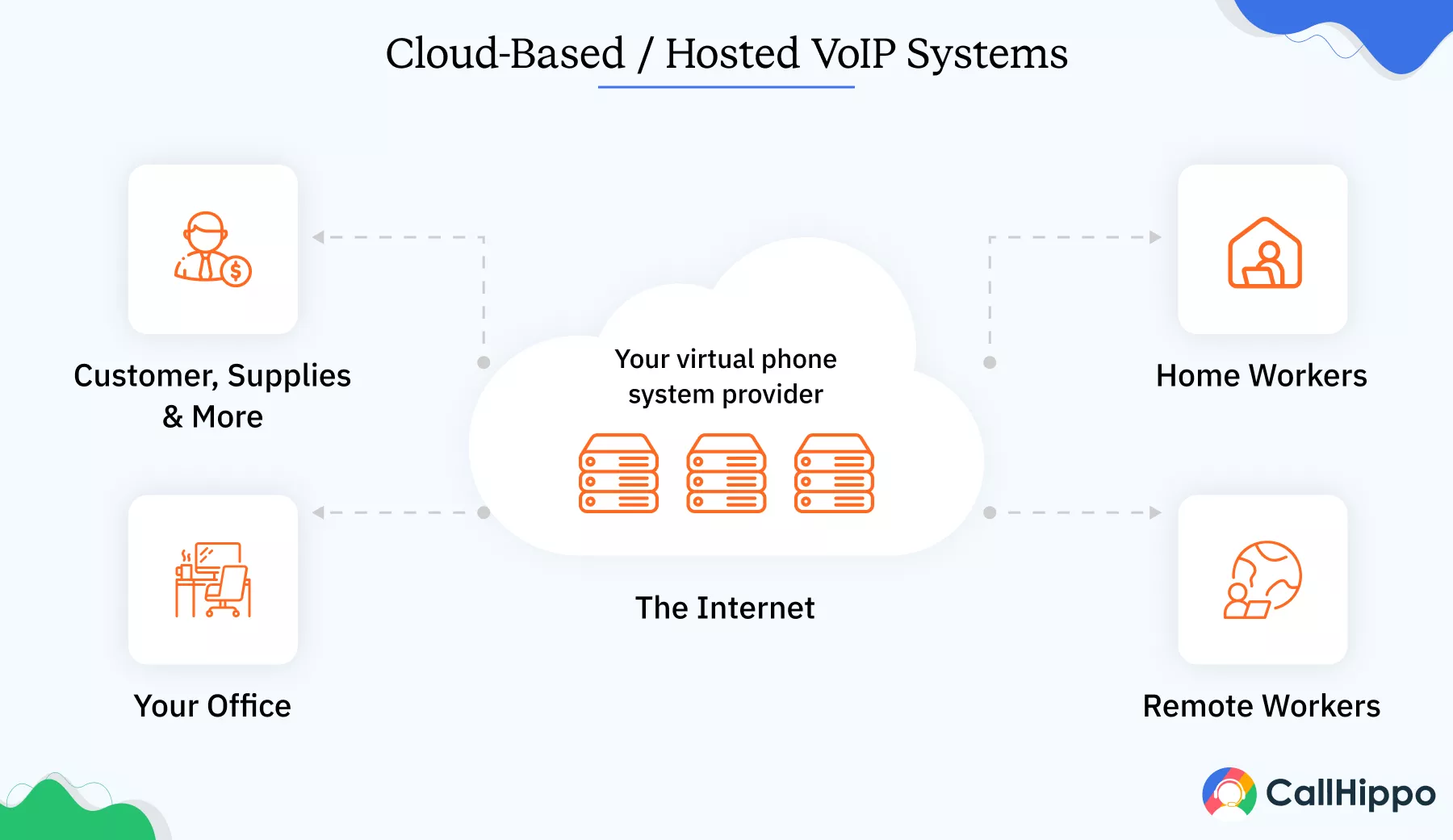
A cloud-based or hosted VoIP system runs fully under a third-party provider. No on-site PBX hardware exists. Setup happens through a web dashboard. Calls route through the provider’s cloud infrastructure.
This type suits small to mid-sized businesses that want low maintenance and fast rollout.
- No physical PBX
- No server upkeep
- Updates handled by the provider
- A 20-person agency sets up a hosted virtual phone system in one afternoon. Each employee installs an app. Calls route by role. Admins manage everything online. No IT visit needed.
- SMEs
- Startups
- Remote teams
- Sites with unstable internet
- Firms with strict on-site control needs
This is the most common virtual phone system model today.
2. SIP Trunking
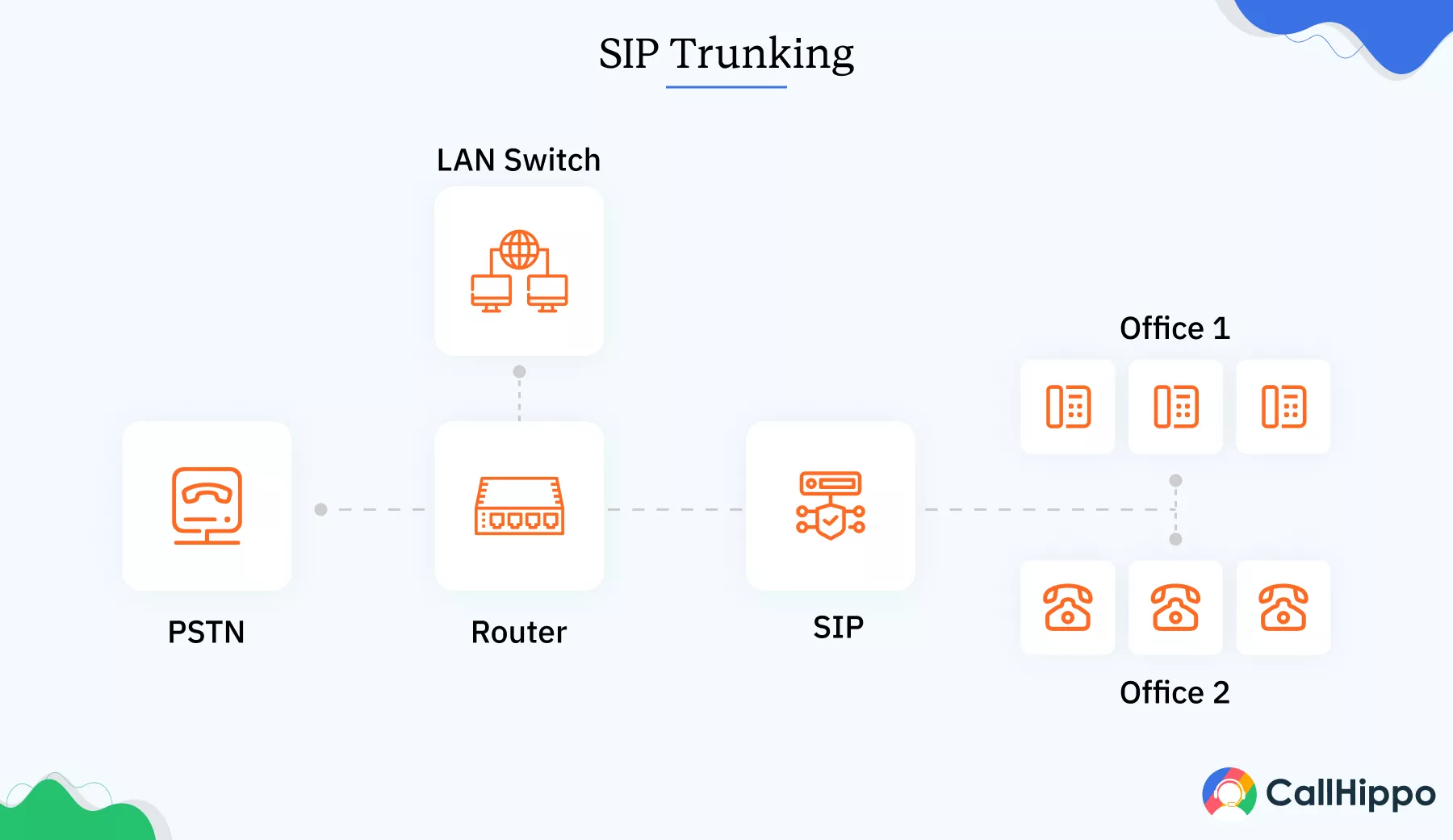
SIP trunking connects VoIP technology to an existing on-premise PBX. Instead of replacing hardware, it extends it. Calls move over the internet while desk phones remain in use. This option suits businesses that have already invested in PBX systems and want a gradual change.
- Uses existing desk phones
- Reduces call costs
- Keeps current call flows
- Imagine a manufacturing firm keeps its PBX across multiple floors. They add SIP trunks to cut carrier costs and enable remote call routing without replacing phones.
- Large offices
- Businesses with sunk PBX costs
- Complex setup
- Ongoing hardware reliance
SIP trunking is not a full virtual office phone system. It is a bridge.
3. Unified Communications as a Service (UCaaS)
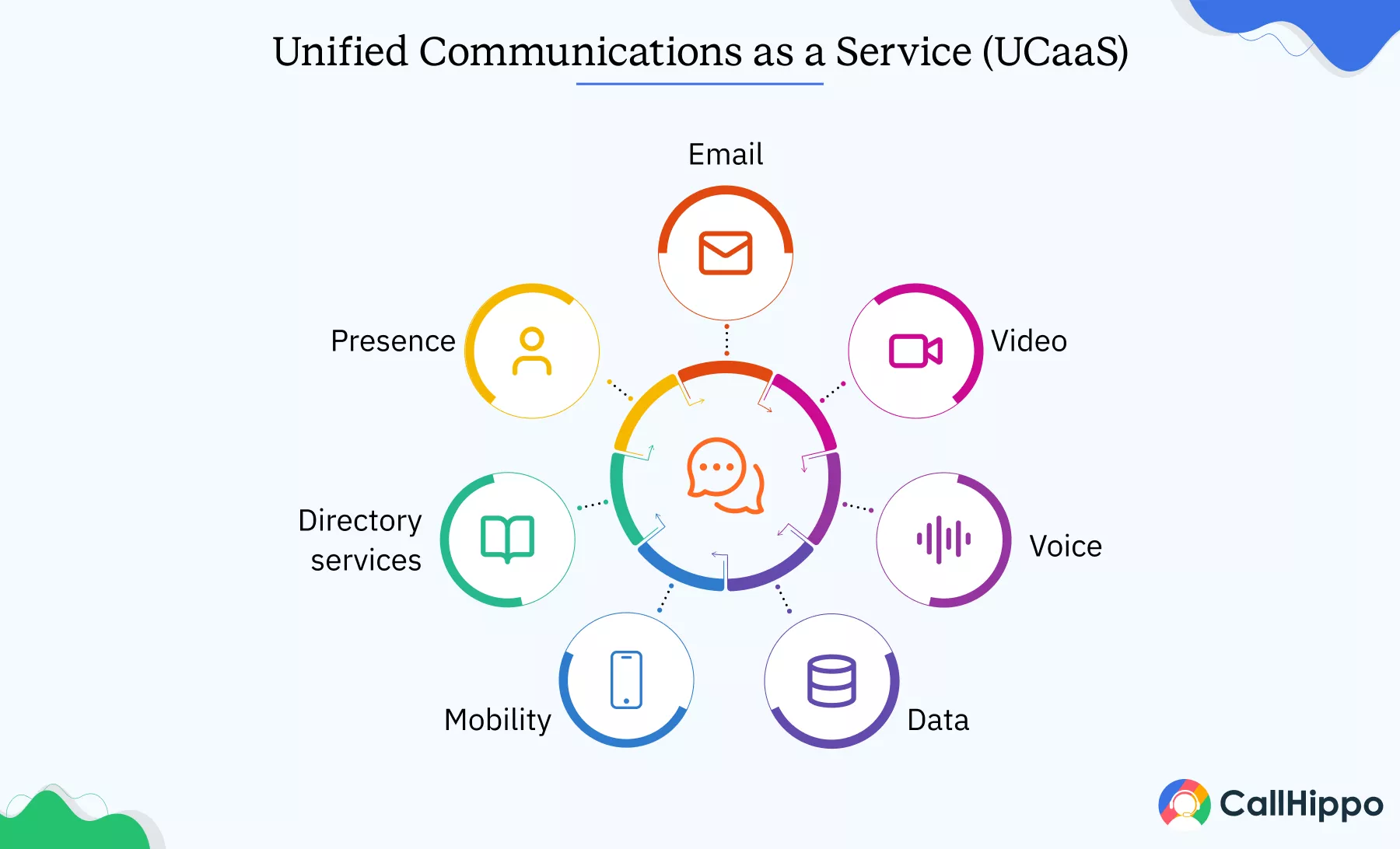
UCaaS platforms bundle calling with video meetings, team chat, SMS, and file sharing. Everything lives in one cloud platform. This type suits teams that want one system for all communication.
- Voice, video, and messaging in one place
- Central user management
- Consistent experience across tools
- A global consulting firm uses UCaaS to run calls, internal chat, and video meetings. Teams switch modes without leaving the platform.
- Distributed teams
- Mid-sized to large firms
- Overkill for call-only needs
- Higher cost
UCaaS works when teams commit fully. Partial use wastes value.
4. Hybrid Virtual Phone Systems
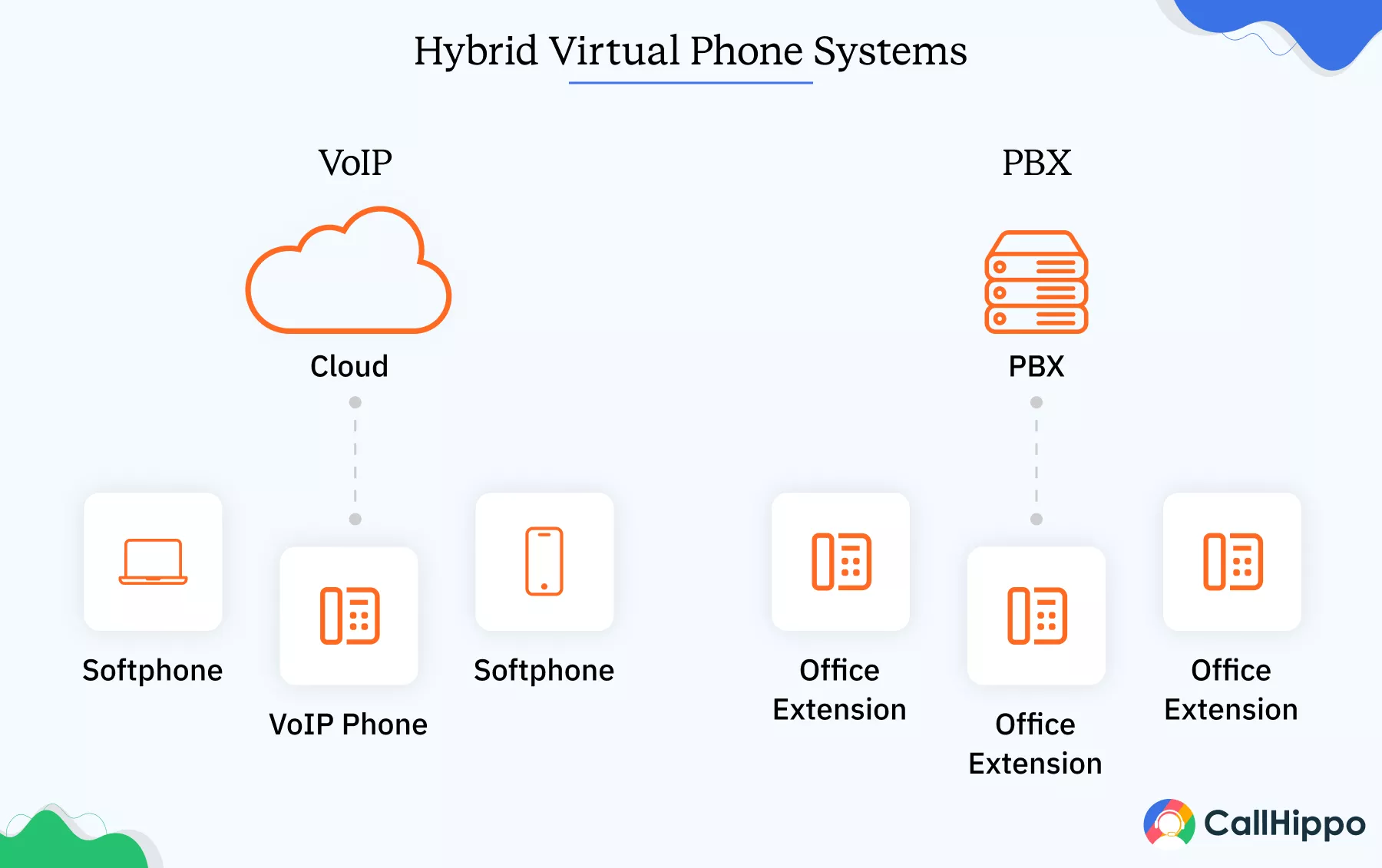
Hybrid systems combine traditional PBX hardware with modern VoIP features. Part of the system stays on-site. Part runs in the cloud.
This option supports a slow transition.
- Keeps legacy hardware
- Adds cloud features gradually
- Reduces migration risk
- Think that a hospital keeps its internal PBX for critical departments. Admin offices use cloud calling. Over time, more teams move to VoIP.
- Regulated industries
- Large enterprises
- Complex management
- Mixed user experience
Hybrid systems solve short-term constraints. Long-term simplicity stays limited.
- Want speed and low upkeep> Cloud-based hosted VoIP
- Have PBX hardware already > SIP trunking
- Want all tools in one system > UCaaS
- Need slow migration > Hybrid
Key Features of Virtual Phone System and How They Benefit Your Business
Features sell virtual phone systems. Results come from how teams use them. Many businesses pay for tools they never touch. Others miss one setting and suffer daily call chaos. This section explains the features that matter and why they work when set right.
1. Call Management
Call management defines the core value of a virtual phone system. Without strong call control, the rest is noise.
A. Call Forwarding
Call forwarding sends calls based on rules like time, user status, or location. Set correctly, it prevents missed calls. Poor setup can create loops.
Mistake to avoid: Forwarding all calls to personal mobiles breaks reporting and exposes private data. CallHippo routes calls within the system, keeping reports accurate and conversations secure.
B. Call Recording
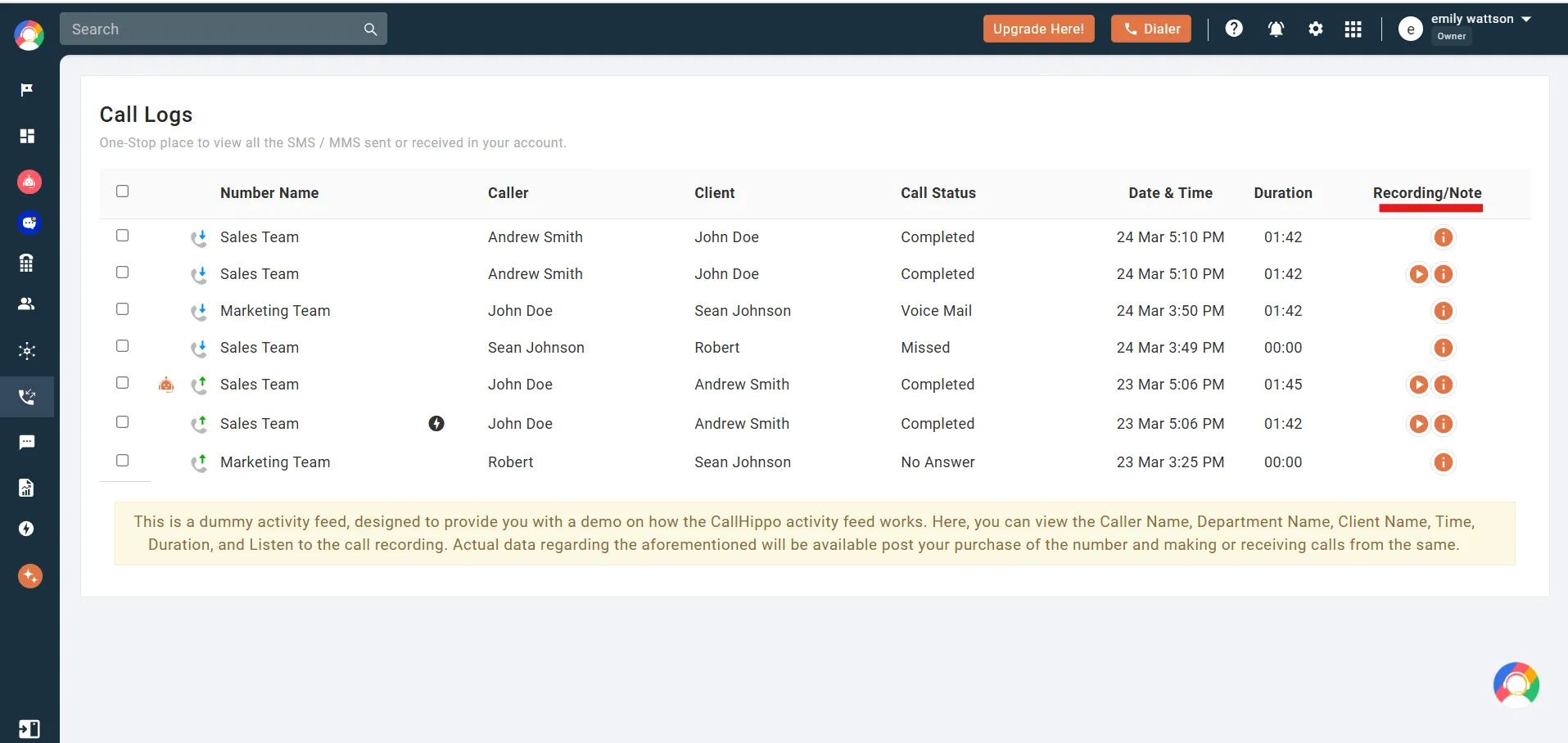
Call recording helps teams maintain quality, comply with rules, and train staff. With CallHippo, you can record important calls, control how long recordings stay, and review calls regularly through the dashboard. Managers and team leads can easily access call details to check performance and ensure standards.
C. Auto Attendant (IVR)
Auto attendants guide callers without manual support. CallHippo lets teams set clear menu options, keep menus one level deep for simplicity, and provide an easy path to a human agent. This reduces confusion for callers while keeping control over call flow and improving customer experience.
2. Mobility and Multi-Device Access
Mobility shapes modern work. Teams need access to calls and messages from anywhere, not just the office. CallHippo lets users answer calls, reply to messages, and view reports on mobile devices, desktops, or desk phones. This flexibility keeps operations steady and ensures teams stay connected with customers, no matter where they work.
Key detail: Good systems sync call state across devices. Poor ones drop calls on the switch. Remote teams depend on this. Office-only tools fail here.
3. Integration with CRM and Collaboration Tools
Integration separates basic tools from serious systems. CRM links show the caller context before answering. That saves time and avoids repeat questions. Common integrations include:
- Salesforce
- HubSpot
- Zoho
- Slack
- Microsoft Teams
Missed setup: Many teams connect the CRM, but skip field mapping. Call log without notes and value drops.
4. Cost Savings and Scalability for Businesses
Virtual phone systems cut costs in clear ways:
- No PBX hardware
- No maintenance contracts
- No location limits
Scaling stays simple. Add users in minutes. Remove lines when teams shrink. Traditional systems fail here. Hardware locks cost regardless of use. Hidden cost to watch: International call rates. Some systems price low seats but high call charges.
Comparing Virtual Phone Systems vs. Traditional PBX
Below is a direct comparison and differences between virtual phone systems and traditional PBX that matter in daily communications.
| Feature | Virtual Phone System | Traditional PBX |
|---|---|---|
How to Choose the Best Virtual Phone System for Your Business?
Most teams choose based on price. That leads to regret. Smart teams start with usage.
1. Considerations: Number of Users, Budget, and Features
Most buying mistakes start with the wrong headcount. Teams count employees. They should count daily call handlers.
Start with usage, not organization size.
- Who answers calls every day?
- Who needs outbound access?
- Who only needs voicemail or reports?
Next, define must-have features. Not future ideas. Not vendor promises. Only what supports daily work.
- Call routing with time and role rules
- Call recording with retention control
- CRM sync for visibility and logging
- Advanced analytics for large teams
- AI tools for review and coaching
Do not let optional features decide the plan. Many teams buy higher tiers for tools they never activate. Budget comes last. Always. Paying less for the wrong system leads to:
- Missed calls
- Manual workarounds
- Early migrations
2. Security, Reliability, and Compliance Factors
Security is no longer a checklist item. It is a business risk. Today, phone systems store sensitive data:
- Call recordings
- Customer details
- Internal notes
Check for:
- End-to-end encryption for voice and data
- Clear data residency options
- Role-based access controls
- Compliance support, such as HIPAA or GDPR
Reliability matters just as much. Do not rely on marketing claims. Ask for:
- Historical uptime data
- Redundancy design
- Carrier failover support
A system that fails twice a month breaks trust fast. Customers do not care why calls drop. They only notice that they do.
3. Evaluating Customer Support and Ease of Setup
Support quality often predicts long-term success. Strong support prevents weeks of delays. Weak support pushes teams to abandon features or use personal phones again.
- Send a chat request
- Ask a setup question
- Note response time and clarity
Depth matters more than speed. A fast answer that misses context wastes time. Ease of setup drives adoption. Admins should complete basic setup without vendor help. Users should start making calls without training sessions.
Features, Plans, and Review Overview of Leading Virtual Phone Providers
Below is a quick comparison table. Detailed reviews follow.
| Provider | Pricing Plan | Free Trial | G2 Rating |
|---|---|---|---|
Disclaimer: Providers were compared based on pricing transparency, feature depth, G2 reviews, and suitability for different team sizes.
1. Nextiva
Nextiva suits companies that want their virtual phone system to act as a central hub. Calls, internal messages, and call data sit in one place. This helps managers keep control as teams expand. It works best for structured teams that care about reporting and call discipline. Setup takes effort, but stability improves once the system settles.
Best for
Growing businesses that want voice, chat, and analytics in one place.
Features
- VoIP Business Phone Service
- Auto Attendant
- Call Queues
- Voicemail to Email
- Call Monitoring
2. Zoom Phone
Zoom Phone makes sense when meetings already run on Zoom. As a virtual phone system, it keeps calling familiar and easy for remote staff. Teams answer calls from the same app they already use daily. Routing stays basic, so it fits teams with simple call paths and steady volume rather than complex support flows. It also offers the option for unlimited domestic calling.
Best for
Teams already using Zoom.
Features
- Cloud VoIP Calling
- Native Zoom App Dialing
- Call Routing Rules
- Call Recording
- Direct Inward Dialing (DID)
Reviews
3. CallHippo
CallHippo is an AI-powered virtual phone system for teams that need scalability as their team size grows. Businesses can assign numbers, route calls by role or region, and track call outcomes without relying on personal phones. Setup takes only three minutes, and for companies that want cleaner operations and better visibility, CallHippo stands out.
Best for
Midsize, large, and enterprise teams, outbound sales, and support teams.
Features
- Virtual Phone Numbers (Local, International, Toll-Free)
- Cloud PBX
- Call Recording & video conferencing
- Smart Call Routing
- Call Analytics & Reports
4. GoTo Connect
GoTo Connect works well as a virtual phone system for offices that still rely on desk phones. It allows detailed call routing while keeping hardware in place. Admins get visual tools to shape call paths, which helps larger teams. It suits businesses that need control over how calls move between departments during the day.
Best for
Mid-sized firms with mixed needs.
Features
- Cloud-Based PBX
- Auto Attendant
- Call Queues
- Dial Plan Editor
- VoIP Desk & Softphone Support
Reviews
5. Ooma Office
Ooma Office fits small businesses that want a virtual phone system without much setup. It covers calling, voicemail, and basic routing for local teams. Many use it to replace personal numbers and present a consistent business line. It lacks deep reporting, but it handles everyday calls without adding admin work or technical overhead.
Best for
Local businesses.
Features
- Virtual Business Phone System
- Auto Attendant (Virtual Receptionist)
- Ring Groups
- Voicemail
- Call Blocking
Reviews
6. 8×8
8×8 serves companies that use a virtual phone system across countries and regions. It handles international numbers, compliance rules, and call reliability at scale. Teams that operate in regulated industries often choose it for control rather than ease. Setup feels heavier, but the system holds up under high incoming call volume and strict policies
Best for
International firms.
Features
- Business VoIP Phone System
- Multi-Level Auto Attendant
- Call Queues
- Call Recording
- Global Cloud Voice
Reviews
7. Dialpad
Dialpad fits teams that want their virtual phone system to show what happens on calls, not just route them. Call transcripts and summaries help managers review conversations without manual notes. Sales and support teams use it to spot patterns in calls. Routing works well, though complex setups need planning before rollout.
Best for
Tech-forward teams.
Features
- Cloud Business Phone System
- VoIP Calling
- Call Routing
- Voicemail Transcription
- Call Recording
Reviews
8. Quo (formerly Openphone)
Quo works as a lightweight virtual phone system for small teams and founders. It keeps calls and messages tied to shared numbers, which helps teams respond without confusion. Many use it to separate business communication from personal phones. It suits simple call needs and fast-moving teams rather than layered support operations.
Best for
Small teams and founders.
Features
- Virtual Phone Numbers
- Cloud Telephony
- Call Forwarding
- IVR
- Call Logs
Reviews
How to Set Up and Get Started with a Virtual Phone System?
The setup looks simple on paper. In practice, most problems start here. Teams rush. Defaults stay untouched. Calls break later. A good setup takes planning, not time.
1. Step-by-Step Setup Guide
In just a few minutes, you can get your system up and running by following these easy instructions. No technical knowledge is required; all you need is a little setup to begin handling calls with ease.
Sign up with CallHippo
Create an account and open the admin dashboard. The system does not ask for technical configuration or outside help. Teams can move straight into setup without delays.
Choose Numbers
Think about how customers usually call your business. Local numbers suit regional teams. Toll-free works well for support or national sales. International numbers matter when customers call from different countries. Buy only what you plan to use. Extra numbers complicate routing and slow daily management.
Add Users
Set up users based on function. This structure holds up when staff changes. Assign extensions and permissions early. Avoid shared logins. Shared access weakens call records and responsibility.
Set Call Routes
Decide where calls go during office hours, late evenings, and holidays. One misplaced option can send callers in circles or drop calls altogether.
Test Call Flows
Use real phones and outside numbers. Press the wrong keys on purpose. Let team members who do not manage the system test it. They notice friction that admins overlook.
2. Tips for Smooth Deployment and Adoption
Strong rollout reduces resistance. Weak rollout creates shadow tools.
Start small
Launch with one team or one number. Fix issues. Then expand. Full rollout on day one often hides problems.
Test real calls
Internal test calls do not reflect customer behavior. Ask partners or friendly clients to call. Listen to recordings.
Gather feedback
Ask users what slows them down. Most friction comes from routing and notifications, not call quality.
Adjust routes
Expect changes in week one. Update rules fast. Waiting frustrates users.
3. Troubleshooting Common Issues
Most call problems have simple causes. Teams often blame the provider when the setup causes the issue.
Echo: check bandwidth
Echo often comes from an unstable internet or poor headsets. Test upload speed. Use wired connections for desks.
Drops: review network
Dropped calls point to network jitter. Prioritize voice traffic. Avoid public Wi-Fi for work calls.
Missed calls: fix routing
Missed calls rarely mean no staff. They usually mean wrong rules. Check ring duration, fallback users, and voicemail timing.
Advanced Use Cases and Innovative Applications of Virtual Phone Systems
Once the basics work, advanced use cases unlock value. These features help teams that already handle calls well.
1. Using AI-Powered Features to Enhance Customer Service
Some virtual phone systems now include AI-based tools.
Common examples:
- Call summaries after hang-up
- Keyword alerts for compliance or urgency
Use these for review, not replacement.
Example:
A support manager reviews AI summaries to spot repeat complaints. Agents still handle conversations. AI highlights patterns, not decisions.
Avoid full automation in customer-facing calls. Customers still prefer people for complex issues.
2. Virtual Phone Systems for Remote and Hybrid Workforces
Remote teams struggle with consistency. Virtual phone systems solve that. One number. Many locations. One dashboard.
Example:
A remote sales team works across four time zones. Calls are routed by region during local hours. Managers track performance from one view. Reps use personal devices without sharing personal numbers.
This setup supports flexibility without chaos.
3. How Virtual Phone Systems Enable Global Business Expansion
Global growth fails when communication stays local. Virtual phone systems support:
- Local numbers in new markets
- Central call control
- Language-based routing
Example:
A US-based company launched support in Europe. They added local numbers for three countries. Calls are routed by language choice. No new offices needed. Local presence builds trust. Central control keeps quality steady.
4. Integrating Virtual Phone Systems with Emerging Tech: IoT and AI Chatbots
Some teams connect phone systems to workflows. Examples include:
- Call triggers ticket creation
- Missed calls send alerts to chat tools
- Chatbots route calls based on intent
These setups suit high-volume teams. Small teams should keep flows simple. Complex automation without oversight causes silent failures.
Common Mistakes to Avoid When Using a Virtual Phone System
When virtual phone systems fail, it is rarely because the product cannot handle the workload. Most issues trace back to decisions made before the first call ever comes in.
1. Choosing a Plan Without Assessing Business Needs
Teams often pick a plan based on price instead of fit. That works for a short time, then cracks appear. Call routing feels limited. Reports lack detail. Integrations stay locked behind higher tiers. By the time the gaps become obvious, switching plans disrupts workflows and retraining costs more than choosing correctly at the start.
2. Ignoring Call Quality and Internet Bandwidth Requirements
Voice traffic does not compete well on crowded networks. Offices that run video meetings, cloud backups, and large file transfers on the same connection often notice issues first on calls. Delays, drops, and echoes usually point back to bandwidth planning that never happened. A virtual phone system depends on network stability more than raw speed.
3. Poor Call Routing and Auto Attendant Setup
Call menus tend to grow over time. Another option here. One more department there. From the caller’s side, this feels confusing fast. Long menus increase hesitation and hang-ups. The best setups stay simple and route calls based on intent, not internal structure. When in doubt, fewer options work better.
4. Overlooking Security, Compliance, and Data Privacy
Security gets attention only after something goes wrong. Certain industries require encrypted calls, retained logs, and controlled access. Not every provider supports this out of the box. Ignoring compliance needs early creates risk later, especially during audits or disputes. The system should fit the rules you operate under, not force compromises.
Conclusion
A virtual phone system works best when it matches how your team handles calls each day. The right choice keeps lines clear, routes callers fast, and supports growth without extra hardware. Before you decide, review call volume, team roles, and security needs. When the setup fits real work, communication stays reliable.
Per User/Month
- Fewer missed calls
- One number for every device
- Teams stay reachable anywhere
- Add or remove users easily

Frequently Asked Questions
1. Is a Virtual Phone System Right for Small Businesses?
Yes, when calls matter. If calls drive sales or support, virtual systems offer control without hardware cost.
2. Can I Keep My Existing Phone Number?
Yes. Number porting allows transfer from most carriers. Plan a short overlap to avoid downtime.
3. What Are the Internet Requirements for a Virtual Phone System?
Stable broadband. Wired connections work best. Mobile data works for backup.
4. How Does Emergency Calling Work with Virtual Phone Systems?
Most providers support E911 or local emergency routing. Admins must set addresses correctly.
5. Can I use my existing phones with a virtual phone system, or do I need to buy new ones?
Many systems support SIP-compatible desk phones. Others work fully through apps.
6. Can I make and receive calls on my mobile device using my business number?
Yes. That is the point. Business identity stays separate from personal numbers.
Published : February 11, 2026

Ankit Dudhwewala is the CEO and Co-founder of CallHippo, a leading virtual phone system designed to optimize business communication through AI and automation. With a strong background in marketing and business administration, Ankit has successfully built and bootstrapped CallHippo. Ankit’s leadership and innovative approach have made him a prominent figure in the SaaS industry, driving growth and shaping the future of business communication solutions.

Subscribe to our newsletter & never miss our latest news and promotions.
 24k+ people have already subscribed



