
 Updated : October 9, 2026
Companies looking to move away from Dialpad typically need three things: transparent pricing, reliable international calling, and simple pricing without surprise charges down the line. While Dialpad’s entry price sits at $15 per user per month, it’s just the start. Features most businesses actually need, like international calling, detailed analytics, and toll-free numbers, often come as paid extras. Small teams face minimum seat requirements on Enterprise plans. Growing companies may encounter billing surprises with per-minute charges and administrative fees. Sales teams looking for power dialers find them locked behind expensive tiers.
- CallHippo: best for transparent pricing and global reach.
- Nextiva: best for omnichannel customer experience
- RingCentral: best for enterprise collaboration tools
- Zoom Phone: best for video-first teams
- Vonage Business: best for international calling needs
How We Evaluated These Dialpad Alternatives?
We tested each platform by making calls, building IVR menus, analyzing call data, and checking integration capabilities. Our evaluation focused on what actually matters when you’re paying monthly per seat.
1. Seamless CRM & Support Tool Integrations
Your phone system should work seamlessly with your existing tools. We’ve tested direct integrations for Dialpad competitors with Salesforce, HubSpot, Zoho CRM, and help desk platforms. CallHippo connects with over 90 tools: no middleware or custom development needed. Next, we measured sync speed: how fast call data appears in your CRM.
Delays of 30+ seconds mean agents duplicate work or miss context. RingCentral offers 300+ integrations, but requires technical setup for many. Nextiva includes built-in CRM but charges extra for third-party connections. CallHippo provides direct API access on all paid plans and gives developers the freedom to build custom workflows.
2. Built to Scale for Remote & Hybrid Teams
Remote teams need mobile apps that work. We tested call quality on spotty connections, checked if you can switch devices mid-call, and verified that mobile apps include admin features, not just calling. CallHippo’s mobile app supports full call management, including live monitoring and call barging. Managers supervise teams from anywhere.
Zoom Phone excels here too, and offers seamless device switching. Dialpad limits video calls to 10 participants on standard plans. This creates bottlenecks for distributed teams. Geographic distribution matters. We checked which providers offer local numbers in emerging markets. CallHippo provides numbers in 50+ countries. Grasshopper focuses only on the US and Canada. If you’re expanding to Asia or Europe, a limited number of availability blocks for market entry.
3. Advanced Automation, Analytics & AI Tools
AI features sound impressive, but often disappoint. We tested real-time transcription accuracy, call sentiment analysis, and automated summaries. Dialpad tools includes AI on all plans, a genuine advantage. But transcription quality drops on accented English or technical conversations. CallHippo offers AI transcription as an add-on starting at $10 per user monthly. The difference is that you only pay when you need it.
Analytics separate functional systems from exceptional ones. We looked for:
- Real-time dashboards showing agent availability and queue status
- Historical reports you can customize without technical support
- Call recording search by keyword or sentiment
8×8 provides enterprise-grade analytics but costs $44+ per user monthly. CallHippo includes customizable reports at $29 per user monthly (professional plan, when billed monthly). Grasshopper offers basic call logs but no analytics beyond call duration.
Top Dialpad Alternatives Worth Considering
Based on our research, these are the top Dialpad alternatives that businesses should consider:
| Provider | Best For | Starting Price | Free Trial | |
|---|---|---|---|---|
| 1 |  Nextiva | Businesses needing unified communications with strong analytics | $15/user/month | Yes |
| 2 |  RingCentral | Large teams needing extensive integrations & customization | Contact sales | Yes |
| 2 |  CallHippo | Fast-growing sales & support teams needing global numbers and analytics | $19/user/month | Yes |
| 4 |  Zoom Phone | Teams already using Zoom for meetings that want seamless calling | $15/user/month | No |
| 5 |  Vonage Business | Businesses needing flexible plans and strong international calling | $13.99/user/month | Yes |
| 6 |  Quo (formerly OpenPhone) | Startups and small teams wanting simple, transparent pricing | $15/user/month | Yes |
| 7 |  GoTo Connect | Businesses needing enterprise-grade features at competitive pricing | Contact sales | Yes |
| 8 |  Ooma | Small businesses that want affordable VoIP with a simple setup | Contact sales | Yes |
| 9 |  Grasshopper | Solopreneurs & very small teams needing a separate business number | $14/month | Yes |
| 10 |  8x8 | Global businesses need secure international calling | Contact sales | Yes |
1. Nextiva
Nextiva is a company that offers unified communications solutions and cloud-based customer experience. It combines voice, video, SMS, and digital channels. Nextiva is built for teams that manage customer interactions across multiple touchpoints.
Features
- HD Video Conferencing
- Team Messaging
- Social Media Management
- Review Management
- Email Routing
Pros
- Nextiva has exceptional call quality with industry-leading uptime.
- It has professional setup and onboarding included.
- It offers strong analytics and reporting.
Cons
- Higher starting price than some competitors.
- Steeper learning curve due to feature richness.
Pricing
- Core: $15/user/month
- Engage: $25/user/month
- Power Suite: $75/user/month
*Pricing as of 01-12-2025
2. RingCentral
RingCentral is a global provider of collaboration tools and cloud-based communication. It is an enterprise-grade UCaaS platform that offers voice, video, messaging, and contact center capabilities. The platform is known for extensive integrations and customization options.
Features
- Video Meetings
- Team Messaging
- Multi-level IVR
- Call Routing
- Call Monitoring and Whisper Coaching
Pros
- It is excellent for large teams needing collaboration tools.
- The platform has video conferencing capabilities and strong call handling flexibility.
- It is reliable with minimal downtime.
Cons
- The starting price is higher than many alternatives.
- Complex setup and requires technical expertise.
Pricing
The business phone pricing is not available. Please contact their sales team for more information.
*Pricing as of 01-12-2025.
3. CallHippo
CallHippo is a cloud-based phone system that provides call analytics, virtual phone numbers, and communication tools designed for fast-growing sales and support teams. It is among the best alternatives to Dialpad that offers features like power dialer, call recording, and virtual numbers from 50+ countries with one-click setup.
Features
- Power Dialer
- Smart Call Routing
- Call Recording
- Real-time Analytics
- Click-to-call Browser Extensions
Pros
- It has transparent pricing with no setup fees.
- CallHippo offers excellent call quality with 99.99% uptime.
- It has 24/7 phone and chat support on all paid plans.
Cons
- Occasional technical glitches during calls.
- SMS credits limited on lower tiers (100-500 per month).
Pricing
- Basic: Free
- Starter: $19 per user/month
- Professional: $30 per user/month
- Ultimate: $42 per user/month
*Pricing as of 09-10-2026.

Move to CallHippo and grow without limits.
4. Zoom Phone
Zoom Phone is a business-grade cloud phone system that uses VoIP technology to make and receive calls. You can make calls from various devices like a mobile device, desk phone, or desktop computer. It is integrated with Zoom’s video meeting platform and is best for teams already using Zoom for video conferencing.
Features
- Unlimited calling in the US and Canada
- Multi-level IVR
- Call Queues and Monitoring
- Visual Voicemail with Transcription
- SMS/MMS Messaging
Pros
- It has excellent video quality and uses Zoom’s infrastructure.
- It offers an easy setup if already using Zoom.
- The platform has an intuitive interface with minimal training needed.
Cons
- Limited features on the entry-level plan.
- Advanced call routing requires higher tiers.
Pricing
If you call from the US:
- US & CA Unlimited: $15/user/month
- Pro Plus: $18.33/user/month
- Business Plus: $22.49/user/month
*Pricing as of 01-12-2025.
5. Vonage Business
Vonage Business is a cloud-based unified communications platform for businesses. It offers a suite of communication services over a high-speed internet connection with a focus on international calling and flexibility. This is among the Dialpad competitors that offer both UCaaS and CCaaS solutions.
Features
- Team Messaging
- Video Conferencing
- Multi-level Auto Attendant
- Call Recording
- Visual Voicemail
Pros
- It offers flexible plan options and strong international calling capabilities.
- The platform has good call quality and reliable uptime.
- The customizable features and a no-frills approach keep costs manageable.
Cons
- The video meeting participant cap is lower than competitors.
- Some advanced features are only available on premium plans.
Pricing
- Mobile: $13.99/month/line
- Premium: $20.99/month/line
- Advanced: $27.99/month/line
*Pricing as of 01-12-2025.
6. Quo (formerly OpenPhone)
Quo (formerly OpenPhone) is a cloud-based business phone system that combines customer information, texting, and calling into one app. It is among the best alternatives to Dialpad, designed for startups and small teams that focus on simplicity and transparent pricing.
Features
- Shared Phone Numbers
- Call Recording and Transcription
- Auto-replies and Scheduled Messages
- Voicemail Transcription
- Contact Management
Pros
- It has a clean, intuitive interface and has no setup fees or hidden costs.
- The platform offers transparent pricing and a quick setup.
- It has collaborative features and free number porting.
Cons
- Limited advanced features compared to enterprise solutions.
- Analytics is basic compared to CallHippo or RingCentral.
Pricing
- Starter: $15/user month
- Business: $23/user month
- Scale: $35/user/month
*Pricing as of 01-12-2025.
7. GoTo Connect
GoTo Connect is a cloud-based business communication platform that offers a suite of tools for meetings, messaging, and phone systems. It is among the Dialpad competitors that help businesses modernize communication and offer enterprise-grade features without high cost.
Features
- Multi-level IVR
- Call Recording
- Visual Voicemail
- CRM Integrations
- SMS/MMS
Pros
- It has a solid feature set at a competitive price.
- The platform has good video conferencing capabilities.
- It has a easy-to-use interface and reliable call quality.
Cons
- SMS limits with overage charges.
- Limited third-party integrations compared to RingCentral.
Pricing
- The pricing is not available. Please contact their sales team for more information.
*Pricing as of 01-12-2025.
8. Ooma
Ooma is a company that offers VoIP services for business and residential use. It uses an internet connection instead of traditional telephone lines. It is a small business VoIP provider focused on simplicity and affordability.
Features
- Multi-device Ring
- Virtual Receptionist
- Call Recording
- Voicemail Transcription
- Ring Groups
Pros
- It is very affordable with entry-level pricing.
- The platform has a simple setup and good call quality.
- It works with existing analog phones via an adapter.
Con
- Limited features compared to comprehensive platforms.
- Basic analytics and fewer integrations.
Pricing
- The pricing is not available. Please contact the sales team for more information.
*Pricing as of 01-12-2025.
9. Grasshopper
Grasshopper is a virtual phone system for solopreneurs and very small businesses. It is designed for simplicity over advanced features. The platform offers a separate business phone number and professional features on your existing phone.
Features
- Custom Business Number
- Call Forwarding
- Voicemail Transcription
- Vanity Numbers
- Business Texting
Pros:
- It is extremely simple to use with minimal hardware required.
- The platform works with existing mobile phones and offers a quick setup.
- It is affordable for solo entrepreneurs.
Cons
- Not suitable for growing teams.
- No video conferencing and limited integrations.
Pricing
- Solo: $14/month
- Solo Plus: $25/month
- Small Business: $80/month
*Pricing as of 01-12-2025.
10. 8X8
8X8 is a cloud-based unified communication platform known for international calling and security. It offers businesses video, voice, chat, and contact center services. The platform offers an extensive set of features like team messaging, video conferencing, etc.
Features
- Video Conferencing
- Team Messaging
- Advanced Call Monitoring
- Hot Desking
- Unlimited Online Faxing
Pros
- It has excellent international calling coverage and strong security features.
- The platform has advanced call monitoring capabilities.
- It has a reliable service with minimal downtime.
Cons
- The user interface is less intuitive than competitors.
- Customer support response times are inconsistent.
Pricing
The pricing is not available. Please connect with the sales team for more information.
*Pricing as of 01-12-2025.
Compare More Than Just AI Features
AI features grab attention, and for good reason. Transcription, summaries, and copilots save real time. But they only help after a call connects. If your numbers get flagged, AI has nothing to work with. So look past the AI buzz. Measure the performance that feeds those smart features.
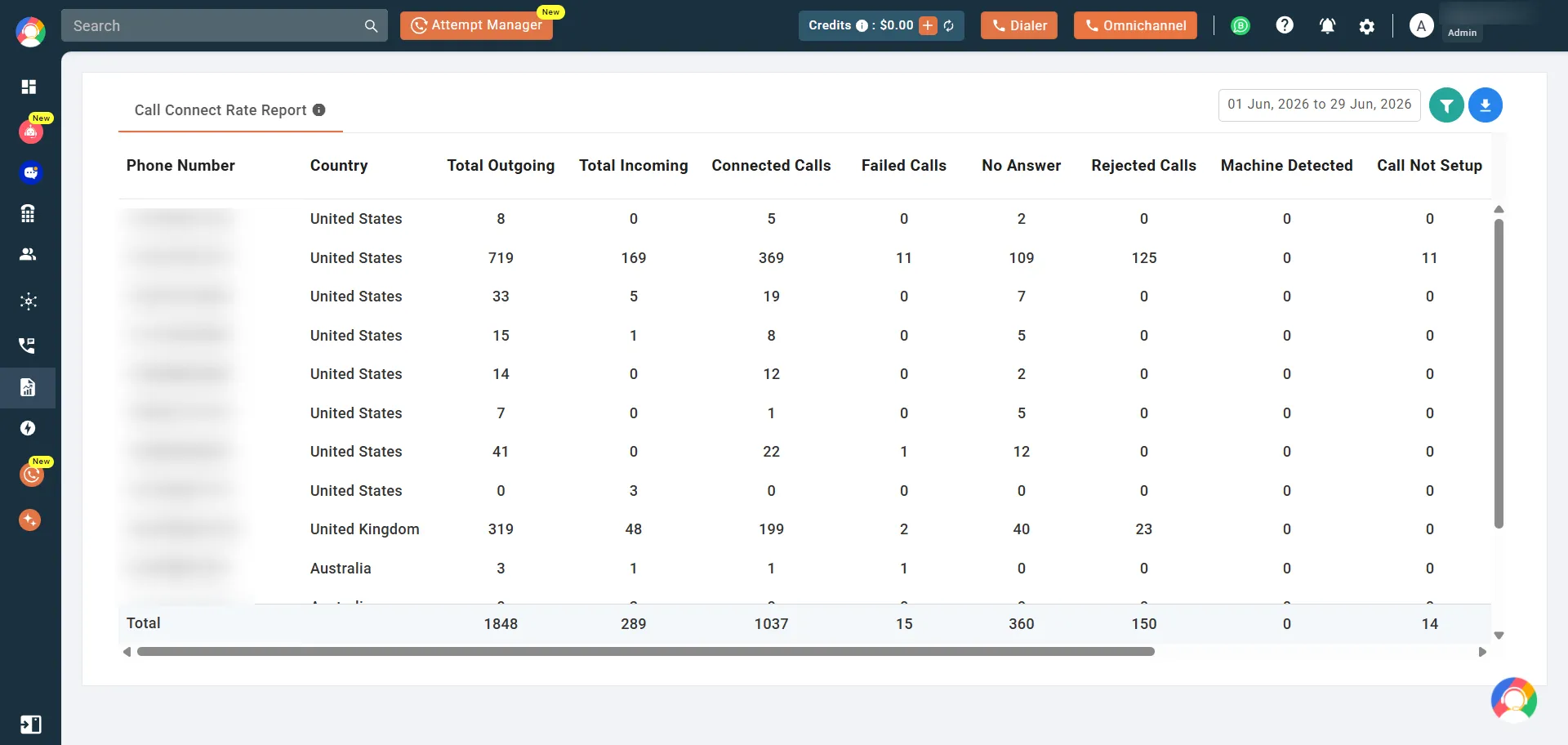
1. Why Business Outcomes Matter More Than Feature Lists
A long feature list looks impressive on paper. Yet outcomes pay the bills, not features. AI summaries mean little without live conversations to summarize. Call connect rate drives those conversations every single day. Judge each provider by the results it delivers. Strong outcomes beat a crowded feature checklist every time.
2. Estimate Your Call Connect Rate Impact
See your potential before you choose. Enter your daily call volume and current call connect rate. Then watch how small gains multiply your monthlyconversations. Those extra talks feed your AI tools and your pipeline alike. CallHippo’s free call connect rate calculator shows the impact instantly.
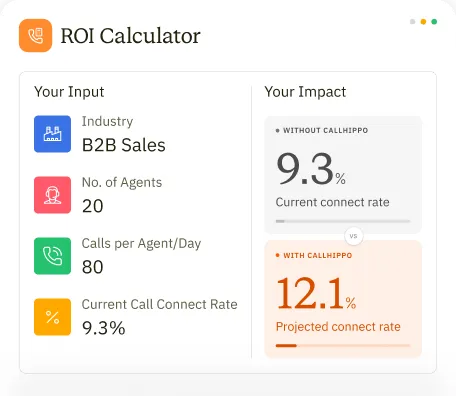
Enter your team's actual numbers. See whether your connect rate is helping or hurting your pipeline.
3. Make a Data-Driven Phone System Decision
Smart buyers trust data over hype. Combine AI features with hard performance numbers. Ask how each provider affects your connect rate first. Then layer in price, features, and AI tools. This complete view leads to a confident, data-driven choice. Pick the system that proves its value, not just promises it.
Why is CallHippo The Best Alternative to Dialpad?
CallHippo delivers consistently higher global call quality, transparent pricing with more built-in features, and 24/7 human support on every plan. This makes it a more reliable and cost-efficient choice than Dialpad.
1. Global Call Quality Backed by Robust Infrastructure
Call quality matters when you’re speaking with clients in different countries. Poor connections create misunderstandings, damage credibility, and waste everyone’s time. CallHippo operates servers across Asia, Europe, the Middle East, and the Americas. The result is noticeably clearer audio with fewer connection problems.
Dialpad handles North American calls well. But companies doing regular business in Asia or Europe report better experiences with CallHippo’s network. The difference becomes obvious during important sales calls or technical support sessions where clear communication is essential. International expansion requires a reliable communication infrastructure. CallHippo’s network supports this without the technical issues that plague region-specific platforms.
2. Transparent Pricing With No Hidden Add-Ons
CallHippo’s pricing includes call recording, CRM integrations, analytics, and mobile access in its standard plans. You see the monthly cost and know what you’re getting. There aren’t features mysteriously locked behind higher tiers. Dialpad advertises lower starting prices, but toll-free numbers, AI tools, and advanced features cost extra. These aren’t luxury add-ons; most businesses need them eventually.
The actual monthly cost climbs as you add necessary capabilities. This difference matters for budget planning. Finance departments need accurate projections. Managers shouldn’t have to request additional funds because basic features weren’t included. CallHippo eliminates this problem through transparent pricing from the start.
3. 24/7 Human Support for Fast-Growing Teams
Phone system failures don’t wait for business hours. Neither do urgent client calls. CallHippo offers 24/7 support access across all paid plans. A five-person team gets the same support availability as a 500-person organization. When issues arise at odd hours, you reach qualified staff who can resolve problems immediately.
Dialpad limits direct support to premium tiers. Standard plan customers often navigate help articles or wait for email responses during critical situations. For smaller companies that depend on phone communication but can’t afford enterprise pricing, this creates real operational risk. Quality support shouldn’t require premium pricing. CallHippo provides it as a standard service component.
Must-Have Features to Look For in a Dialpad Alternative
Here are some of the must-have features that businesses must consider when looking for a Dialpad alternative:
1. Value for Money (Total cost, not just base price)
What You’ll Actually Pay: Looking Beyond the Sticker Price
When you’re weighing Dialpad against CallHippo, don’t get caught up in just the monthly per-user rate. What really matters is your total spend once you’ve added everything your sales team actually needs to do their jobs. Here’s what to factor in when calculating your real costs:
- Your base subscription rate
- Any add-ons for features you can’t live without (think toll-free numbers, advanced analytics, call recording)
- Per-minute fees if you’re calling internationally
- Costs to port your existing numbers
- One-time setup charges
- Training fees (some providers charge for this separately)
To find your true cost per user per month, add up everything and divide by your team size and contract length.
Example: Estimated cost for a 10-person sales team
This is a hypothetical scenario for illustration. Actual pricing will vary based on region, usage, and plan configuration.
| Provider | Monthly Cost Breakdown | Estimated Monthly Total | Estimated Annual Total |
|---|---|---|---|
*Depending on international usage and extra phone numbers needed.
Potential Savings
Even with a similar feature set, a 10-seat CallHippo setup may cost hundreds to over $1,000 less per year compared to Dialpad, especially if you need add-ons like toll-free calling, advanced routing, or global dialing.
2. Ease of Setup/User Experience
Time to productivity matters. We measured how long it takes to:
- Create an account and add users
- Port existing numbers
- Configure call routing and IVR
- Set up CRM integrations
- Train the team on the new system
CallHippo: 2 hours total. Most of that is waiting for number porting (24-48 hours). Actual configuration takes 30 minutes. Dialpad: 4-6 hours, including setup and training. AI features require additional configuration. User interface complexity affects daily productivity. Look for:
- One-click call access from CRM
- Mobile apps that mirror desktop functionality
- Intuitive admin panel for making changes
- Quick access to recent calls and contacts
CallHippo’s Chrome extension adds click-to-call to any webpage. Highlight a phone number, click the icon, and you’re connected. This saves 15-20 seconds per call. For teams making 50 calls daily, that’s 12.5 minutes saved per agent.
3. Reliability (Consistent Quality/Uptime)
Check three reliability metrics:
- Uptime percentage: 99.9% sounds good until you realize it means 8.76 hours of downtime yearly. 99.99% reduces that to 52.56 minutes. CallHippo guarantees 99.99%. Dialpad Standard offers 99.9% SLA.
- Call completion rate: What percentage of calls connect successfully? Target 98%+. Poor routing or carrier issues drop this number.
- Audio quality scores: Measured in MOS (Mean Opinion Score). Target 4.0 or higher on a 5.0 scale.
Read user reviews specifically about reliability. Look for patterns in complaints. Dialpad users report occasional dropped calls during high-volume periods. CallHippo reviews mainly praise call quality.
4. Quality Customer Support
Test support before committing:
- Submit a pre-sales question via chat
- Measure response time
- Evaluate answer quality
Strong support indicators:
- Multiple contact channels (phone, chat, email)
- Extended or 24/7 availability
- Technical expertise (not just scripted responses)
- Proactive monitoring (they contact you about issues)
CallHippo’s support team monitors system performance actively. If they detect issues affecting your account, they reach out before you notice problems. Check if onboarding is included. Premium providers assign implementation specialists who help configure your system correctly from day one. This prevents configuration mistakes that cause problems later.
5. Key Business Features (IVR, call analytics, CRM integration)
IVR (Interactive Voice Response): Your automated menu system. Look for:
- Visual call flow builder (drag-and-drop)
- Unlimited menu levels
- Business hours routing
- Holiday schedules
- Custom greetings
CallHippo includes basic IVR on lower tiers and multi-level IVR on higher-tier plans. Dialpad requires the Pro plan for advanced IVR.
Call analytics: Essential reports include:
- Real-time queue status
- Agent performance metrics
- Call volume trends
- Abandoned call rates
- Average handle time
- First call resolution
CallHippo’s professional plan includes customizable analytics dashboards. Dialpad includes basic analytics on all plans but locks advanced reporting behind the Enterprise tier.
CRM integration: Native integrations work better than third-party connectors. Check that your provider supports:
- Automatic call logging
- Screen pop with contact details
- Click-to-call from CRM records
- Contact sync (bi-directional)
CallHippo integrates natively with Salesforce, HubSpot, Zoho CRM, Pipedrive, Freshdesk, Zendesk, and 80+ more platforms. Setup takes 5-10 minutes per integration.
Conclusion
Choosing a phone system affects daily operations for every team member. Dialpad offers solid AI features but locks certain capabilities behind higher tiers and add-ons. Small and mid-sized teams may end up paying more than advertised prices once they add features they need. CallHippo delivers transparent pricing, comprehensive features on lower tiers, and 24/7 support at prices that make sense for growing businesses. Start with Starter at $19 per user monthly (annual billing) and scale to Enterprise when team size demands advanced features.
- The global call center market hit $352.4 billion in 2024. Experts predict it'll reach $500.1 billion by 2030.
FAQ
1. What is the best alternative to Dialpad for business calling?
CallHippo is the best Dialpad alternative for most businesses. It offers a transparent price that starts at $19 per user monthly, with features Dialpad locks behind higher tiers.
2. Is CallHippo more affordable than Dialpad for small teams?
Yes. CallHippo costs significantly less for comparable features. Dialpad Standard costs $15 per user monthly but lacks toll-free numbers, international calling, and advanced features. Adding these pushes costs higher.
3. Can I migrate my existing numbers from Dialpad to CallHippo easily?
Yes, you can migrate your existing numbers from Dialpad to CallHippo. Number porting from Dialpad to CallHippo takes 3-4 weeks in most cases. The process requires:
- Request a Letter of Authorization (LOA) from CallHippo support
- Complete LOA with details from your Dialpad account
- Submit LOA to CallHippo
- Wait for port completion (carriers handle transfer)
- Update your phone system settings
Published : December 1, 2025

Priya Naha is an experienced technical content writer who focuses on VoIP and telephony technologies. Her expertise in telecommunication and content marketing allows her to simplify complex topics with real-world knowledge, making her writing relatable, informative, and easy-to-read. Her direct involvement with VoIP products and solutions makes her a reliable voice in the field.

Subscribe to our newsletter & never miss our latest news and promotions.
 24k+ people have already subscribed



