

 Updated : May 13, 2026
Every call is a make-or-break moment.
In fact, 32% of customers stop doing business with a brand after just one bad experience (PwC). That’s why call routing matters.
It’s not just about transferring calls; it’s about making sure the right person picks up at the right time.
This guide breaks down the types of call routing, advanced features, and best practices that transform missed calls into stronger customer relationships.
What is Call Routing?
Call routing can be defined as a process within a business phone system that directs incoming calls to the appropriate destination. This could be an agent, department, or even a voicemail system, depending on the routing rules in place.
The system, also known as an automatic call distributor (ACD) or routing engine, works during the distribution phase of a call. It evaluates factors such as caller ID, business hours, agent availability, time zone, language preferences, and even customer preferences before deciding how to route calls.
How Does Call Routing Work?
There are several ways a business phone system can route incoming calls. When a customer calls your company, your cloud-based phone system presents them with an IVR (Interactive Voice Response) or an auto-attendant. The customer then chooses the most relevant option as per their problem, and the call router transfers the phone to the right team (or agent).
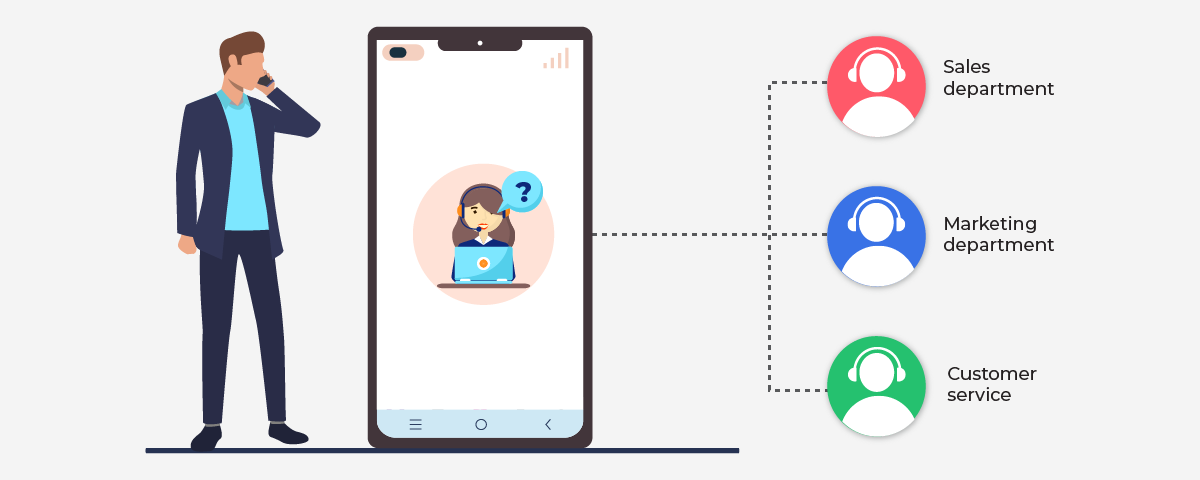
Here are some of the rules (or criteria) that you can set up to route calls:
- Auto-attendant selections: What does the caller select from the menu? Do they have a problem with your product? Or just want some information? Redirect the call accordingly.
- Caller ID: Use the caller ID to determine the customers’ previous interaction with your business. Check the products they have bought from you and redirect the call accordingly.
- Agent skill: Direct the call based on who your system identifies as the best-suited person to handle the call.
- Priority-based routing: Direct calls based on the priority of the caller (for example, the value the customer brings to your business).
- Time of the day: Use this if your support team and customers are in different time zones.
Let’s understand how call routing works with an example.
Suppose you want to add your spouse to your health policy. You call the toll-free number of your insurer.
The phone system offers several options: you can buy a new policy, renew your existing policy, or submit a claim. Simply press a number to connect with an agent.
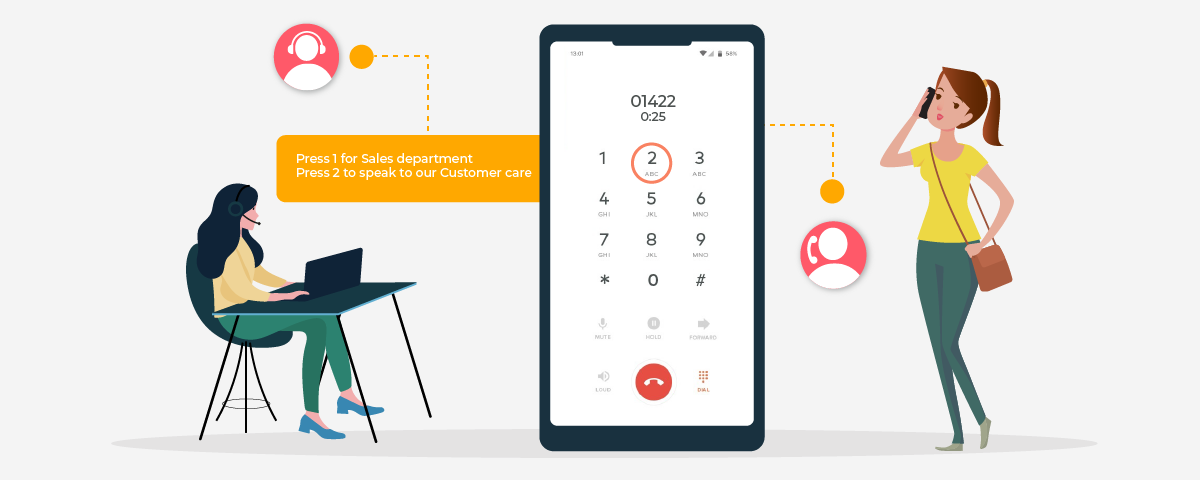
The company’s phone system already knows that you are an active customer of the insurer. When you choose the first option (buy a new policy), you will be redirected to the team that handles queries related to buying policies (an add-on to your existing policy is also considered as buying a new one), instead of general customer care.
Behind the scenes, the call routing feature identifies you and directs you seamlessly to the person most qualified to answer your queries.
What if the company hasn’t set up call routing? You will be asked to share your requirements, and then the agent will say, “Oh, sorry, sir, but that’s not my department. I will have to redirect your call to the relevant agent.” And you will have to repeat everything. Would you like that? Well, I won’t!
What are the Different Types of Call Routing?
Every business has its own routing strategy based on its location, call volume, staff workforce, and customer requirements when calling. We’ll cover some of the most common types of phone call routing:
1. Sequential Routing (In Fixed Order)
This type of call routing routes the call to the agents in a fixed order. If the first agent doesn’t answer, the call goes to the second agent or down the list until someone answers.
- Where It Works: A small team with lower call volumes.
- Example: A boutique law firm routes calls first to the receptionist, second to the office manager, and last to the partners.
2. Round Robin Routing
Round robin routing distributes calls evenly across agents based on availability. The first call goes to the first agent, the second call goes to the second agent, and the third call goes to the third agent, etc. Each call would go to the next available agent in the rotation.
- Where It Works: Sales teams that receive calls for sales leads or inquiries.
- Example: In a software company, the sales team gets calls from prospects. The first call goes to Agent A, the second to Agent B, the third to Agent C, and then back to Agent A in the cycle.
3. Skills-Based Routing
Studies show that businesses that respond to leads in 5 minutes or less are 100x more likely to connect and convert opportunities. That’s where skills-based routing comes in.
Skills-based routing sends customers to the correct agent – based on skills, specialty or language. The intention is to allow the call to be resolved immediately.
- Where It Works: Call centers with a diverse range of customer inquiries
- Example: A telecommunications provider routes all technical issues to IT Support, and Spanish-speaking customers are routed to Spanish-speaking agents.
4. IVR Routing (Interactive Voice Response)
IVR gives customers automated menu options to select departments. This prevents call transfers and puts the caller directly in contact with the right person.
- Where It Works: Businesses with many departments that receive high-volume calls.
- Example: A bank allows callers to select loans, cards, and fraud reporting through an auto attendant phone system.
5. Time-Based Routing
Time-based routing sends incoming calls to the right place based on time zones or business hours. This allows customers always to contact someone, even when the marketing office is not open.
- Where It Works: Global business with after-hour demands.
- Example: A SaaS business routes US-based calls during the day to the US office and then routes calls at night to the Asia-Pacific support center. Teams setting up that kind of Asia-Pacific coverage often hire through an employer of record like remote people to onboard agents in the Philippines without opening a local entity.

Always set up a “safety net” rule for after-hours calls. If you redirect to voicemail, record a custom greeting with the next business hours and a callback promise. This small step prevents churn by managing expectations.
6. VIP / Relationship-Based Routing
VIP routing prioritizes high-value customers or sends them to their dedicated account manager. It creates a personalized and loyalty-driven experience.
- Where It Works: Industries where customer relationships drive long-term revenue.
- Example: A wealth management firm sends premium clients straight to their personal advisor.
7. Simultaneous & Percentage Routing
Simultaneous routing rings all available agents at once, while percentage routing divides calls by ratio. Both approaches help balance speed and skill.
- Where It Works: High-volume businesses managing efficiency and training.
- Example: An e-commerce retailer uses simultaneous routing during peak sales, while percentage routing ensures trainees handle a portion of calls.
8. Intelligent (AI-Powered) Routing
AI-driven routing analyzes caller data, history, and sentiment to make smarter routing decisions. It even reconnects repeat callers to the same agent for consistency.
- Where It Works: Large enterprises or contact centers with heavy call traffic.
- Example: An airline’s AI detects frustration in a repeat caller and routes them directly to a senior specialist. For omnichannel support, many businesses use omnichannel routing to manage customer interactions across channels.
CX with CallHippo
- Smart call routing
- Faster resolutions
- Stronger customer trust

Advanced Call Routing Features in CallHippo
Automated call routing solutions go beyond just distributing calls. Platforms like CallHippo offer advanced routing solutions that improve both the customer experience and agent workflows.
1. Ring Groups
Ring groups alert a whole team at once, so nobody’s left hanging. This setup makes sure someone always picks up, which keeps the customer experience smooth and stress-free.
2. Multilingual Greetings
CallHippo allows you to set up greetings in multiple languages so global customers feel heard from the first conversation. This call management feature can be critical in making your brand look diverse and inclusive.
3. Department-Based Routing
Automatically point calls to the right team like sales, billing, or support, so customers don’t get have to switch to different departments. It shortens hold times and gets people exactly where they need to go.
4. In-Queue Callback
Let your customers hang up and get a callback when the representative is ready. It reduces frustration, lowers abandonment, and still keeps clients engaged.
5. Built-in Analytics
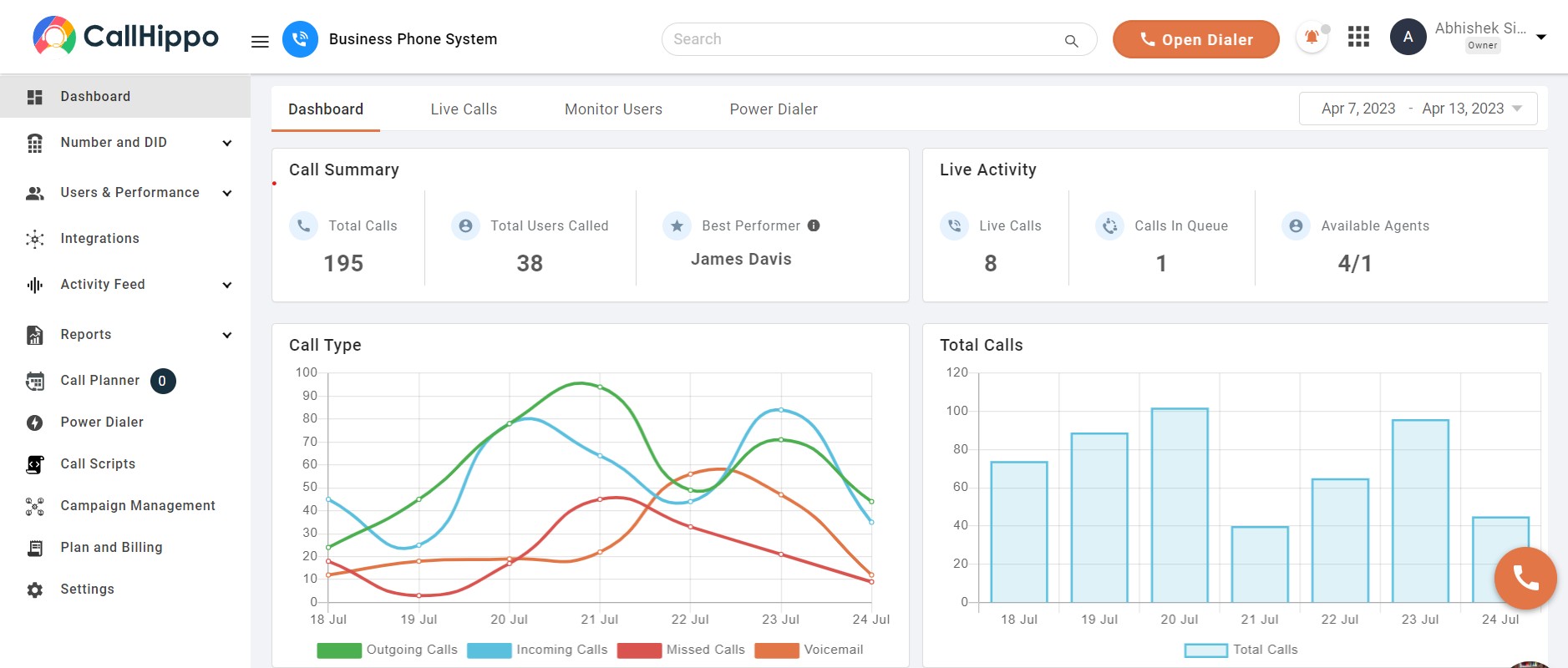
CallHippo gives you real-time insights into call analytics, response times, and who’s handling what. With those metrics in hand, managers can fine-tune workflows and maintain performance.
- Don’t just activate features; track usage. If callbacks reduce drop-off rates by 20%, scale that feature. If analytics show long wait times for billing calls, add staff or update routing. Data without action doesn’t move the needle.
A Real-Life Call Routing Example
When you dial emergency services such as 911, your call is routed to the nearest emergency call center based on your location. This phone call routing system ensures that emergency calls are handled as quickly and efficiently as possible, as sometimes it can be a matter of life and death.
The call routing system used by emergency services involves a network of call centers and dispatchers who work together to route calls to the most appropriate first responders. It utilizes GPS to identify the caller’s location and factors such as the type of emergency and the availability of resources in the area.
What are the Key Benefits of Call Routing?
Virtual call routing strategy affects the way customers engage with your brand, how agents go about their day, and, ultimately, the efficiency of your business overall. When effective, it has the potential to provide significant benefits for customers, agents, and businesses.
Here are its top benefits for customers, agents, and businesses.
For Customers
- Callers get connected to an agent faster, providing a reduction in wait time and frustration.
- First call resolution rate can be improved as clients reach the right agent at the right time.
- Customers get more personalized interactions based on their preferences, like language and time zone.
For Agents
- Calls can be distributed more evenly, and agents won’t be overworked.
- Agents will spend more time solving customer issues, rather than transferring their calls back and forth.
- Fair distribution of calls also helps reduce burnout and motivates agents to provide even better service.
For Businesses
- Smarter routing significantly decreases resource wastage and reduces operational costs.
- Satisfied customers become a core reason behind an increased retention rate.
- Scalable systems make it easy to handle high inbound volumes without major investments.
What Are the Best Practices for Setting Up a Call Routing System?
Effective call routing isn’t about “press 1 for sales”, it’s about how effortless you make the customer’s path. Done right, it saves time, reduces friction, and makes your business look more professional. Here’s how to become proficient in it:
1. Keep IVR Menus Simple
Nobody wants to play a guessing game with your phone menu. Give callers a few clear options. The faster they land in the right spot, the better their experience (and the less your agents get complaining customers).
2. Provide Estimated Wait Times
If people don’t know how long they’ll be waiting, they leave. Tell them upfront, give a callback option if you can, and you’ll cut your drop-off rate substantially.
3. Update Call Routing Rules Regularly
Businesses aren’t static as teams grow, people leave and priorities shift. If your routing rules don’t move with you, inbound calls start slipping through the cracks. Make updates part of your regular operations.
4. Use Analytics to Improve Routing Performance
Guessing doesn’t scale, but data does. Tracking call volume, wait times, and resolution rates reveals patterns you can use to fine-tune routing. With the right analytics, you spot inefficiencies before they become bottlenecks.
5. Invest in CRM + Call Routing Integration
When routing is synced with your CRM, your team sees exactly who’s calling and why before they even pick up. Tools like CallHippo offer this type of integration, so your agents aren’t starting from scratch; they’re continuing a conversation.
 : What Is a Hunt Group and How Does it Work?
Wrapping Up
Call routing isn’t just call management. It’s customer management. The smoother you make the experience, the faster trust builds. This will lead to better bottom-line results. Tools like CallHippo make sure every conversation starts on the right foot. And in business, that’s the edge that actually matters.
FAQs
1. What is call routing in a phone system?
It’s the process of using routing rules to automatically route incoming calls to the right destination within a business phone system.
2. What is the difference between call routing and call forwarding?
Routing is a smart management feature with automated call routing solutions, while forwarding just directs calls from one number to another.
3. Can small businesses use virtual call routing effectively?
Yes. Call routing for small businesses ensures they appear professional, manage phone calls effectively, and scale with demand.
4. What is the best call routing type for a support team?
Skills-based routing or intelligent call routing works best, as it aligns customer needs with agent skills and availability.
Published : August 22, 2025
Juhi is a senior content writer with over 4 years of experience in the B2B SaaS industry. A passionate storyteller at heart, she transforms complex ideas into compelling narratives with an adaptive and audience-first writing style. Juhi has helped multiple brands strengthen their voice, connect with their audience, and drive measurable growth through content. When she is away from the screen, she enjoys winding down with a well-written book!

Subscribe to our newsletter & never miss our latest news and promotions.
 24k+ people have already subscribed



