
Click to Call Software
Call prospects instantly from your browser, CRM, or business apps. CallHippo eliminates manual dialing, connects your agent first, and automatically logs every call, recording, and outcome to your CRM.
- Dial web numbers in one click, no copy-paste needed
- 100+ integrations including HubSpot, Salesforce, Pipedrive, etc.
- Automatically logs every call to the right contact record
 No credit card required.







The Call Flow, Step by Step
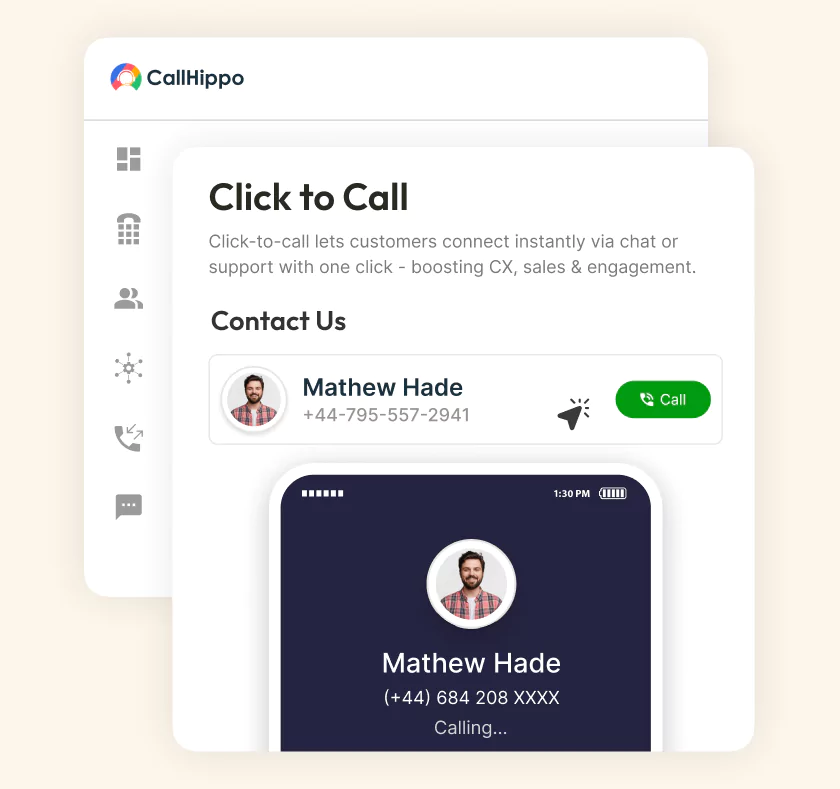
Click to call software works in the background. Three things happen every time you click a number. Here’s what actually runs inside the system.

A user clicks any phone number on a web page or CRM record. The click sends a request to CallHippo's VoIP layer. The layer prepares the call session instantly.

CallHippo dials the agent's device first. The destination number rings only after the agent is on the line. Reps are ready to talk the moment the customer answers.

Every call auto-logs to your CRM. Recording, transcription, disposition tags, and analytics all update in the background. The agent stays focused on the conversation, never on data entry.
Benefits of Using Click to Call
A click to call feature does more than save typing time. Six clear benefits show up in the first week of use.

Reps dial new leads within seconds of an inbound form fill. Speed-to-lead climbs by 3x compared to manual dialing workflows.
Reps skip the copy-paste between apps. Every extra minute talking to prospects means another chance to close the deal.

CallHippo's click to call button embeds inside your website, CRM, or helpdesk. Every click launches a call and logs itself.

VoIP dialing removes per-minute carrier surcharges from every outbound leg. Cost per call drops to a fraction of PSTN rates.

Reps make more dials per hour without changing headcount. Teams switching from manual dialing see higher outbound call volume.
Customers reach the right agent faster. They never sit on hold explaining context. Calls open with the record already loaded.
Related Features That Work Alongside Click to Call
Click to call unlocks its full value with the right supporting features. Here are seven that ship with every CallHippo plan.

Native connectors sync every call to HubSpot, Salesforce, and 100+ other CRMs. Notes, dispositions, and recordings flow with it.

Track every dial by campaign, agent, and outcome. Live dashboards show which calls converted and which sources drove the volume.

Live dashboards show call volume, talk time, and connect rates. Break down by campaign, team, or agent in real time.

Every click to call session logs itself to your CRM automatically. No forgotten records, no data gaps, no manual entry.

Reps dial from desktop, browser, or mobile through one platform. Sessions move between devices without dropping the call or losing context.

Pair click to call with an AI voice agent handling inbound qualification. Reps only take calls that are already warm.

Missed calls land as voicemail with automatic transcription. Reps read the message or listen to the audio, whichever is faster.
Pricing
-

 Calling
- Pay Only for Numbers
- Voicemail
- Click to Dial
- Business Hours
Define operating hours for each number to route calls appropriately.
- Smart Failover System
If a call fails to complete, Attempt Manager surfaces it for retry on a number you've assigned to the campaign, improving call connection success rates.
-

 Messaging
 - SMS (Text messages) & MMS
- WhatsApp Business API
 Platform
- 2FA
Add an extra security layer by requiring a verification code in addition to your password.
- Desktop & Mobile Apps
-
Calling
- Unlimited Minutes (Includes Both Landline & Mobile Calling)
Shared pool of free calling minutes for your entire team. Valid for manual dialing to standard US/Canada numbers only.
- Forward to Device Automatically route incoming calls to your mobile or alternative device to never miss calls.
- Ring All Devices Ring simultaneously on all your logged-in devices (desktop, mobile, browser) for every call.
- Country Blocking Restrict outbound calls to specific countries to prevent unauthorized international dialing.
-
Messaging
-
100 SMS (Text Messages)
Standard A2P charges apply.
- SMS Templates Create and save message templates for one-click texting with consistent communication.
- Free Omnichannel Inbox


-

 Analytics
- Basic Report Analytics
- Call Logs (1 month) Access detailed records of all calls including duration, outcome, recordings, and participant information.
- Audit Logs Track all account changes and user actions for security, compliance, and accountability.
-
 Integrations
-
ZZapierSSlack50+WWebhook


 Popular
-
Calling
- Unlimited Minutes (Includes Both Landline & Mobile Calling)
Shared pool of free calling minutes for your entire team. Valid for manual dialing to standard US/Canada numbers only.
- Call Recordings Record and store calls for quality monitoring, training, and compliance.
- Multilingual IVR Offer IVR menu options in multiple languages to serve diverse customer bases.
- Call Distribution (Cascading) Route calls to agents in a priority sequence until someone answers.
- Custom Greetings Upload personalized welcome messages for callers to hear when they reach your number.
-
Messaging
-
500 SMS (Text Messages)
Standard A2P charges apply.
-
Analytics
- Reports / Analytics Get detailed insights and summarized analytics on team's calling performance.
- AI Voicemail Transcription Automatically convert voicemail audio to text for faster message review.
- Call Logs (Lifetime)
- Role Based Access Control Assign specific roles with tailored permissions to control what each user can view and manage.
- Call Transcription
-
Integrations
-
HHubSpotSSalesforcePPipedrive50+ZZoho
-
Calling
-
Unlimited Minutes (Includes Both Landline & Mobile Calling)
Shared pool of free calling minutes for your entire team. Valid for manual dialing to standard US/CA numbers only.
- Smart DID Routing Automatically routes calls to the best available agent based on real-time data.
- Multilevel IVR Create multi-step phone menus to route callers to the right department or person automatically.
- Call Blocking Block unwanted callers and spam numbers to keep your team focused on quality conversations.
- Holiday Routing Configure special call handling and greetings for holidays and non-business days.
- CRM-Based VIP Routing Route calls automatically to the correct contact/lead owner based on CRM information.
-
Messaging
-
1000 SMS (Text Messages)
Standard A2P charges apply.
- Analytics
- Call Summary
-
 Enterprise
- Single Sign-On (SSO) Log in once to access CallHippo and all integrated tools with your company credentials.
- Custom Integrations Build advanced integrations with your systems—add click-to-call anywhere, sync call data with custom logic, and create workflows specific to your business.
- Dedicated Account Manager Resolve account queries efficiently with dedicated account manager.
- Personalized Onboarding Experience personalized onboarding for a tailored start.
- 24×7 & Phone Support
-
Integrations
-
HHubSpotSSalesforceZZoho50+ZZendesk
Mobile vs. Desktop Behavior of Click to Call Feature
CallHippo’s click to call software behaves slightly differently on mobile and desktop.
On Desktop
You can put click to call buttons right on your lead capture pages, inside your CRM, and in your outbound emails. When a lead shows interest, your rep can call them instantly – literally one click and they’re connected.
On Mobile
Tap any phone number on a web page. The link redirects you into the CallHippo mobile app. The call launches from there without leaving the flow.
Same experience across devices. Call quality, recording, and CRM logging work identically on both. Reps switch between laptop and phone without losing any functionality.
Click to Call vs. Click to Dial: What’s the Difference?
The two terms sound identical, but they cover different workflows. Here’s how each one actually works.
| Dimension | Click to Call | Click to Dial |
|---|---|---|
| What it is | A clickable link tied to one phone number | A workflow that dials through a list of contacts |
| Where it lives | Web pages, CRM records, landing pages | Contact lists inside a CRM or dialer |
| How it works | One click launches one outbound call | One click starts a full campaign |
| Number of calls | Single number per click | Sequential dialing through a full list |
| Best for | Reactive workflows | Proactive outbound campaigns |
| Common use cases | Inbound follow-up, support callbacks, one-off outreach | Cold prospecting, cadence outreach, high-volume sales |
Best Use Cases of Click to Call
Click to call service earns its keep in four core workflows. Each one moves faster with a click to call widget in place.
Sales Teams and Lead Generation
Sales reps handling demo requests and trial signups need to dial fast. A click to call button on the CRM record removes copy-paste delay. Speed-to-lead improves in the first week.
Customer Support and Helpdesks
Support agents callback ticket authors from Zendesk or Freshdesk in one click. Context loads instantly, so agents skip the manual dial. Customer wait times drop, and troubleshooting starts immediately.
Appointment Booking and Consultations
Clinics, wealth managers, and legal firms dial appointments from the calendar entry itself. No number lookup, no dial mistake. Consultation calls start on time, every time, without pre-call scrambling.
E-Commerce and Online Services
Ecommerce teams call abandoned-cart customers directly from Shopify or the order dashboard. A click to call widget on product pages lets shoppers reach sales. Checkout conversion lifts as a result.
How to Choose the Best Click to Call Software?
Three criteria separate serious click to call software from a browser plugin. Check these before you buy.
CRM and Website Compatibility
Ask specifically which CRMs are supported natively. HubSpot, Salesforce, Zoho, Pipedrive, and Zendesk should appear on the list. Website integration should support widget links out of the box.
Setup Time and Ease of Use
A good click to call service activates in under 10 minutes. Sign up, invite the team, connect the CRM, done. Vendors that need pro services or multi-week deployment are the wrong pick.
Security and Compliance
Every outbound call carries data. Verify SOC 2 compliance, GDPR handling, and encryption before you sign. Ask about DNC scrubbing if outbound sales is your primary use case.

“Thanks to the CallHippo team, we were able to resolve a tough issue with flagged phone numbers. As an EdTech startup, outbound calls are crucial for us. CallHippo's solution not only improved our attestation score but also boosted our answer rates and overall customer experience.”

Frequently Asked Questions
-
Click to call turns a phone number into a clickable link. One click launches the outbound call automatically.
-
Top click to call providers include CallHippo, HubSpot, Aircall, JustCall, and Dialpad. Each fits different team sizes and workflows.
-
Click to call is a feature that dials from a link. VoIP is the network that carries the voice call.
-
CallHippo's click to call software starts at $19 per user per month. Free trial available with no credit card required.
-
Under 3 minutes is all it takes to set up click to call. Sign up, invite your team, connect your CRM, and start clicking to call the same day.
-
Yes. CallHippo integrates natively with 100+ CRMs including HubSpot, Salesforce, Zoho, Pipedrive, Freshdesk, and other helpdesk tools.
-
Yes. Click to call works on iOS and Android through the CallHippo mobile app. Sessions sync with desktop calls seamlessly.
-
Yes, in most jurisdictions. Federal US law follows one-party consent, but 12 states and GDPR-covered regions require all-party consent.
-
Yes. Sales reps use click to call for cold outbound, inbound follow-up, and cadence-driven outreach from CRM contact records.
-
Yes. CallHippo's click to call software supports outbound calls to 150+ countries. Verify per-country rates before running high-volume international campaigns.