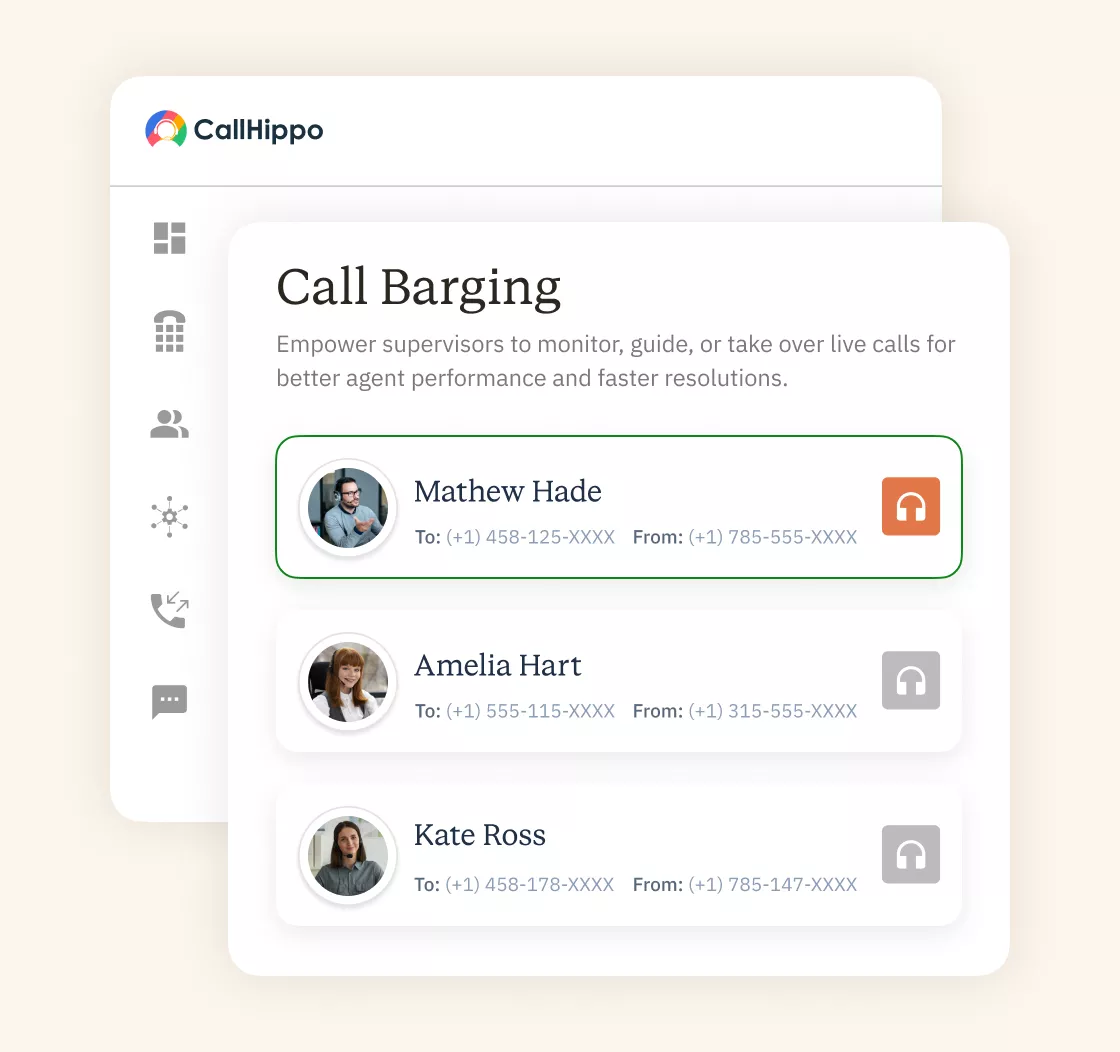
Call Barging
Some calls need a supervisor to step in fast. CallHippo’s call barging lets managers join a live call instantly. Support your agents and protect every customer relationship in real time.
- Join any live call the moment your agent needs help
- Listen, whisper, or barge in with one click
- Rescue tough calls before you lose a customer







What are the Benefits of Call Barge?
Call barging does more than fix one call. It strengthens your whole team every day.

A supervisor can step in before a call goes wrong. Customers get fast, accurate help and leave the call satisfied.

Managers hear real calls as they actually happen. This keeps service quality high and standards consistent across your team.

Solve problems live instead of reviewing them hours later. Your team fixes issues faster and wastes far less time.

Agents feel supported when help is one click away. That confidence keeps them happier and less likely to quit.

New reps get live backup during their hardest calls. A supervisor can guide or take over whenever needed.

No more waiting for a callback or a transfer. A manager joins instantly and resolves the problem on the spot.
What are the Key Features of CallHippo Call Barging?
CallHippo gives supervisors full control over live calls. Here are the key features you get.

Listen in on any live call for quality assurance, covered by your standard call-monitoring disclosure, without interrupting the conversation.

Speak privately to the agent through a side channel the customer doesn't hear, without interrupting the live call.

Join the live conversation and speak with both people. Step in directly whenever a call needs your help.

See every active call across your team in one view. Pick any call and join it with a single click.

Live dashboards show call volumes, wait times, and agent activity. This helps you catch problems the moment they start.

Record every call automatically for later review. Use these recordings for training, coaching, and quality checks too.

Hand the call to another agent or team instantly. The customer stays connected without any awkward delay or drop.

Sync CallHippo with your most-used CRM in a few clicks. Keep every call and note tied to the right contact.
Pricing
-

 Calling
- Pay Only for Numbers
- Voicemail
- Click to Dial
- Business Hours
Define operating hours for each number to route calls appropriately.
- Smart Failover System
If a call fails to complete, Attempt Manager surfaces it for retry on a number you've assigned to the campaign, improving call connection success rates.
-

 Messaging
 - SMS (Text messages) & MMS
- WhatsApp Business API
 Platform
- 2FA
Add an extra security layer by requiring a verification code in addition to your password.
- Desktop & Mobile Apps
-
Calling
- Unlimited Minutes (Includes Both Landline & Mobile Calling)
Shared pool of free calling minutes for your entire team. Valid for manual dialing to standard US/Canada numbers only.
- Forward to Device Automatically route incoming calls to your mobile or alternative device to never miss calls.
- Ring All Devices Ring simultaneously on all your logged-in devices (desktop, mobile, browser) for every call.
- Country Blocking Restrict outbound calls to specific countries to prevent unauthorized international dialing.
-
Messaging
-
100 SMS (Text Messages)
Standard A2P charges apply.
- SMS Templates Create and save message templates for one-click texting with consistent communication.
- Free Omnichannel Inbox


-

 Analytics
- Basic Report Analytics
- Call Logs (1 month) Access detailed records of all calls including duration, outcome, recordings, and participant information.
- Audit Logs Track all account changes and user actions for security, compliance, and accountability.
-
 Integrations
-
ZZapierSSlack50+WWebhook


 Popular
-
Calling
- Unlimited Minutes (Includes Both Landline & Mobile Calling)
Shared pool of free calling minutes for your entire team. Valid for manual dialing to standard US/Canada numbers only.
- Call Recordings Record and store calls for quality monitoring, training, and compliance.
- Multilingual IVR Offer IVR menu options in multiple languages to serve diverse customer bases.
- Call Distribution (Cascading) Route calls to agents in a priority sequence until someone answers.
- Custom Greetings Upload personalized welcome messages for callers to hear when they reach your number.
-
Messaging
-
500 SMS (Text Messages)
Standard A2P charges apply.
-
Analytics
- Reports / Analytics Get detailed insights and summarized analytics on team's calling performance.
- AI Voicemail Transcription Automatically convert voicemail audio to text for faster message review.
- Call Logs (Lifetime)
- Role Based Access Control Assign specific roles with tailored permissions to control what each user can view and manage.
- Call Transcription
-
Integrations
-
HHubSpotSSalesforcePPipedrive50+ZZoho
-
Calling
-
Unlimited Minutes (Includes Both Landline & Mobile Calling)
Shared pool of free calling minutes for your entire team. Valid for manual dialing to standard US/CA numbers only.
- Smart DID Routing Automatically routes calls to the best available agent based on real-time data.
- Multilevel IVR Create multi-step phone menus to route callers to the right department or person automatically.
- Call Blocking Block unwanted callers and spam numbers to keep your team focused on quality conversations.
- Holiday Routing Configure special call handling and greetings for holidays and non-business days.
- CRM-Based VIP Routing Route calls automatically to the correct contact/lead owner based on CRM information.
-
Messaging
-
1000 SMS (Text Messages)
Standard A2P charges apply.
- Analytics
- Call Summary
-
 Enterprise
- Single Sign-On (SSO) Log in once to access CallHippo and all integrated tools with your company credentials.
- Custom Integrations Build advanced integrations with your systems—add click-to-call anywhere, sync call data with custom logic, and create workflows specific to your business.
- Dedicated Account Manager Resolve account queries efficiently with dedicated account manager.
- Personalized Onboarding Experience personalized onboarding for a tailored start.
- 24×7 & Phone Support
-
Integrations
-
HHubSpotSSalesforceZZoho50+ZZendesk
What’s the Difference Between Call Monitoring, Whisper, and Barge?
These three tools sound alike but work differently. Here is how each one truly compares.
| Feature | What It Does | Who Can Hear the Supervisor? | Can Supervisor Speak? | Best For |
|---|---|---|---|---|
| Call Monitoring | Listen silently to a live call. | No one. | No. | Quality checks and evaluation. |
| Call Whisper | Speak privately to the agent only. | Only the agent. | Yes, to the agent. | Live coaching and guidance. |
| Call Barge | Join and speak in the live call. | Agent and customer. | Yes, to both. | Rescuing tough or escalated calls. |
When to Use Call Barging?
Call barging works best at a few moments. Here is exactly when to step in.
Customer Asks To Speak To The Manager
his could be skipping required compliance disclosures, using outdated scripts, or failing to offer appropriate solutions.
After that, document every intervention. Track which agents require frequent barging and which ones rarely need help. This data reveals who needs additional training versus who’s ready for more responsibility.
Agent May Be Making A Mistake
You notice an agent giving wrong or risky information. You step in before that mistake reaches the customer. A quick barge protects your brand and saves the relationship instantly.
Customer Becomes Agitated
A call heats up, and the customer grows angry. A calm supervisor barges in to de-escalate the situation. Stepping in early often turns a lost customer into a loyal one.
Training New Agents
New agents often freeze during tricky or unexpected calls. A supervisor listens in and barges in when needed. This live support builds real skills far faster than classroom training.
Live Monitoring To Ensure Service Consistency
Standards can slip when nobody is actively listening. Managers monitor live calls and barge in to correct course. This keeps every customer getting the same high-quality experience across your team.
What are the Best Practices for Call Barging?
Smart habits make call barging far more effective. Here are the practices that work best.
Define Clear Triggers For Barge-In
Decide in advance exactly when a barge-in is right. Set clear triggers, such as escalations, compliance risks, or angry customers. Clear rules stop supervisors from jumping in at the wrong moment.
Train Both Supervisors And Agents On The Process
Barging only works when everyone knows the process. Train your supervisors to step in smoothly and professionally. Prepare agents so a barge feels like support, not an ambush.
Use Real-Time Analytics To Monitor
Your dashboard shows every live call at a glance. Watch for rising wait times, long holds, or tense moments. These real-time signals tell you exactly which call needs a barge.
Review Regularly
Look back at your barged calls on a regular schedule. Spot patterns in why and when supervisors stepped in. Use these insights to coach agents and refine your triggers.
Ensure Technical Readiness
Barging fails if your setup is not reliable. Make sure your connection, devices, and software all work smoothly. A well-timed side barge in call centers needs zero technical hiccups.
Which Industries Use Call Barging?
Call barging helps any team handling live calls. Here are three that rely on it.
Healthcare
Voice remains the primary channel for call barging because it handles the most complex and emotional customer interactions. Phone calls escalate faster than text-based channels, making real-time intervention more critical. Next, voice barging works through your VoIP system or contact center platform.
SMS
Financial calls carry strict rules and real money on the line. Supervisors barge in to prevent errors and stay compliant. One quick step-in can save a costly problem.
In sales, one call can make or break a deal. A manager barges in to rescue a stalling conversation. That helps close deals a rep might lose alone.

“Thanks to the CallHippo team, we were able to resolve a tough issue with flagged phone numbers. As an EdTech startup, outbound calls are crucial for us. CallHippo's solution not only improved our attestation score but also boosted our answer rates and overall customer experience.”

Frequently Asked Questions
-
No. Call escalation transfers the customer to a supervisor on a separate call. The original agent disconnects, and the customer explains their issue again. Call barging adds the supervisor to the existing conversation. All three parties stay on the same line. The customer doesn't repeat themselves, and the agent learns by hearing how the supervisor handles the situation.
-
Yes. Most call center platforms show a visual notification when someone joins the call. Agents see an alert on their screen indicating a supervisor has entered. Then, they hear the supervisor's voice when they start speaking. Some systems play a brief tone when barging occurs, but this can confuse customers. The best approach is training agents to expect barging during specific situations so they're not surprised when it happens.
-
Absolutely. Cloud-based call center software makes barging easier for remote teams than traditional office setups. Supervisors monitor calls from anywhere and join with one click. The technology works the same whether your team sits in one building or across different countries.
-
You need call center software that includes barging features. Most modern VoIP platforms and contact center solutions have this built in. Then, ensure you have stable internet connections for all users, as barging fails if the network quality drops. Supervisors need headsets with good microphones so customers can hear them clearly. Finally, verify your system supports three-way calling without audio degradation. Test the feature before you rely on it during critical customer conversations.
-
Call barging lets a supervisor join a live call. They can speak to the agent, the customer, or both.
-
Yes, CallHippo logs every barged call in your dashboard. Review who barged in, when, and on which calls.
-
Yes, you can barge into calls from the mobile app. Support your team from anywhere you are.
Get International Phone Numbers
 Canada Virtual Phone Number
UK Virtual Phone Number
Canada Virtual Phone Number
UK Virtual Phone Number
 US Virtual Phone Number