Get A Call Tracking Software
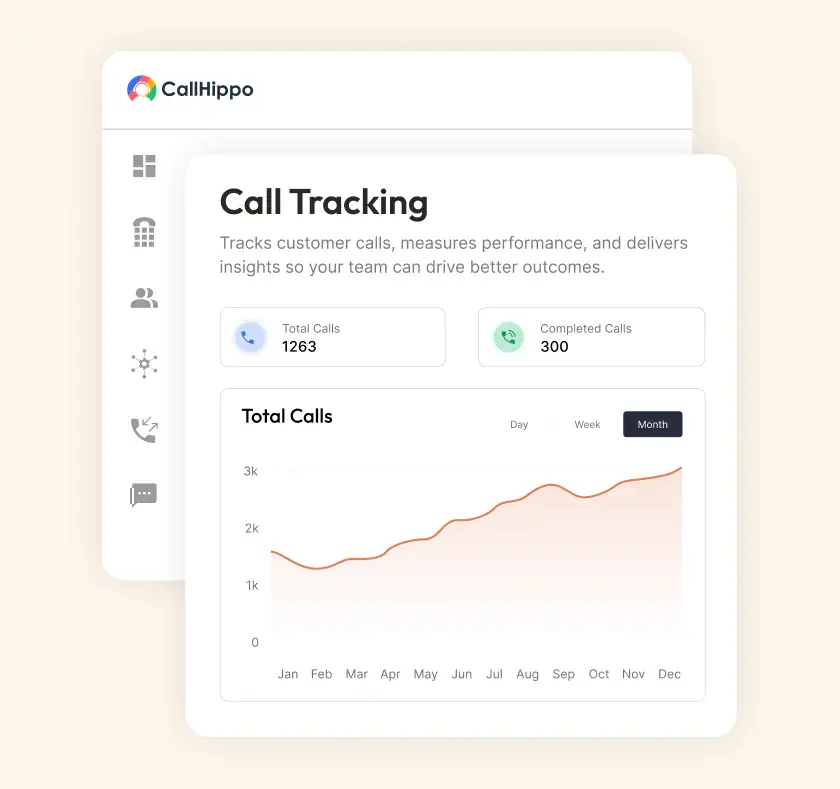
Without call tracking, leads go unidentified. Marketing efforts and budgets get wasted. And teams rely on guesswork. CallHippo’s call tracking software connects every call to its true source.
- Track sales calls across ads/campaigns for accurate attribution.
- Review recordings, transcripts, etc. from one dashboard.
- Sync call insights with CRM to make data-driven decisions.







What is Call Tracking and Why Does Every Marketer Need it?
Call tracking helps businesses understand exactly where their calls come from. It assigns unique phone numbers to different marketing channels. When a customer calls, the system records the source. This allows the marketers to gain conversation insights into which campaign, keyword, etc., actually generates the call.
- Identify Marketing Channels
Call tracking shows which campaigns, ads, etc., generate phone calls. This helps marketers to focus their budget on marketing strategies that actually work. - Improve Marketing ROI
Call tracking connects calls to specific campaigns. This helps marketers to identify wasted marketing spend and reallocate budgets to channels that deliver results. - Understand Customer Calls Clearly
Running campaigns becomes easier if teams have insight into common questions, buying interest, etc. It helps adjust messaging and target the right audience. - Make Data-Driven Decisions
CRM stores each detail to help teams gain complete context. They can personalize outreach and focus on prospects who are more likely to convert.
How Call Tracking Actually Works?
Call tracking helps marketing teams analyze which campaigns are working and which aren’t. But to track and analyze calls, it is crucial that you know how it works.

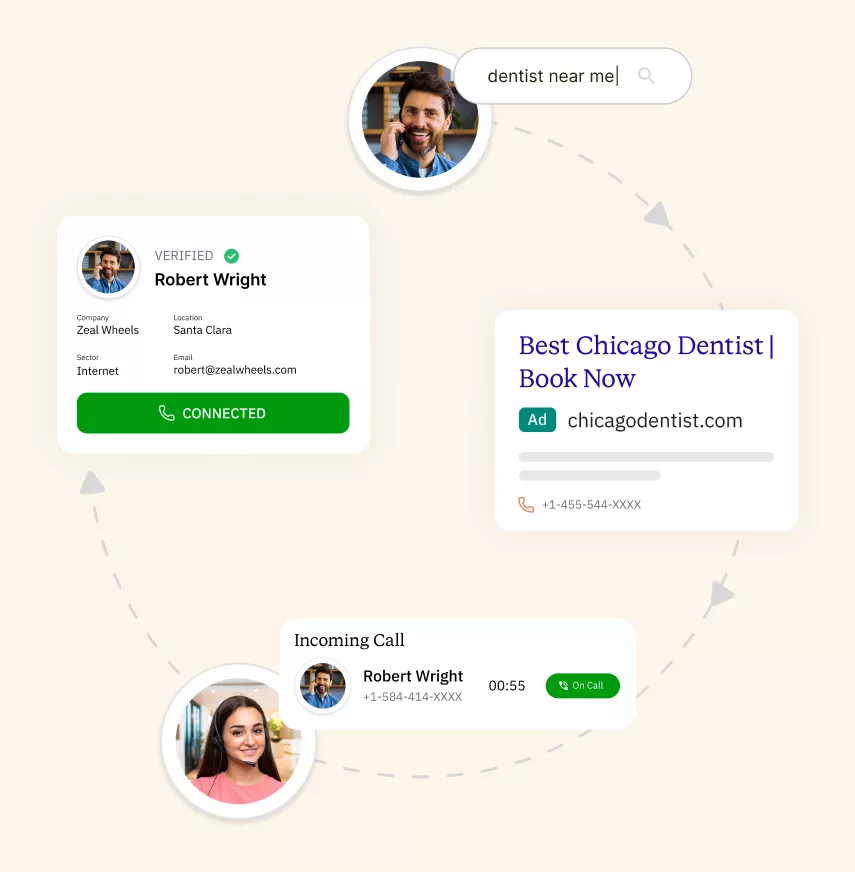
Each marketing channel gets its own unique tracking phone number. When a prospect sees an ad and calls, they dial that unique number instead of your main business line.

The tracking system intercepts the incoming call. Then, it automatically routes calls to your real business number. The caller experiences no difference, while the system logs the call.

As the call connects, the platform records key data points. From the number dialed to the caller ID to whether the call was answered. Many systems record calls as well.

All this data flows into a dashboard or your CRM. Marketers can now see exactly which campaigns/channels are driving phone calls. This enables smarter budget decisions.
8 Ways Call Tracking Changes How You Spend Your Marketing Budget
Call tracking is crucial, but it’s even more crucial to know how to use it to its full potential. Here are the 8 best ways call tracking can be used to improve your marketing campaigns.

Connects every call to the exact campaign it generated from. Let your marketers see which platforms are actually driving phone conversations.

Generating calls doesn't mean generating revenue. Phone call tracking lets you analyze which keywords lead to conversations and helps in refining strategies.

Connect the full journey, from ad click to closed deal. Linking call data with outcomes can show how marketing contributes to growth.

Modern systems use AI to analyze conversations in real-time. Based on keywords, caller intent, etc., the system can score lead quality automatically.

Call data reveals which campaigns/keywords generate calls. If a set of keywords drives conversations, marketers can shift their budget towards them.

Offline campaigns are difficult to measure using traditional analytics. Call tracking solves this by assigning unique phone numbers to each campaign.

Every call can be automatically logged in your CRM with important details. This ensures sales and marketing teams work with better visibility.

Most customer journeys involve multiple touchpoints. Phone call tracking helps connect these interactions, allowing marketers to understand how different channels work.
Pricing
-

 Calling
- Pay Only for Numbers
- Voicemail
- Click to Dial
- Business Hours
Define operating hours for each number to route calls appropriately.
- Smart Failover System
If a call fails to complete, Attempt Manager surfaces it for retry on a number you've assigned to the campaign, improving call connection success rates.
-

 Messaging
 - SMS (Text messages) & MMS
- WhatsApp Business API
 Platform
- 2FA
Add an extra security layer by requiring a verification code in addition to your password.
- Desktop & Mobile Apps
-
Calling
- Unlimited Minutes (Includes Both Landline & Mobile Calling)
Shared pool of free calling minutes for your entire team. Valid for manual dialing to standard US/Canada numbers only.
- Forward to Device Automatically route incoming calls to your mobile or alternative device to never miss calls.
- Ring All Devices Ring simultaneously on all your logged-in devices (desktop, mobile, browser) for every call.
- Country Blocking Restrict outbound calls to specific countries to prevent unauthorized international dialing.
-
Messaging
-
100 SMS (Text Messages)
Standard A2P charges apply.
- SMS Templates Create and save message templates for one-click texting with consistent communication.
- Free Omnichannel Inbox


-

 Analytics
- Basic Report Analytics
- Call Logs (1 month) Access detailed records of all calls including duration, outcome, recordings, and participant information.
- Audit Logs Track all account changes and user actions for security, compliance, and accountability.
-
 Integrations
-
ZZapierSSlack50+WWebhook


 Popular
-
Calling
- Unlimited Minutes (Includes Both Landline & Mobile Calling)
Shared pool of free calling minutes for your entire team. Valid for manual dialing to standard US/Canada numbers only.
- Call Recordings Record and store calls for quality monitoring, training, and compliance.
- Multilingual IVR Offer IVR menu options in multiple languages to serve diverse customer bases.
- Call Distribution (Cascading) Route calls to agents in a priority sequence until someone answers.
- Custom Greetings Upload personalized welcome messages for callers to hear when they reach your number.
-
Messaging
-
500 SMS (Text Messages)
Standard A2P charges apply.
-
Analytics
- Reports / Analytics Get detailed insights and summarized analytics on team's calling performance.
- AI Voicemail Transcription Automatically convert voicemail audio to text for faster message review.
- Call Logs (Lifetime)
- Role Based Access Control Assign specific roles with tailored permissions to control what each user can view and manage.
- Call Transcription
-
Integrations
-
HHubSpotSSalesforcePPipedrive50+ZZoho
-
Calling
-
Unlimited Minutes (Includes Both Landline & Mobile Calling)
Shared pool of free calling minutes for your entire team. Valid for manual dialing to standard US/CA numbers only.
- Smart DID Routing Automatically routes calls to the best available agent based on real-time data.
- Multilevel IVR Create multi-step phone menus to route callers to the right department or person automatically.
- Call Blocking Block unwanted callers and spam numbers to keep your team focused on quality conversations.
- Holiday Routing Configure special call handling and greetings for holidays and non-business days.
- CRM-Based VIP Routing Route calls automatically to the correct contact/lead owner based on CRM information.
-
Messaging
-
1000 SMS (Text Messages)
Standard A2P charges apply.
- Analytics
- Call Summary
-
 Enterprise
- Single Sign-On (SSO) Log in once to access CallHippo and all integrated tools with your company credentials.
- Custom Integrations Build advanced integrations with your systems—add click-to-call anywhere, sync call data with custom logic, and create workflows specific to your business.
- Dedicated Account Manager Resolve account queries efficiently with dedicated account manager.
- Personalized Onboarding Experience personalized onboarding for a tailored start.
- 24×7 & Phone Support
-
Integrations
-
HHubSpotSSalesforceZZoho50+ZZendesk
CallHippo vs. Top Call Tracking Platforms: 2026 Comparison
Let’s explore a brief comparison between CallHippo and other call tracking software to understand which ones best for your business.
| Software/Aspects | Best For | Pricing | Standout Features | Limitations | |
|---|---|---|---|---|---|
| 1 |

CallHippo
|
Best for teams that need call tracking + full phone system in one platform | $19 per user/Month | Dynamic Number Insertion, Real-Time Call Analytics, CRM Integrations, Multi-Channel Call Tracking, Sentiment Analysis, AI-driven Call Summary | Limited deep marketing attribution tools compared to other platforms |
| 2 |

CallRail
|
Best for teams that solely need call tracking for marketing teams | $50/month + additional usage | Premium Conversation Intelligence, Smart Call Routing, Advanced Reporting | Complex dashboard and learning curve when managing multiple campaigns. |
| 3 |
Invoca
|
Best for marketing teams that require AI-powered call tracking analytics to measure campaign performance | (Contact for More details) | Real-Time Call Attribution, Automated Lead Scoring, Customer Journey Insights | Very expensive compared to most call tracking tools. This makes it less suitable for small businesses. |
| 4 |

WhatConverts
|
Best for businesses that want call tracking along with form/chat lead tracking to measure all lead sources | (Contact for More details) | Lead Management, Marketing Attribution Reports, Call Recording, Call Analytics | Manual lead classification is required. This slows down campaign analysis. |
| 5 |

CallTrackingMetrics
|
Best for companies that need advanced call tracking with detailed marketing attribution | $65 USD/month + usage | Call Automation & Routing, Call Scoring & Lead Qualification, Advanced Marketing Attribution | Occasional data accuracy concerns, especially with integrations like Google Analytics. |
| 6 |
Marchex
|
Best for enterprises that rely on call tracking and conversation analysis to understand customer behavior | (Contact for More details) | AI Conversation Intelligence, Call Attribution for Marketing, Lead Qualification & Scoring | Outdated or difficult user interface. This leads to a steeper learning curve. |
Call Tracking for Every Marketing Channel
Customers reach out from different marketing channels. How to know which channel they chose? The top call tracking software helps you understand this by tracking every marketing channel.
Google Ads & PPC
Many high-intent users prefer calling directly from search ads. Call tracking solution connects each call to the exact keyword or ad group. Marketers can identify which keywords produce qualified conversations. This allows teams to invest more in search terms that generate sales opportunities.
SEO & Organic Search
Organic visitors often call after reading a blog/landing page. With Dynamic Number Insertion (DNI), call tracking shows exactly which page led to the call. This helps marketing teams identify high-converting content. They can also optimize SEO strategies for pages that generate leads.
Social Media Ads
Social media campaigns often focus on engagement. But many prospects prefer calling after seeing an ad. Call tracking assigns unique tracking numbers to landing pages or call CTAs. This allows marketers to see which ad creatives or campaigns drive real phone inquiries.
Email Marketing
Email campaigns frequently encourage prospects to reach out directly for product information or demos. With dedicated tracking numbers, businesses can measure exactly how many calls come from each campaign. Marketers can then identify which subject lines, offers, or messages motivate prospects.
Offline Campaigns
Offline channels like billboards, print ads, etc., are difficult to track with traditional analytics. Call tracking solves this by assigning a unique phone number to each campaign. When a call comes in, businesses instantly know which offline source generated it.
Setting Up Call Tracking with CallHippo
Call tracking can be enabled in just a few steps with CallHippo. Let’s see how.
Log in to CallHippo
Log in to your “CallHippo” account. Once you enter the dashboard, you can access all your calling tools and settings. The unified dashboard lets you easily manage the phone system.
Open Add-Ons in Settings
Go to the “Settings” section from the dashboard and search for the “Add-Ons” option. This section allows you to enable additional advanced features that extend the capabilities of your CallHippo account.
Enable the Call Tracking Add-On
Find the “Call Tracking” add-on and select it to activate. Once enabled, you can track incoming calls and identify call sources. This helps in understanding which campaigns drive phone conversations.

“Thanks to the CallHippo team, we were able to resolve a tough issue with flagged phone numbers. As an EdTech startup, outbound calls are crucial for us. CallHippo's solution not only improved our attestation score but also boosted our answer rates and overall customer experience.”

Frequently Asked Questions
-
No. Visitors see a tracking number. But the call is automatically routed to your existing business number. Your team continues receiving calls normally while the system captures the marketing source.
-
No. Call tracking scripts are lightweight and designed to load quickly.
-
Yes. Inbound call tracking software can link incoming calls to specific Google Ads campaigns, ad groups, or even keywords. This helps you see which ads generate real conversations and leads.
-
Some call tracking providers offer HIPAA-compliant solutions. The right call tracking software, like CallHippo, has secure data handling and encryption for data protection.
-
It depends on how many campaigns/channels you want to track. It is advisable to start with a few numbers for major channels.
-
Yes. The best call tracking software, like CallHippo include call tracking and call recording as well. This allows teams to review conversations and monitor quality. Teams can also understand customer needs better.
-
Most call tracking tools integrate with popular CRMs like Salesforce, HubSpot, etc. This allows call data, recordings, and lead information to automatically appear in your CRM.
-
Dynamic Number Insertion (DNI) automatically shows different phone numbers to visitors based on how they arrived at your website. This helps businesses identify which marketing source triggered the call.

Get International Phone Numbers
 Canada Virtual Phone Number
UK Virtual Phone Number
Canada Virtual Phone Number
UK Virtual Phone Number
 US Virtual Phone Number


