WhatsApp Business API
The WhatsApp Business API enables businesses to communicate with customers through automated messages. You can use it for customer support, sending updates, and marketing. It gives you a direct way to reach people on WhatsApp.
- Reply to customer questions 24/7 automatically. Save time and keep customers happy.
- Chat with customers in real time. Give them the help they need when they need it.
- Send order confirmations, updates, and special offers straight to their phones.
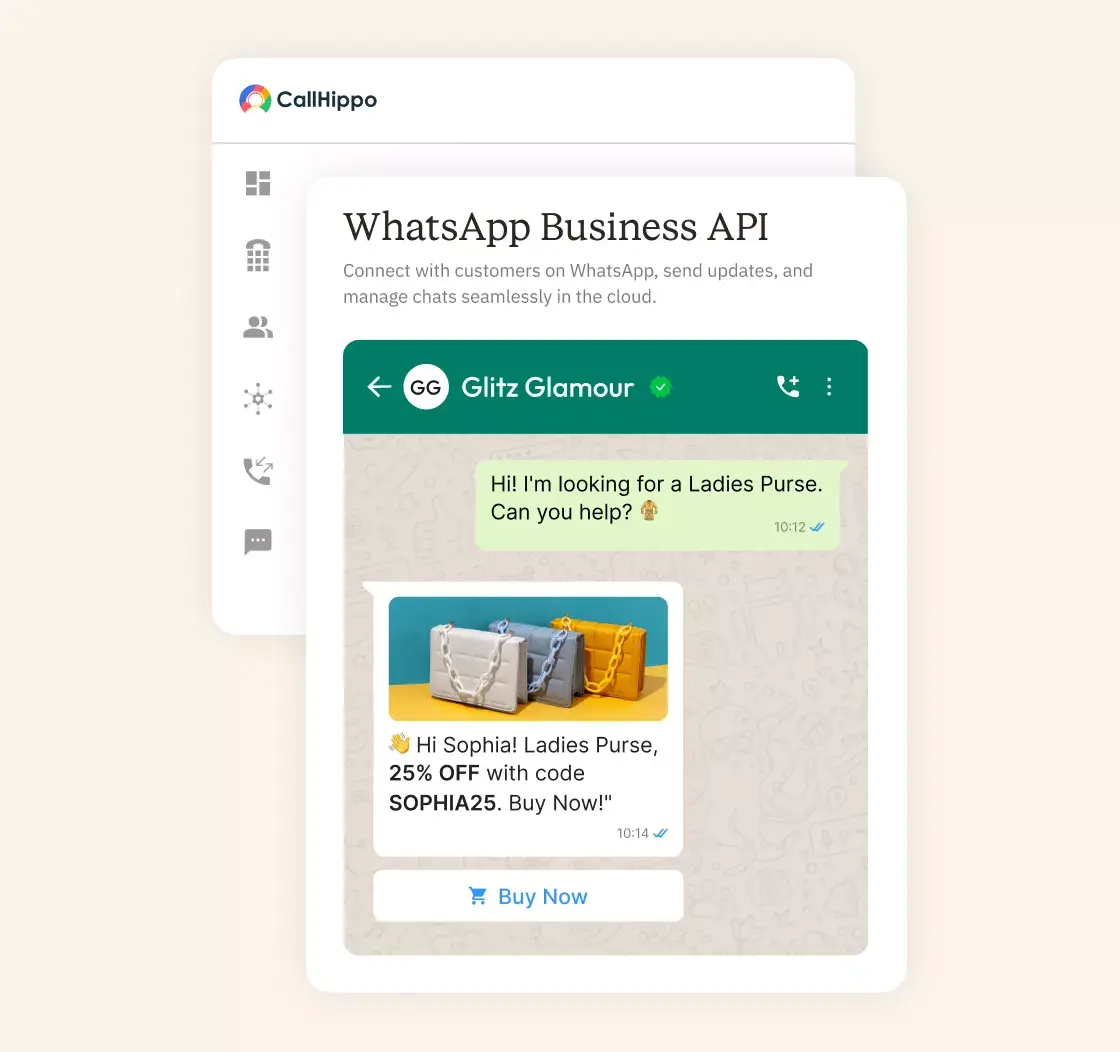







What is WhatsApp Business API?
The WhatsApp Business API facilitates companies to better handle customer messages. It differs from the standard WhatsApp Business app. You get many more features, such as automated messages, CRM integrations, and support for multiple agents.
The API allows high-volume messaging as one unit. This can be integrated with the existing CRM and other business systems. Communicate with customers through the app they are already using.
Why Do You Need a WhatsApp Business API for Your Business?
The API helps you talk to more customers and keep them engaged. It automates work, builds trust, keeps data safe, and connects you with people worldwide.

The API can manage a large volume of messages without any issues. The growth of your business is accompanied by the growth of the system. Connect with thousands of customers effortlessly.

Send targeted messages to the right customers. More people will read and respond to your messages. Personal touches and automation help you connect better throughout the customer journey.

Stop doing repetitive tasks manually. The API sends automated messages for order confirmations, appointment reminders, and shipment updates. This saves your team time and keeps customers informed.

A verified WhatsApp Business account shows customers that you're legitimate. The green checkmark builds trust and makes people more comfortable messaging your business.

All messages use end-to-end encryption. Your talks with customers stay private. The platform follows data privacy rules to protect everyone's information.

Talk to customers anywhere in the world. The API works across countries and supports different languages. Reach more people and serve customers wherever they are.
Key Features & Capabilities of WhatsApp Business API
The API has features that make customer communication easier. You get automation, security, and the ability to connect with other tools.

Send pre-approved message templates for notifications and reminders. These keep your messages consistent. Use them for alerts, updates, and important information about sales or services.

Have real back-and-forth conversations with customers. They can ask questions, and you can answer. It feels more personal than one-way messages.

Send more than just text. Share images, videos, and documents. Add buttons to make it easy for customers to take action. Interactive messages with quick replies help conversations flow more smoothly.

Track all your messages and see what's working. Check delivery rates and monitor customer responses. Use this data to make your messages better and optimize your campaigns.

Connect the API to your existing CRM or helpdesk. Manage all customer talks in one place. Keep track of conversations and store customer information in an easily accessible location.

All messages are encrypted end-to-end. Only you and your customer can read them. The system follows GDPR and other privacy laws to keep data safe.

Let multiple team members use the platform at once. Human agents can each have their own login with specific permissions. Organize who does what to keep things running smoothly.

Set up bots to handle common questions automatically. Send notifications without manual work. Customers get instant answers, even outside business hours.
Pricing
-

 Calling
- Pay Only for Numbers
- Voicemail
- Click to Dial
- Business Hours
Define operating hours for each number to route calls appropriately.
- Smart Failover System
Automatically retries calls with an alternate caller ID when a provider rejection is received, improving call connection success rates.
-

 Messaging
 - SMS (Text messages) & MMS
- WhatsApp Business API
 Platform
- 2FA
Add an extra security layer by requiring a verification code in addition to your password.
- Desktop & Mobile Apps
-
Calling
- Unlimited Minutes (Includes Both Landline & Mobile Calling)
Shared pool of free calling minutes for your entire team. Valid for manual dialing to standard US/Canada numbers only.
- Forward to Device Automatically route incoming calls to your mobile or alternative device to never miss calls.
- Ring All Devices Ring simultaneously on all your logged-in devices (desktop, mobile, browser) for every call.
- AI Global Connect View caller's timezone before dialing to reach contacts at optimal times.
- Country Blocking Restrict outbound calls to specific countries to prevent unauthorized international dialing.
-
Messaging
-
100 SMS (Text Messages)
Standard A2P charges apply.
- SMS Templates Create and save message templates for one-click texting with consistent communication.
- Free Omnichannel Inbox


-

 Analytics
- Basic Report Analytics
- Call Logs (1 month) Access detailed records of all calls including duration, outcome, recordings, and participant information.
- Audit Logs Track all account changes and user actions for security, compliance, and accountability.
-
 Integrations
-
ZZapierSSlack50+WWebhook


 Popular
-
Calling
- Unlimited Minutes (Includes Both Landline & Mobile Calling)
Shared pool of free calling minutes for your entire team. Valid for manual dialing to standard US/Canada numbers only.
- Call Recordings Record and store calls for quality monitoring, training, and compliance.
- Multilingual IVR Offer IVR menu options in multiple languages to serve diverse customer bases.
- Call Distribution (Cascading) Route calls to agents in a priority sequence until someone answers.
- Custom Greetings Upload personalized welcome messages for callers to hear when they reach your number.
-
Messaging
-
500 SMS (Text Messages)
Standard A2P charges apply.
-
Analytics
- Reports / Analytics Get detailed insights and summarized analytics on team's calling performance.
- AI Voicemail Transcription Automatically convert voicemail audio to text for faster message review.
- Call Logs (Lifetime)
- Role Based Access Control Assign specific roles with tailored permissions to control what each user can view and manage.
- Call Transcription
-
Integrations
-
HHubSpotSSalesforcePPipedrive50+ZZoho
-
Calling
-
Unlimited Minutes (Includes Both Landline & Mobile Calling)
Shared pool of free calling minutes for your entire team. Valid for manual dialing to standard US/CA numbers only.
- Smart DID Routing Automatically routes calls to the best available agent based on real-time data.
- Multilevel IVR Create multi-step phone menus to route callers to the right department or person automatically.
- Call Blocking Block unwanted callers and spam numbers to keep your team focused on quality conversations.
- Holiday Routing Configure special call handling and greetings for holidays and non-business days.
- CRM-Based VIP Routing Route calls automatically to the correct contact/lead owner based on CRM information.
-
Messaging
-
1000 SMS (Text Messages)
Standard A2P charges apply.
- Analytics
- Call Summary
-
 Enterprise
- Single Sign-On (SSO) Log in once to access CallHippo and all integrated tools with your company credentials.
- Custom Integrations Build advanced integrations with your systems—add click-to-call anywhere, sync call data with custom logic, and create workflows specific to your business.
- Dedicated Account Manager Resolve account queries efficiently with dedicated account manager.
- Personalized Onboarding Experience personalized onboarding for a tailored start.
- 24×7 & Phone Support
-
Integrations
-
HHubSpotSSalesforceZZoho50+ZZendesk
Which are the Top Business Phone System Providers?
Compare trusted providers for your commercial phone system needs, from startups to enterprises, and choose features, pricing, and support wisely.
| Tool | Best For | Trial Info | Price | |
|---|---|---|---|---|
| 1 |

CallHippo
|
Businesses needing reliable communication with global numbers |
10-day free trial
|
Starts at $18/month |
| 2 |

Gupshup
|
Companies seeking multi-channel messaging and automation |
Free 30-day trial
|
Custom pricing based on usage |
| 3 |

WATI
|
Teams looking for easy automation and CRM integration |
7-day free trial
|
Starts at $49/month |
| 4 |

Twilio
|
Developers needing highly customizable, scalable solutions |
$15 free trial credit
|
Starts at $0.005 per message |
| 5 |
MessageBird
|
Businesses using multiple messaging channels in one platform |
Free test credits available
|
Custom pricing based on usage |
| 6 |
360dialog
|
Businesses wanting simple, reliable messaging with CRM integration |
Free trial available
|
Starts at €50/month |
| 7 |
AiSensy
|
Small businesses needing bulk messaging and chatbot automation |
14-day free trial
|
Starts at ₹999/month |
CallHippo
CallHippo offers the WhatsApp Business API which is easy to use, offering effective communication tools. You get support and marketing features all in one place. Setup is quick, and you can get phone numbers from anywhere in the world. It works well for businesses that need reliable ways to talk to customers.
Key Features
- Call Forwarding
- Analytics & Reporting
- Power Dialer
- VoIP Support
- CRM Integration
Pros
- Quick setup with phone numbers available from countries around the world.
- Works for small new businesses and big companies with many customers.
- Support team replies fast and helps you fix problems right away.
Cons
- Basic plans don’t have all the features and you need upgrades later.
- Some system connections take a lot of time to set up.
- Has fewer call center tools than platforms made just for calls.
Pricing
- Gives a free trial, starts at $18/month
Gupshup
Gupshup is a messaging platform that lets you use WhatsApp Business API. It has smart bots and works on many different messaging apps. The platform helps businesses connect deeply with their CRM. Good for companies that want to automate customer chats.
Key Features
- Multi-channel Messaging
- AI-powered Bots
- CRM Integrations
- Multi-language Support
- Automation Workflows
Pros
- Smart bots do boring tasks for you and keep customers engaged.
- Talk to customers on WhatsApp, Facebook, and other apps they use.
- Works in many languages so you can reach people everywhere.
Cons
- Basic plans don’t show you detailed stats about your messages.
- First-time setup feels hard if you’re new to automation tools.
- Some connections need tech help and take time to customize properly.
Pricing
- Custom pricing based on usage
WATI
WATI is simple and made for automating your business messages. It connects WhatsApp directly with your CRM, so everything stays organized. Good for automating repeat tasks and answering customer questions. Perfect for teams that want easy tools without confusing setup steps.
Key Features
- Chat Automation
- CRM Integration
- Multi-agent Support
- Quick Setup
- Message Templates
Pros
- Easy to use, even if you don’t know much about technology.
- Prices are low enough for small businesses with tight money limits.
- Support team answers fast and fixes your problems without long waits.
Cons
- Basic plans don’t give detailed reports about how customers respond to messages.
- Doesn’t work well for very big companies with lots of needs.
- It can’t customize much compared to other platforms with more options available.
Pricing
- Starts at $49/month
Twilio
Twilio is flexible and great for developers who like to customize. You can change everything to fit exactly what your business needs. It works in all countries and sends tons of messages fast. Best for companies that need special features and want to grow big.
Key Features
- Customizable APIs
- Real-time Messaging
- Global Coverage
- High Scalability
- Detailed Developer Documentation
Pros
- You can customize almost everything to match your business exactly.
- Works worldwide, so you can reach customers in any country easily.
- Has great guides and help docs that make setup much easier.
Cons
- More technical information is needed to set it up correctly.
- Costs more money than small businesses can usually afford to spend.
- Extra features cost more on top of the basic price already.
Pricing
- Starts at $0.005 per message
360dialog
360dialog focuses on being easy and helping your business grow. It connects smoothly with CRM systems and other business tools. Good for businesses that want automation without headaches. Made for companies that need simple, reliable messaging.
Key Features
- CRM Integration
- API Access
- Automation Tools
- Quick Onboarding
- Reliable Messaging
Pros
- Gets you started in minutes, so you can jump right into messaging.
- Integrates well with CRM to keep all customer info organized nicely.
- Doesn’t cost too much for small and medium-sized companies.
Cons
- Can’t customize much if you need really special features or workflows.
- Stats and reports aren’t very detailed in the cheaper plans.
- Complicated features needs extra setup time and maybe some tech help.
Pricing
- Starts at €50/month
MessageBird
MessageBird is a messaging platform that works with WhatsApp Business API. It lets you message customers on many different apps. The platform puts all your customer talks in one place. Good for businesses that use WhatsApp, SMS, and other apps together.
Key Features
- Multi-channel Messaging
- Automation Tools
- Real-time Messaging
- CRM Integration
- Unified Inbox
Pros
- Reach customers on WhatsApp, SMS, email, and other apps they like.
- Connects easily with other messaging tools and your CRM system too.
- Messages are delivered instantly, ensuring customers receive quick responses.
Cons
- Costs a lot if you’re a small business without much money.
- The support team sometimes takes a while to answer your questions.
- Good features are only in expensive plans, not cheap ones.
Pricing
- Custom pricing based on usage
AiSensy
AiSensy is simple and made for automating business messages easily. It lets you send many messages at once and add chatbots. Perfect for small businesses that want basic, easy-to-use tools. Made for companies that need cheap automation without tech confusion.
Key Features
- Chatbot Automation
- AI-powered Support
- Bulk Messaging
- Easy Setup
- Affordable Plans
Pros
- Very easy to start using without any tech skills needed.
- Cheap prices that work great for small and growing businesses.
- The support team helps quickly and gives you useful tips and guides.
Cons
- Doesn’t grow well when your team gets bigger with more needs.
- Basic stats don’t tell you enough about your marketing results.
- Limited customization options make it harder to personalize.
Pricing
- Starts at ₹999/month
Choosing the Right WhatsApp API Service for Your Business
Pick the right service by looking at price, coverage, and how it connects with your tools. Also, check reliability and support.
Pricing Models (Sessions, Templates, Tiered Plans)
Services charge in different ways. Some bills per session, others per template message. Tiered plans give you options based on message volume. Session pricing works well if you chat with customers often. Template pricing is better for marketing and sales campaigns. Pick what fits your budget and how you use the platform.
Region / Messaging Coverage & Throughput
Make sure your provider works in the countries where you do business. Check their message throughput, how many messages they can send quickly. High throughput means your messages reach users fast. Good coverage means customers everywhere can get their WhatsApp messages.
Integration & Developer Support
The service should connect easily with your existing CRM and helpdesk. Look for good documentation and developer resources. This makes setup easier and lets you customize the API for your business systems. Good integration helps you optimize the whole process.
SLA, Uptime, and Reliability
Check the Service Level Agreement. It should promise good uptime and fast performance. Pick a provider that stays online consistently. You need access to the platform when customers want to talk. Reliable service keeps conversations going without interruptions.
Support, Onboarding & Documentation
Look for providers with clear setup help and good documentation. You want resources that help your team learn the platform quickly. Responsive support helps when things go wrong. Easy onboarding means you can start using the API to connect with customers right away.
How to Get WhatsApp Business API?
Getting access involves meeting requirements and setting up your business account. Here’s what you need to do.
Eligibility & WhatsApp Business Account Requirements
- You need a verified WhatsApp Business account.
- Follow WhatsApp’s rules for messaging and content.
- Get a dedicated phone number for the API.
- Show you have a real reason to use it for customer communication.
Steps to Apply for API Access
- Go to the WhatsApp Business website to apply.
- Provide documents that prove your business is legitimate.
- Submit your phone number for verification.
- Wait for approval, which usually takes a few days.
Setup & Verification (Phone number, Business Profile, Display Name)
- Verify your business phone number with WhatsApp.
- Create your business profile with address, email, and website.
- Pick a display name that matches your business.
- Finish verification to get full API access and start using the service.
WhatsApp Business App vs. WhatsApp Business API
The regular app works for small businesses. The API is built for large businesses that send lots of messages.
| Feature | WhatsApp Business App | WhatsApp Business API |
|---|---|---|
| Target Audience | Small businesses or solo owners | Medium to large businesses with many customers |
| Set-Up Process | Quick setup on your phone | Needs approval from WhatsApp to access |
| Message Automation | Basic automated greetings | Advanced automation with bots and workflows |
| Multi-Agent Support | One device only | Multiple human agents can use it at once |
| Customization | Limited options | Highly customizable with API and CRM connections |
| Cost | Free | Paid based on usage |
| Message Volume | Low volume only | Handles high message volume |
| Supported Devices | Mobile phones only | Works on web, CRM, and multiple platforms |
| Access to Advanced Features | Basic quick replies and labels | Full access to templates, media, and interactive messages |
| Business Profile | Simple profile with basic info to display | Detailed profile with customer history and data |
| Customer Support | Limited app support | Dedicated support with custom solutions for business systems |
Best Practices & Tips for WhatsApp Business API
Follow these tips to get the most from the API. Keep customers happy and engaged on the platform.
Design Engaging Templates
Write clear, short message templates. Make them personal and relevant. Use templates for notifications, reminders, and updates. Follow WhatsApp’s guidelines to ensure your templates are approved quickly. This keeps your messages from getting blocked.
Handle User Opt-In & Opt-Out
Always get permission before sending marketing messages or promotions. Make it easy for people to opt out at any time with quick replies. Be clear about how often you plan to message them. Follow WhatsApp’s opt-in rules to keep your accounts safe. Easy opt-out options build trust with users.
Balancing Automated vs Human Messaging
Use automation to handle simple questions and common requests. Let human agents take over for complex issues. Keep automated responses personal so customers don’t feel like they’re talking to a robot. Balance bots and people based on what the conversation needs throughout the customer journey.
Monitoring Delivery & Open Rates
Track how many messages get delivered and opened. This data shows what’s working. Check the numbers regularly to identify areas for improvement. Adjust timing and content to get better engagement with customers on WhatsApp.
Fallback Strategies (SMS, Email) if Message Fails
Have backup plans, such as SMS or email, ready. If WhatsApp messages don’t go through, you can still reach users. Test your backup options regularly. This approach ensures you can always connect with customers through some platform.
Challenges & Limitations of WhatsApp Business API
The API is powerful and offers extensive capabilities, but it does come with a few challenges. Here’s what you need to know to navigate them effectively.
Template Approval Delays
WhatsApp takes time to approve templates. This can slow you down when you need to send time-sensitive messages. Submit templates early to avoid delays. Plan so the approval process doesn’t block your campaigns.
Conversational Limitations & 24h Window Rule
You can only send free-form messages for 24 hours after a customer contacts you. After that, you need approved templates to continue conversations. This limits your long-term engagement. Manage timing carefully to keep the customer journey going.
Cost and Template Constraints
The API can get expensive with high message volume. You also need approval for template messages used outside the 24-hour window. These costs and rules can be tough for businesses with many customers. Factor this into your budget when you scale.
Regulatory / Opt-In Compliance
WhatsApp has strict rules about getting customer permission. You must follow these rules and local laws. Breaking them can get your accounts suspended. Keep clear records of opt-ins to protect your business.
Scaling Conversations & Rate Limits
The platform limits the number of messages you can send. As your business grows, you might hit these limits. Plan your growth carefully. Connect the API properly with your business systems to handle volume efficiently.
Metrics & KPIs to Measure WhatsApp Business API Performance
Track these numbers to see how well your WhatsApp messaging is working. Use the data to make improvements.
Message Delivery Rate
Check what percentage of messages actually get delivered. High delivery rates mean your messages reach customers. Low rates signal problems you need to fix on the platform.
Read and Response Rate
See how many people open your messages and respond. Read rates show engagement. Response rates tell you if customers want to have conversations. Use this to optimize your content for users.
Average Response Time
Measure how fast your team or bots reply to customers. Quick responses make people happier. Slow responses hurt satisfaction. Track this to find bottlenecks in your support process.
Conversion Rate per Campaign
Count how many customers take action after getting your messages. This could be buying something, signing up, or using promotions. High conversion rates mean your sales and marketing messages work well.
Agent Performance & Resolution Time
Track how well human agents perform. Log how fast they solve customer problems. Shorter resolution times and happy customers show good performance. This data helps you improve your team.
Opt-In vs Opt-Out Ratio
Compare how many people sign up versus how many leave. High opt-ins mean customers value your messages. High opt-outs mean you’re sending too much or the wrong content. Monitor your accounts to keep this balanced.
Security, Privacy & Compliance Checklist for WhatsApp Business API
Keep customer data safe and follow privacy rules. This protects your business and builds trust on the platform.
End-to-End Encryption Protocols
WhatsApp uses end-to-end encryption. Only you and your customer can read messages. No one else can access them. Make sure any other tools you connect to maintain this encryption level. This keeps data safe throughout your business systems.
GDPR & Data Retention Compliance
GDPR requires strict handling of customer data. WhatsApp gives you tools to delete data and manage retention. Create clear processes for handling information. Log what data you keep and access it appropriately.
Customer Consent and Opt-In Management
Before sending any messages to customers, get unambiguous permission. Use forms or checkboxes on your website to get opt-ins. Inform the people about the types of messages they will receive, including notifications, promotions, and support messages.
Compliance with WhatsApp Business Policy
WhatsApp has laid down certain rules for businesses that want to use its services. Either adhere to these policies or risk having your access to the platform revoked. The rules deal with what can be sent, how to use templates, and conduct. Getting blocked can significantly diminish your customer communication.
Get Started with a Business Phone System You Can Trust
Learn how to quickly buy your virtual business phone number with CallHippo and hear from satisfied customer about how we improved their communication and customer experience.


“Thanks to the CallHippo team, we were able to resolve a tough issue with flagged phone numbers. As an EdTech startup, outbound calls are crucial for us. CallHippo's solution not only improved our attestation score but also boosted our answer rates and overall customer experience.”

Frequently Asked Questions
-
Absolutely, small businesses can access and utilize it. It is made easier for smaller firms with the help of services such as CallHippo. You will have a straightforward interface and pricing that is not too expensive. There will be no need for technical expertise or large budgets.
-
The price is determined by the extent of your use and the provider you choose. CallHippo offers various plans that are flexible enough for businesses of all sizes. Select services according to your message volume and budget to meet your requirements.
-
It is a tool that allows companies to send messages automatically. One can interact with customers through the platform without needing to do it manually. CallHippo is one of the providers that facilitates the process. The clients get the ultimate assistance in connecting with their customers through chatbots, CRM integrations, and helpful support tools.
Related Post
Get International Phone Numbers
 Canada Virtual Phone Number
UK Virtual Phone Number
Canada Virtual Phone Number
UK Virtual Phone Number
 US Virtual Phone Number


