
On Hold Music and Messages for Your Callers
Fill queue wait time with your own track or a spoken message instead of silence. Set it for each number in CallHippo.

What Is Music on Hold?
Music on hold is the audio a caller hears while waiting to be connected. In CallHippo, it plays to callers waiting in a call queue for the next free user. It also plays to a caller you put on hold during a transfer or while adding someone to the call. You can use CallHippo’s default track or set your own wait music for each number.
Benefits of On Hold Music
A few seconds of silence can make callers think they’ve been cut off. Hold audio tells them they’re still connected and gives you a chance to say something useful.
Reassures Callers
Audio on the line signals that the call is still connected and someone will pick up.
Sounds Professional
Your chosen music or message gives callers a consistent experience every time they wait.
A Way Out of the Queue
With Auto Callback on, waiting callers can press # to request a callback instead of holding.
Share Useful Information
Use a spoken message to point callers to your office hours, your website or a new service while they wait.
Leave a Message Instead
Callers can press * to leave a voicemail if voicemail is enabled for the user.
Different Audio per Number
Upload separate wait music for each number, such as one track for sales and another for support.
Set Up Hold Music on a Number
After signing up, add wait music from your number settings.
- Open Numbers > settings
- Go to Call Queue
- Turn on Wait Music
- Upload a track or type a message
- 10-day free trial.
- No credit card required.
Pricing
-

 Calling
- Pay Only for Numbers
- Voicemail
- Click to Dial
- Business Hours
Define operating hours for each number to route calls appropriately.
- Smart Failover System
If a call fails to complete, Attempt Manager surfaces it for retry on a number you've assigned to the campaign, improving call connection success rates.
-

 Messaging
- SMS (Text messages) & MMS
- WhatsApp Business API
 Platform
- 2FA
Add an extra security layer by requiring a verification code in addition to your password.
- Desktop & Mobile Apps
-
Calling
- Unlimited Minutes (Includes Both Landline & Mobile Calling)
Shared pool of free calling minutes for your entire team. Valid for manual dialing to standard US/Canada numbers only.
- Forward to Device Automatically route incoming calls to your mobile or alternative device to never miss calls.
- Ring All Devices Ring simultaneously on all your logged-in devices (desktop, mobile, browser) for every call.
- Country Blocking Restrict outbound calls to specific countries to prevent unauthorized international dialing.
-
Messaging
-
100 SMS (Text Messages)
Standard A2P charges apply.
- SMS Templates Create and save message templates for one-click texting with consistent communication.
- Free Omnichannel Inbox


-

 Analytics
- Basic Report Analytics
- Call Logs (1 month) Access detailed records of all calls including duration, outcome, recordings, and participant information.
- Audit Logs Track all account changes and user actions for security, compliance, and accountability.
-
 Integrations
-
ZZapierSSlack50+WWebhook



 Popular
-
Calling
- Unlimited Minutes (Includes Both Landline & Mobile Calling)
Shared pool of free calling minutes for your entire team. Valid for manual dialing to standard US/Canada numbers only.
- Call Recordings Record and store calls for quality monitoring, training, and compliance.
- Multilingual IVR Offer IVR menu options in multiple languages to serve diverse customer bases.
- Call Distribution (Cascading) Route calls to agents in a priority sequence until someone answers.
- Custom Greetings Upload personalized welcome messages for callers to hear when they reach your number.
-
Messaging
-
500 SMS (Text Messages)
Standard A2P charges apply.
-
Analytics
- Reports / Analytics Get detailed insights and summarized analytics on team's calling performance.
- AI Voicemail Transcription Automatically convert voicemail audio to text for faster message review.
- Call Logs (Lifetime)
- Role Based Access Control Assign specific roles with tailored permissions to control what each user can view and manage.
- Call Transcription
-
Integrations
-
HHubSpotSSalesforcePPipedrive50+ZZoho
-
Calling
-
Unlimited Minutes (Includes Both Landline & Mobile Calling)
Shared pool of free calling minutes for your entire team. Valid for manual dialing to standard US/CA numbers only.
- Smart DID Routing Automatically routes calls to the best available agent based on real-time data.
- Multilevel IVR Create multi-step phone menus to route callers to the right department or person automatically.
- Call Blocking Block unwanted callers and spam numbers to keep your team focused on quality conversations.
- Holiday Routing Configure special call handling and greetings for holidays and non-business days.
- CRM-Based VIP Routing Route calls automatically to the correct contact/lead owner based on CRM information.
-
Messaging
-
1000 SMS (Text Messages)
Standard A2P charges apply.
- Analytics
- Call Summary
-
 Enterprise
- Single Sign-On (SSO) Log in once to access CallHippo and all integrated tools with your company credentials.
- Custom Integrations Build advanced integrations with your systems—add click-to-call anywhere, sync call data with custom logic, and create workflows specific to your business.
- Dedicated Account Manager Resolve account queries efficiently with dedicated account manager.
- Personalized Onboarding Experience personalized onboarding for a tailored start.
- 24×7 & Phone Support
-
Integrations
-
HHubSpotSSalesforceZZoho50+ZZendesk
Link Your Inbound Line to Your Apps
Connect CallHippo to the CRM, helpdesk and e-commerce apps behind your inbound lines, all from the App Marketplace.

Pipedrive
Sales Automation
Zapier
Sales Automation
HubSpot
CRM
Slack
Productivity
Salesforce
Sales Automation
Shopify
E-Commerce
Zendesk
Helpdesk
Intercom
Helpdesk- 10-day free trial.
- No credit card required.
Features That Work With Hold Music

Call Monitoring
See how many calls are live from the dashboard and step in when queues build up.

Smart Switch
Calls fail over to another telephony provider if the primary one has issues.
Global Connect
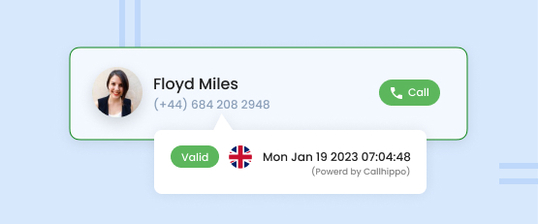
Shows an international contact’s local time before you call them back.

Smart Call Forwarding
Unanswered calls on the app can forward to your mobile or landline after 30 seconds.

Call Transfer
The caller hears hold music while you brief a colleague in a warm transfer.
Call Conference
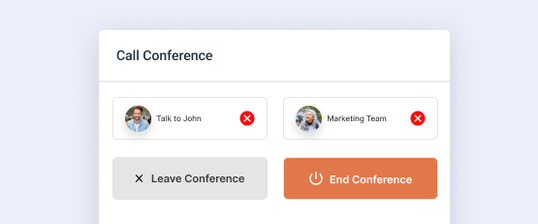
The first caller hears hold music while you dial a third person, then you merge all three.

Call Queuing Software
Line up simultaneous callers and answer them in order, holding each for up to 1,000 seconds.
Call Barging
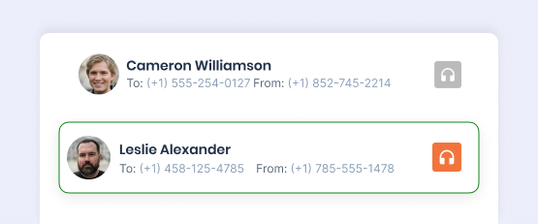
A supervisor can join a live call discreetly and speak if needed.
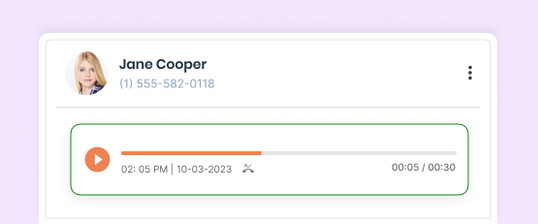
Call Recording
Record inbound calls for quality checks and training.
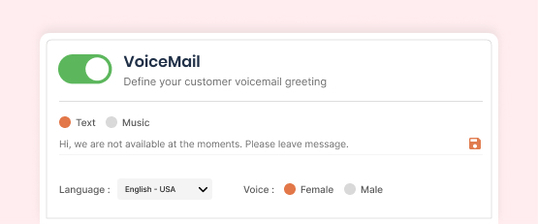
Voice Mail
Number voicemail can take over when a queue times out.
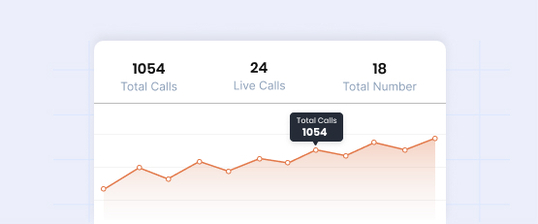
Call Analytics
Download call logs to see how long each caller waited in the queue.
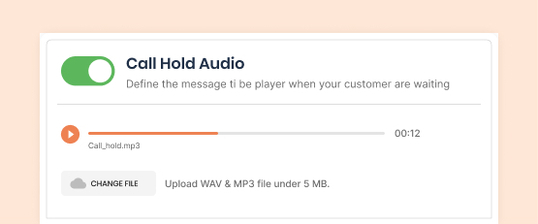
Call Hold Audio
Upload an MP3 or WAV up to 5 MB, or type a message read in the voice and accent you choose.

Upload your own hold music or message and play it to every caller in your queue.
Start Free Trial- 10-day free trial.
- No credit card required.
Frequently Asked Questions
-
Go to Numbers, click the settings icon for the number, open Call Queue and turn it on. Then enable Wait Music, choose Music, upload an .mp3 or .wav file up to 5 MB, and save.
-
If wait music isn't enabled, callers hear CallHippo's default hold music.
-
Yes. Choose Text and type your message, then pick the language, accent and a male or female voice.
-
Yes. Wait music is set per number, so each line can have its own audio.
-
300 seconds by default, adjustable up to 1,000 seconds. After that, the call goes to voicemail or disconnects, depending on your number settings.
-
No. Call Queue, and the wait music that comes with it, isn't supported on CallHippo India numbers because of telecom regulations.
