
Call Pop: Instant Caller Alerts, Across Every Tab
Never lose track of an incoming call while switching between tabs. Call Pop delivers a real-time visual alert across your browser so you always know who’s calling before you answer.







What is Call Pop?
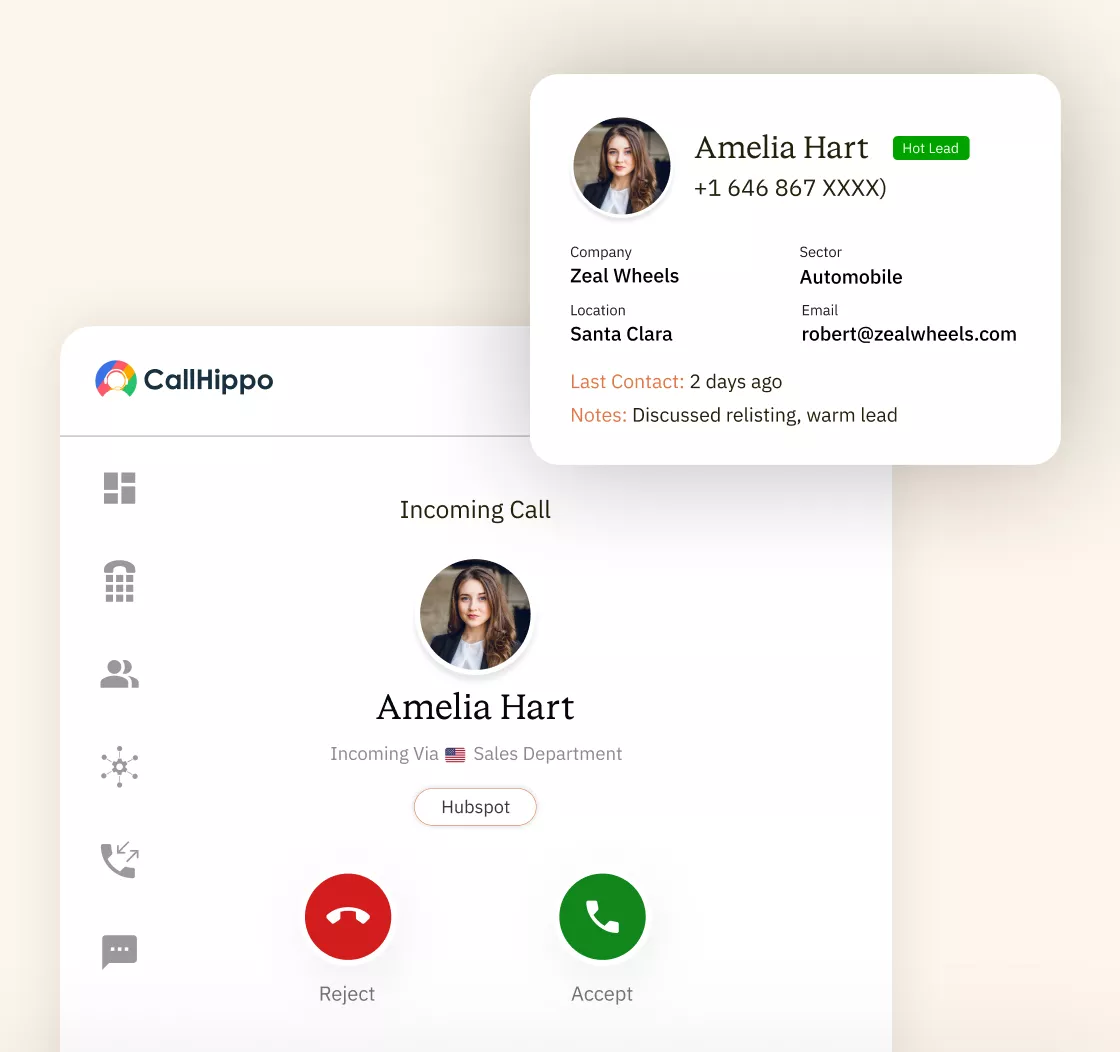
Call Pop is a browser-based feature that instantly displays a visual alert on your screen the moment an incoming call arrives. No matter which tab you have open, you’ll always see who’s calling and be ready to respond before you even pick up.
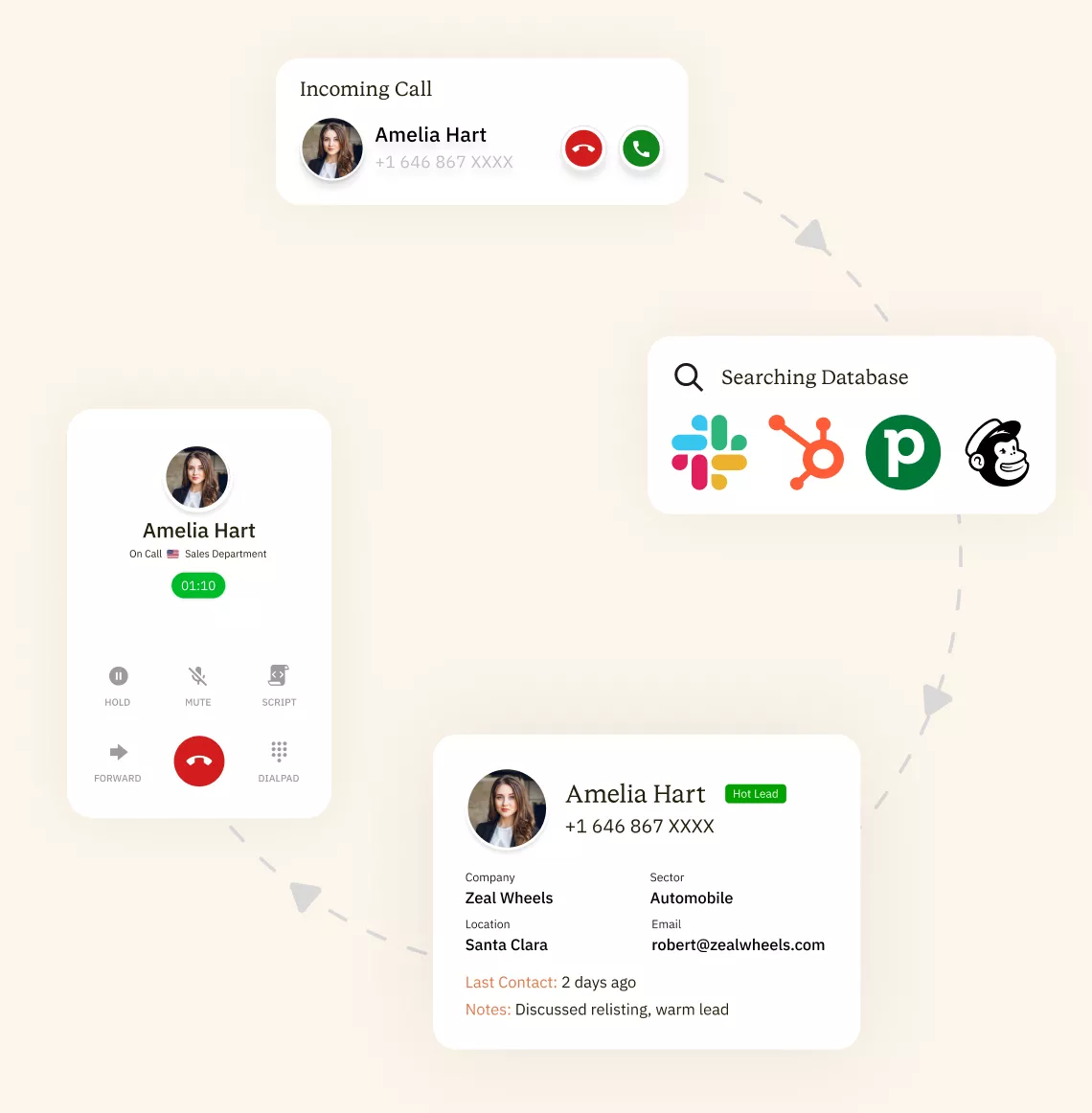
- Incoming Call is Detected
The moment a call reaches your VoIP system, the caller’s number is captured using ANI (Automatic Number Identification). This triggers the Call Pop process instantly, while the phone is still ringing and before any agent has touched anything. - System Searches Your CRM and Connected Tools
The phone number is immediately queried against your connected platforms, including CRMs like Salesforce, HubSpot, Zoho, and Pipedrive, and helpdesks like Zendesk and Freshdesk, as well as industry-specific management systems. Matching happens via phone number, email, or contact record. If a record exists, it is queued for display. - Caller Data Appears on Screen Instantly
A pop-up notification appears on the agent’s screen, showing the caller’s name, history, open tickets, account status, and more. The entire retrieval and display process happens in under two seconds, before the agent picks up. - Agent Starts the Call With Full Context
Agents start the call with everything they need, so there is no searching, no delays, and no friction. The customer feels recognized from the first word, and the call gets resolved faster.
What Information Does a Call Pop Display?
When a call arrives, CallHippo instantly queries your connected CRM and pushes the matching contact record to your agent’s screen before they pick up. No manual searching. No tab-switching. Here is exactly what your agents see.

CallHippo matches the incoming number to your CRM and instantly surfaces the caller's name, company, phone number, email, and location before your agent has said a word.

CallHippo syncs your CRM activity log so agents can see previous calls, chat transcripts, emails, and past support tickets the moment the phone rings.

Unresolved issues, pending follow-ups, and escalation flags are pulled from your connected helpdesk, visible on screen before the call connects, so agents already know what's outstanding.

CallHippo surfaces products purchased, subscription plan, contract value, and renewal dates directly from your CRM, giving agents the account context to handle the call with authority.

Outstanding payment flags and billing alerts appear on screen before the agent answers, so your team can address payment issues naturally within the same call, without switching tools..

CSAT scores, NPS data, and recent feedback synced from your CRM. Agents see the caller's sentiment before they pick up and adjust their tone accordingly, from the very first word.
Pricing
- 1 Free Phone Number
Get a dedicated phone number for each team member at no extra cost. Share numbers across multiple users for collaborative calling.
- Free WhatsApp Business API
- Voicemail
- Click To Dial
- SMS (Text messages) & MMS
- Everything in Basic + Telephony
-
Unlimited Minutes (Includes Both Landline & Mobile Calling)
Shared pool of free calling minutes for your entire team. Valid for manual dialing to standard US/Canada numbers only.
- 100 SMS (Text Messages)
Standard A2P charges apply.
- Basic Report Analytics
- Free Omnichannel Inbox
- Everything in Starter +
-
Unlimited Minutes (Includes Both Landline & Mobile Calling)
Shared pool of free calling minutes for your entire team. Valid for manual dialing to standard US/Canada numbers only.
- 500 SMS (Text Messages)
Standard A2P charges apply.
- Call Recordings
- Reports / Analytics
Get detailed insights and summarized analytics on team's calling performance.
- Everything in Professional +
-
Unlimited Minutes (Includes Both Landline & Mobile Calling)
Shared pool of free calling minutes for your entire team. Valid for manual dialing to standard US/Canada numbers only.
- 1000 SMS (Text Messages)
Standard A2P charges apply.
- Dedicated Account Manager
- Custom Integrations
- Single Sign On (SSO)
Log in once to access CallHippo and all integrated tools with your company credentials.
- CRM-Based VIP Routing
Route calls automatically to the correct contact/lead owner based on CRM information.
Why Your Team Needs Call Pop
Every second an agent spends searching for a record is a second the customer spends waiting. Call pop removes that friction, and the impact reaches across operations, experience, and revenue.
Operational Efficiency
- Cut Average Handle Time (AHT): The caller’s record is already on screen before they pick up, so the conversation starts immediately, moves faster, and wraps up sooner.
- Reduce After-Call Work (ACW): When agents have full context during the call, post-call notes are quicker and more accurate.
Better Customer Experience
- Personalize Every Interaction: Greeting a caller by name, referencing their last purchase, and acknowledging an open ticket before they have said a word signals that your business actually pays attention.
- Improve First Call Resolution (FCR): With full caller context on screen from the moment the call connects, agents resolve issues in a single call instead of scheduling callbacks.
- Eliminate Repetition for Callers: Customers hate explaining themselves every time they reach someone new. Call pop, including during transfers, ensures every agent already has the complete picture.
Business Outcomes
- Higher Sales Conversions: Agents who already know a caller’s purchase history, account value, and current plan can tailor their pitch before the conversation begins
- Increased Agent Productivity: No manual searching, no tab-switching, no asking callers for information already in your system. Agents handle more calls per shift with less cognitive load.
- Lower Call Abandonment Rates: Faster handling means shorter hold times for everyone in the queue. When agents move efficiently through each call, fewer callers hang up before being answered.
Call Pop by Industry — What Data Matters Most
The fields that help a dental front desk are completely different from the fields that help a SaaS support rep. Call pop is not a one-size-fits-all display. Here is what actually matters, by team.
Healthcare & Dental Practices
- When a patient calls, CallHippo pulls their record from your connected CRM or practice management system. If your team has stored appointment dates, insurance details, last visit notes, and outstanding balances, all of that is on screen before anyone picks up, so front-desk staff can confirm, collect, and assist without putting the patient on hold.
SaaS & Software Companies
CallHippo surfaces the caller’s CRM contact record the moment the call arrives. If your team tracks subscription plan, renewal date, and open tickets against each contact, your support agent sees all of it upfront and immediately knows whether they are speaking to a trial user or a paying customer before saying a word.
Sales Teams
CallHippo pulls the matching lead or contact record from your CRM: Salesforce, HubSpot, Pipedrive, or Zoho. Whatever your team has logged against that contact: deal stage, last touchpoint, account value, assigned rep is visible on screen before the rep answers, so they can open with full context instead of starting from scratch.
Customer Support Centers
CallHippo integrates with Zendesk and Freshdesk, so when a customer calls, their helpdesk record surfaces automatically. If your team has been logging ticket status, escalation history, and case notes, agents walk into every call already knowing what is open and what has already been tried.
E-commerce & Retail
If your CRM stores order history, return records, and customer notes, CallHippo brings that to the surface when the call comes in. Support agents can see what the customer last ordered and any previous interactions, so they can address the reason for the call immediately instead of asking the customer to repeat themselves.
Call Pop vs. Basic Caller ID — What Is the Difference?
Basic caller ID tells you a name and a number. Call pop and screen pop software give your agents the full picture. Here is how they compare, feature by feature.
| Feature | Basic Caller ID | Call Pop / Screen Pop |
|---|---|---|
| Shows Caller Name | ||
| Shows Phone Number | ||
| Shows Past Interactions | ||
| Shows Open Tickets | |
|
| Shows Purchase History | ||
| Shows account Value | ||
| Requires CRM Integration | ||
| Works before Answering |
How to Set Up Call Pop for Your Business
Getting call pop live on CallHippo takes minutes. CallHippo integrates natively with Salesforce, HubSpot, Zoho, Pipedrive, Zendesk, Freshdesk, and more. Once your CRM is connected, call pop activates automatically for every inbound call across your entire team.

Log in to CallHippo and select a plan with call pop included. The feature is available across paid tiers and scales from small sales teams to large contact centers.

Go to Settings > Integrations in your CallHippo dashboard. Select your CRM: Salesforce, HubSpot, Zoho, Pipedrive, Zendesk, or Freshdesk, and authenticate the connection. CallHippo immediately begins syncing your contact data.

Toggle call pop on and select which fields appear on every inbound call: caller name, account status, open tickets, last interaction, overdue balance, or any other CRM field your agents actually need..

Place a test call from a number already in your CRM. Confirm that the contact record appears correctly and in under two seconds. Once verified, every inbound call your team takes from that point forward starts with full caller context already on screen.
Frequently Asked Questions
-
Call pop and screen pop describe the same feature: an automatic display of caller information on an agent's screen when an inbound call arrives. "Call pop" is the term commonly used by VoIP providers like CallHippo. Screen pop is a broader industry term rooted in CTI (Computer Telephony Integration) technology. Both describe a pop-up or sidebar that pulls caller data from a connected CRM and presents it to the agent before or the moment the call connects. The functionality is identical; the terminology varies by provider.
-
Call pop removes the manual lookup phase at the start of every inbound call. Without it, agents spend time identifying the caller, locating their CRM record, and reviewing account details before the actual conversation can begin. Call pop compresses all of that to zero. Agents also spend less time on post-call documentation because they have accurate context throughout the conversation, which makes note-writing faster and more precise.
-
Yes. CallHippo's call pop works on the CallHippo mobile app for iOS and Android, the same way it does on the desktop. When an inbound call arrives, the matching CRM record is pushed to the agent's mobile screen automatically, giving remote agents and field teams the same full context as office-based staff. The CRM query runs server-side, so agents do not need to be separately logged into their CRM app for the call pop to fire. As long as the agent is signed into the CallHippo app with an active CRM integration, call pop activates on every inbound call, on any device.

“Thanks to the CallHippo team, we were able to resolve a tough issue with flagged phone numbers. As an EdTech startup, outbound calls are crucial for us. CallHippo's solution not only improved our attestation score but also boosted our answer rates and overall customer experience.”

Get International Phone Numbers
 Canada Virtual Phone Number
UK Virtual Phone Number
Canada Virtual Phone Number
UK Virtual Phone Number
 US Virtual Phone Number


