
Best Unified Communication Platform
Switch to a smarter way to communicate with customers with Business VoIP phone service. Enjoy better flexibility, lower costs, and modern features. With the right provider, you can quickly set it up and keep your business connected.
- Connect with customers and teams from anywhere through the internet.
- Get access to advanced tools that improve communication and efficiency.
- Expand your phone system without hassle as your business grows.







What is Business VoIP Phone Service?
A Business VoIP phone service lets you make calls over the internet instead of old phone lines. It works with devices you already use and is quick to set up. You also get handy features like call routing, recordings, and video meetings.
Find the Best VoIP Phone Number for Your Business
Find the Perfect VoIP Phone Number to Improve Engagement and Streamline Operations.

 Local
Local Toll-free
 Mobile


How To Get A Business VoIP Phone Service?
Getting started with a business VoIP phone service is simple and quick. Follow the steps given below to set up your system.

Start by creating an account on CallHippo’s website. Just add your business details and you’re set. The process is simple and quick. After you sign up, log in to your dashboard. Here, you will find everything you need to set up and manage your phone system without any technical hassle.

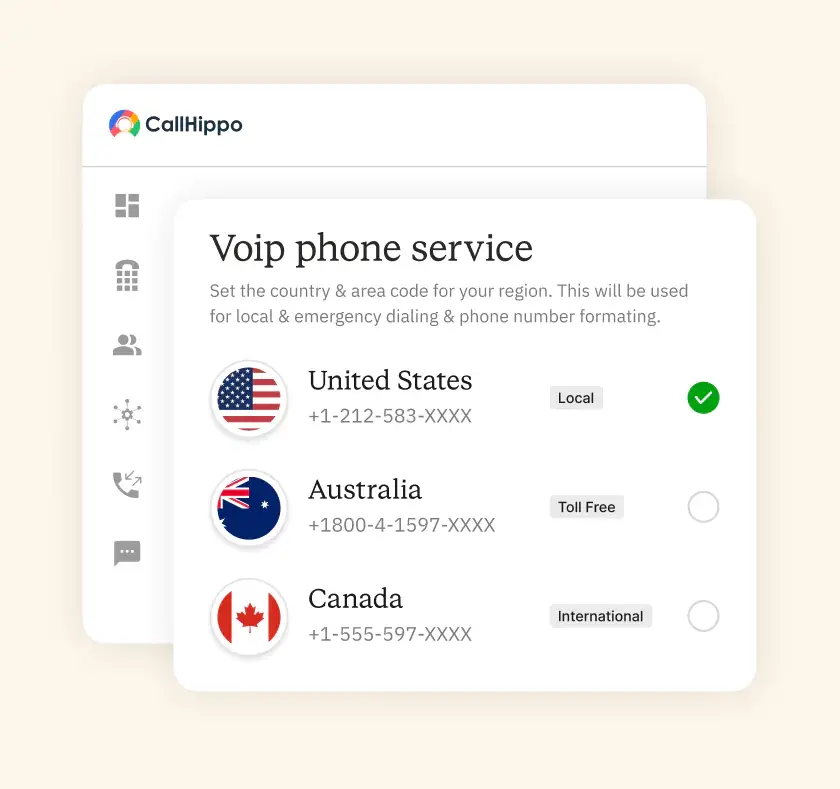
Next, select the number that works best for your business. Go with a local number to build trust in a specific region. A toll-free number helps customers reach you easily. Want to go global? Choose an international number and connect with customers worldwide at an affordable cost.

Now, personalize your system. Add call forwarding, voicemail, IVR menus, and team extensions. You can assign roles and give your team easy access. The dashboard makes setup simple, even if you don’t have technical knowledge. After configuring it, your VoIP system is ready. You can start making business calls right away.
How Business VoIP Works?
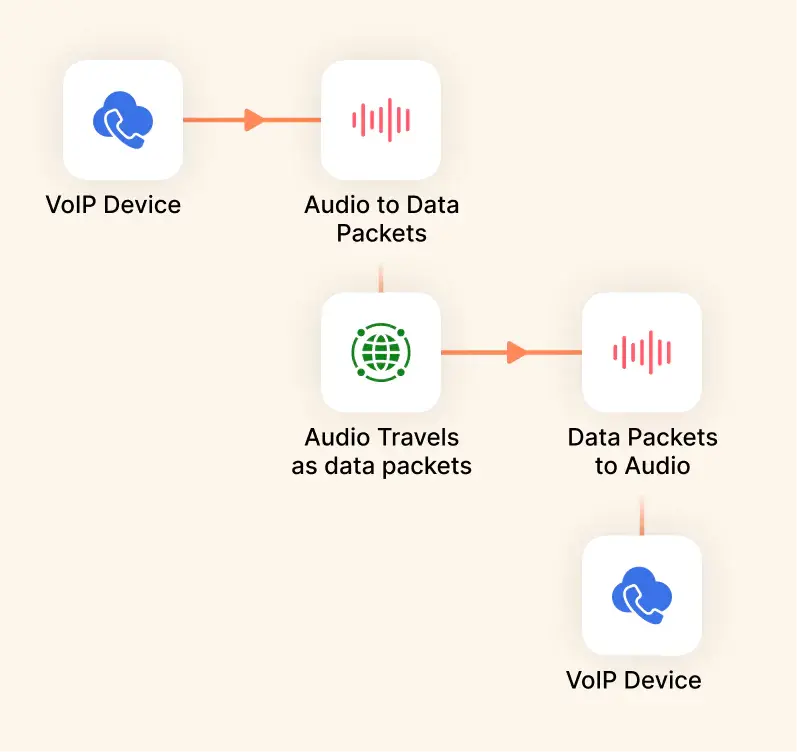
Business VoIP sends your voice over the internet instead of old phone lines. There’s no need for heavy wiring or special hardware. With just an internet connection, you’re ready to call.
When you speak, your voice changes into small data packets. These travel across the internet and reach the other person instantly. That’s why calls feel clear and quick.
VoIP also gives you freedom. You can use it on a computer, tablet, or phone. Whether you’re in the office or working from home, your business number always stays with you.
And it’s not only about calls. In VoIP you get features like video meetings, voicemail, and call forwarding. So instead of just a phone line, you get a full communication system to run your business in a better way.
Why Use a Virtual Business Phone Number?
A business phone number makes it easy to stay connected and run your business smoothly. It benefits your business in various ways.

Don’t stay confined to your desk. Take calls from anywhere on your mobile, laptop, or tablet.

Cut hardware and maintenance costs and pay only for the features your business requires.

Scale your business easily by adding new features or numbers as your team grows.

Keep personal numbers private and protect calls with secure and encrypted connections.

Pick a number that represents your brand. It builds trust and makes your business stand out.

Gain instant insights into your calls. Use this to enhance your customer interactions.
What Are the Essential Features of VoIP for Small Business?
VoIP for small business comes packed with features that help teams work smarter and stay connected at all times.

Forward calls to any team member or device. Customers can always reach the right person, even if you are away.

Use an IVR system to guide callers. It helps direct calls to the right person quickly. This improves customer satisfaction.

Never miss an important message. Customers can leave voicemails which your team can listen to at any time.

Let AI-powered agents answer routine questions instantly. They save time for your team and provide quick, accurate responses to customers.

With conference calling, you can host virtual meetings, share ideas, and collaborate without needing to be in the same room.

Keep your callers engaged while they wait. With call queuing, customers get updates and know when their turn is coming.

Send and receive texts with your VoIP system. Use it for reminders, offers, or to give updates to customers and clients.

Record calls for training and analyzing performance. It helps improve training, ensures quality, and gives your team valuable insights.
What Are the Benefits of Business VoIP Phone Service?
Business VoIP makes communication smarter and simpler. It saves costs while adding powerful tools for growth. Let’s have a look at some more benefits.

Connect your calls with your CRM system. Keep customer details updated and boost productivity without extra effort.

Automated agents handle routine calls. They save time for your team and improve the customer experience.

Use your business number anywhere. You can remain connected, whether at the office, at home, or while traveling.

Get smart call routing and insights with AI. Make faster decisions and deliver better customer support.

Track every call with detailed reports. Use insights to measure performance and improve communication strategies.

Get local numbers across the world. Build a global presence and connect with customers in any region.
Pricing
-

 Calling
- 1 Free Phone Number
Get a dedicated standard phone number for each team member at no extra cost. Share numbers across multiple users for collaborative calling.
- Voicemail
- Click to Dial
- Business Hours
Define operating hours for each number to route calls appropriately.
-

 Messaging
 - SMS (Text messages) & MMS
- WhatsApp Business API
 Platform
- 2FA
Add an extra security layer by requiring a verification code in addition to your password.
- Desktop & Mobile Apps
-
Calling
- Unlimited Minutes (Includes Both Landline & Mobile Calling)
Shared pool of free calling minutes for your entire team. Valid for manual dialing to standard US/Canada numbers only.
- Forward to Device Automatically route incoming calls to your mobile or alternative device to never miss calls.
- Ring All Devices Ring simultaneously on all your logged-in devices (desktop, mobile, browser) for every call.
- AI Global Connect View caller's timezone before dialing to reach contacts at optimal times.
- Country Blocking Restrict outbound calls to specific countries to prevent unauthorized international dialing.
-
Messaging
-
100 SMS (Text Messages)
Standard A2P charges apply.
- SMS Templates Create and save message templates for one-click texting with consistent communication.
- Free Omnichannel Inbox


-

 Analytics
- Basic Report Analytics
- Call Logs (1 month) Access detailed records of all calls including duration, outcome, recordings, and participant information.
- Audit Logs Track all account changes and user actions for security, compliance, and accountability.
-
 Integrations
-
ZZapierSSlack50+WWebhook


 Popular
-
Calling
- Unlimited Minutes (Includes Both Landline & Mobile Calling)
Shared pool of free calling minutes for your entire team. Valid for manual dialing to standard US/Canada numbers only.
- Call Recordings Record and store calls for quality monitoring, training, and compliance.
- Multilingual IVR Offer IVR menu options in multiple languages to serve diverse customer bases.
- Call Distribution (Cascading) Route calls to agents in a priority sequence until someone answers.
- Custom Greetings Upload personalized welcome messages for callers to hear when they reach your number.
-
Messaging
-
500 SMS (Text Messages)
Standard A2P charges apply.
-
Analytics
- Reports / Analytics Get detailed insights and summarized analytics on team's calling performance.
- AI Voicemail Transcription Automatically convert voicemail audio to text for faster message review.
- Call Logs (Lifetime)
- Role Based Access Control Assign specific roles with tailored permissions to control what each user can view and manage.
-
Integrations
-
HHubSpotSSalesforcePPipedrive50+ZZoho
-
Calling
- Smart DID Routing Automatically routes calls to the best available agent based on real-time data.
- Multilevel IVR Create multi-step phone menus to route callers to the right department or person automatically.
- Call Blocking Block unwanted callers and spam numbers to keep your team focused on quality conversations.
- Holiday Routing Configure special call handling and greetings for holidays and non-business days.
- CRM-Based VIP Routing Route calls automatically to the correct contact/lead owner based on CRM information.
-
Messaging
-
1000 SMS (Text Messages)
Standard A2P charges apply.
-
 Enterprise
- Single Sign-On (SSO) Log in once to access CallHippo and all integrated tools with your company credentials.
- Custom Integrations Build advanced integrations with your systems—add click-to-call anywhere, sync call data with custom logic, and create workflows specific to your business.
- Dedicated Account Manager Resolve account queries efficiently with dedicated account manager.
- Personalized Onboarding Experience personalized onboarding for a tailored start.
- 24×7 & Phone Support
-
Integrations
-
HHubSpotSSalesforceZZoho50+ZZendesk
Business VoIP vs Traditional Landline
Have a look at how Business VoIP compares with old-style landline phones:
| Feature | Business VoIP | Traditional Landline |
|---|---|---|
| Setup | Quick and easy, no wiring needed | Needs physical wiring and hardware |
| Cost | Lower monthly cost, pay as you go | Higher bills with fixed line rentals |
| Flexibility | Use on mobile, laptop, or desk phone | Limited to desk phones |
| Scalability | Add new users in minutes | Expensive and time-consuming to expand |
| Features | Comes with IVR, call forwarding, voicemail, video calls, analytics | Basic calling only |
| Global Reach | Get local or international numbers easily | Limited to local coverage |
| Maintenance | Managed online with simple tools | Needs on-site maintenance |
How To Choose The Right Business VoIP Service Provider?
Picking the right VoIP provider helps your business stay connected. A few smart checks can make your choice much easier.
Assess Your Business Needs
You need to first identify what your business needs from a VoIP phone system. Start by knowing your team size. Evaluate the daily call volume and the features that you need. When you are clear about these basics, it becomes much easier for you to select the right provider.
Compare Pricing & Features
Look at different pricing plans and what they include. Providers may seem cheaper but offer fewer features. Find a balance between cost and value. The right choice should give you the tools you actually need. You should not be spending on the features that you don’t really require.
Check Call Quality & Uptime Guarantees
Good communication depends on call quality. Make sure your provider delivers clear calls and strong uptime guarantees. Even a small downtime can hurt customer trust. Choose a service that promises reliable performance and ensures smooth conversations without interruptions.
Reviews
Before deciding, also take a few minutes to read customer reviews. This is where you get to know the real experiences about the service and its support. If a platform has consistent positive feedback, this means you can trust the provider. Honest reviews help you avoid surprises. You can choose a system that truly has the use case for your business.
Customer Support
Strong customer support is just as important as other factors. Check if the provider is available 24/7 and offers multiple channel support. Quick and helpful answers save time when issues come up. Good support ensures your communication stays smooth, even when problems appear.
Experience Smarter Calling with Business VoIP Phone Service
Learn how to set up your VoIP phone service effortlessly and see how businesses are enhancing their communication and efficiency with CallHippo.


“Thanks to the CallHippo team, we were able to resolve a tough issue with flagged phone numbers. As an EdTech startup, outbound calls are crucial for us. CallHippo's solution not only improved our attestation score but also boosted our answer rates and overall customer experience.”

Get International Phone Numbers
 Canada Virtual Phone Number
UK Virtual Phone Number
Canada Virtual Phone Number
UK Virtual Phone Number
 US Virtual Phone Number


