Predictive Dialer
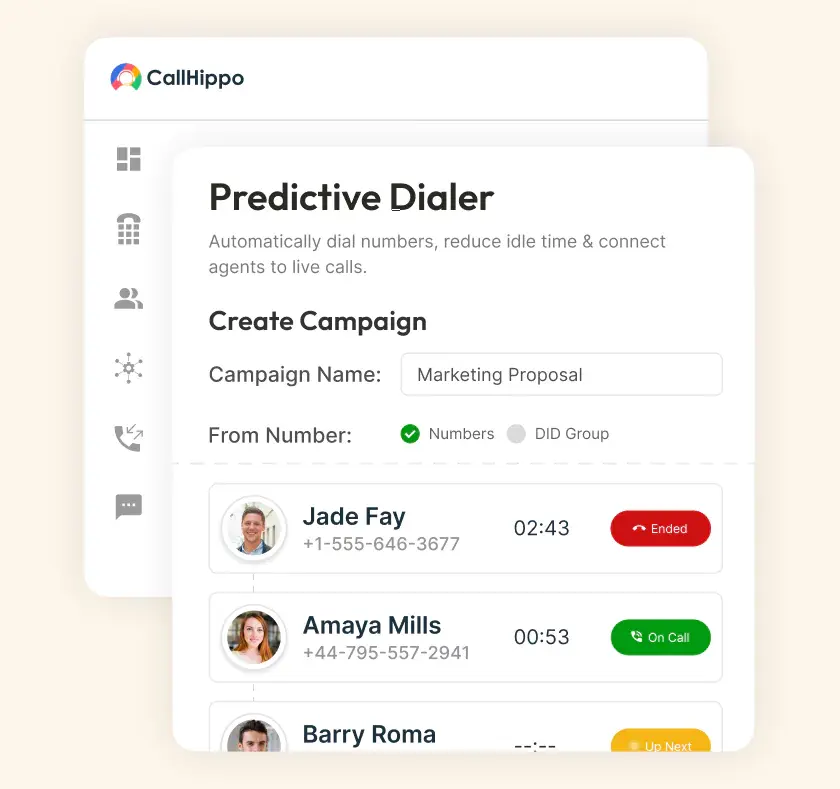
Connect agents to live conversations, not ringing phones. The algorithm dials multiple numbers, skips voicemails, and routes only real pickups to available reps. Call center productivity triples with the same number of reps.
- Dial three to five times more contacts per agent per hour
- Auto-skip voicemails, busy signals, and disconnected phone numbers
- Stay TCPA compliant with automated Do Not Call (DNC) list scrubbing







What are the Benefits of Using a Predictive Dialer?
A predictive dialer changes the math of outbound calling. Six benefits show up in the first week of use.

Manual dialing wastes 40% of an agent's day on rings and voicemails. A predictive dialer eliminates that dead time completely.

A predictive dialer triples effective output on the same salary. Cost per contact drops by two-thirds without adding new hires.

More conversations per hour means more opportunities per week. Sales teams see pipeline coverage climb 60-70% in the first month.

Every dial checks against federal, state, and DNC lists automatically. TCPA thresholds are enforced in the background, keeping risk low.

Live dashboards show which agents are active, waiting, or falling behind. Managers coach in the moment, not after the fact.

CallHippo's predictive dialer runs entirely in the cloud. Agents log in through a browser or mobile app and dial immediately.
How Does Predictive Dialer Software Work?
A predictive dialer uses an algorithm to keep agents in live conversations. Instead of ringing phones, it dials multiple numbers ahead of agent availability. The system filters out no-answers, voicemails, and busy signals. Only real human pickups route to whoever is ready to talk.

Upload your contact list from a CSV or sync directly from your CRM. Segment leads by campaign, priority, or region. The dialer runs the right list against the right agents.

The predictive dialer starts calling multiple numbers before the current call ends. The algorithm calculates dial volume based on agent count and connect rate. Average call length feeds into the pacing too.

When someone picks up, the call routes instantly to a free agent. Agents move from one live conversation to the next without dialing themselves. Idle time drops to zero.
What are the Top Features of a Predictive Dialer?
Not every predictive dialer software ships with the same feature set. Eight features separate a serious platform from a basic auto dialer.

Upload contact lists via CSV, Google Sheets, or direct CRM sync. Segment by campaign or region, then deduplicate before dialing.

AMD identifies voicemail systems in the first two seconds of pickup. Prerecorded messages drop automatically, and voicemails stay off live counts.

Native connectors sync with HubSpot, Salesforce, Zoho, Pipedrive, and 100+ tools. Every call, disposition, and recording logs automatically to the CRM.

Local presence matches your caller ID to the prospect's area code. Pickup rates lift 2-3x, and rotation avoids spam flags.

Voice broadcast sends prerecorded messages to thousands of contacts at once. IVR menus handle opt-outs, callbacks, and interactive customer responses.

Managers listen silently, whisper-coach the rep, or barge into the call. Every mode helps teams save deals in real time.

Every dial scrubs against federal, state, and internal DNC lists automatically. Opt-outs and litigator screening update the master list instantly.

Live dashboards track connect rate, talk time, and agent productivity live. Filter by campaign, list, agent, or disposition instantly.
Pricing
-

 Calling
- Pay Only for Numbers
- Voicemail
- Click to Dial
- Business Hours
Define operating hours for each number to route calls appropriately.
- Smart Failover System
Automatically retries calls with an alternate caller ID when a provider rejection is received, improving call connection success rates.
-

 Messaging
 - SMS (Text messages) & MMS
- WhatsApp Business API
 Platform
- 2FA
Add an extra security layer by requiring a verification code in addition to your password.
- Desktop & Mobile Apps
-
Calling
- Unlimited Minutes (Includes Both Landline & Mobile Calling)
Shared pool of free calling minutes for your entire team. Valid for manual dialing to standard US/Canada numbers only.
- Forward to Device Automatically route incoming calls to your mobile or alternative device to never miss calls.
- Ring All Devices Ring simultaneously on all your logged-in devices (desktop, mobile, browser) for every call.
- AI Global Connect View caller's timezone before dialing to reach contacts at optimal times.
- Country Blocking Restrict outbound calls to specific countries to prevent unauthorized international dialing.
-
Messaging
-
100 SMS (Text Messages)
Standard A2P charges apply.
- SMS Templates Create and save message templates for one-click texting with consistent communication.
- Free Omnichannel Inbox


-

 Analytics
- Basic Report Analytics
- Call Logs (1 month) Access detailed records of all calls including duration, outcome, recordings, and participant information.
- Audit Logs Track all account changes and user actions for security, compliance, and accountability.
-
 Integrations
-
ZZapierSSlack50+WWebhook


 Popular
-
Calling
- Unlimited Minutes (Includes Both Landline & Mobile Calling)
Shared pool of free calling minutes for your entire team. Valid for manual dialing to standard US/Canada numbers only.
- Call Recordings Record and store calls for quality monitoring, training, and compliance.
- Multilingual IVR Offer IVR menu options in multiple languages to serve diverse customer bases.
- Call Distribution (Cascading) Route calls to agents in a priority sequence until someone answers.
- Custom Greetings Upload personalized welcome messages for callers to hear when they reach your number.
-
Messaging
-
500 SMS (Text Messages)
Standard A2P charges apply.
-
Analytics
- Reports / Analytics Get detailed insights and summarized analytics on team's calling performance.
- AI Voicemail Transcription Automatically convert voicemail audio to text for faster message review.
- Call Logs (Lifetime)
- Role Based Access Control Assign specific roles with tailored permissions to control what each user can view and manage.
- Call Transcription
-
Integrations
-
HHubSpotSSalesforcePPipedrive50+ZZoho
-
Calling
-
Unlimited Minutes (Includes Both Landline & Mobile Calling)
Shared pool of free calling minutes for your entire team. Valid for manual dialing to standard US/CA numbers only.
- Smart DID Routing Automatically routes calls to the best available agent based on real-time data.
- Multilevel IVR Create multi-step phone menus to route callers to the right department or person automatically.
- Call Blocking Block unwanted callers and spam numbers to keep your team focused on quality conversations.
- Holiday Routing Configure special call handling and greetings for holidays and non-business days.
- CRM-Based VIP Routing Route calls automatically to the correct contact/lead owner based on CRM information.
-
Messaging
-
1000 SMS (Text Messages)
Standard A2P charges apply.
- Analytics
- Call Summary
-
 Enterprise
- Single Sign-On (SSO) Log in once to access CallHippo and all integrated tools with your company credentials.
- Custom Integrations Build advanced integrations with your systems—add click-to-call anywhere, sync call data with custom logic, and create workflows specific to your business.
- Dedicated Account Manager Resolve account queries efficiently with dedicated account manager.
- Personalized Onboarding Experience personalized onboarding for a tailored start.
- 24×7 & Phone Support
-
Integrations
-
HHubSpotSSalesforceZZoho50+ZZendesk
Limitations and challenges in Predictive Dialer
Predictive dialers deliver real gains, but they come with real trade-offs too. Five limitations worth understanding before you deploy.
Not enough contact context
Predictive dialing prioritizes speed over research. Agents connect to live calls without knowing the prospect’s history, industry, or last touchpoint. The fix is a CRM-connected screen pop. Context surfaces the moment a call routes to the agent.
Imperfect answering machine detection
AMD misclassifies calls occasionally. A long personal greeting can trigger a false voicemail drop. A short “hello” can slip past detection. Modern AMD accuracy sits around 95%, so the remaining 5% needs a quick recovery playbook for the agent.
Limited agent control
Predictive dialers pace calls based on the algorithm, not the agent. Reps sometimes get a live call the second the previous one ends. There is no breath in between. Managers should tune the pacing ratio and give agents a between-call buffer. That prevents burnout over long shifts.
Data requirements
Predictive dialers work best on lists of 500+ contacts per campaign. Smaller lists don’t give the algorithm enough volume to pace efficiently. Teams with limited outbound data should start with a power dialer. Upgrade once your pipeline scales.
Regulatory risks
TCPA violations can cost $500-1,500 per call, per person. A misconfigured abandonment threshold or a missing DNC scrub creates real legal exposure. The best predictive dialer platforms make compliance a default setting. Never an add-on.
How Can We Improve Agent Efficiency with Predictive Dialers?
Buying the software is only half the work. Five habits separate teams that see real gains from those that don’t.
Fine-tune pacing ratios
The pacing ratio decides how many numbers get dialed per available agent. Too high and abandonment climbs. Too low and agents wait too long. Start conservative, review the abandonment rate weekly, and adjust from there.
Use real-time analytics
Waiting until the campaign ends to review performance can prove to be costly. Instead, live dashboards flag slow lists and weak scripts in the first hour. Mid-campaign corrections happen fast, which lifts overall campaign yield.
Equip Agents With Call Scripts and Live Assist
Agents on a predictive dialer have seconds between calls, not minutes. In-app scripts, objection handling prompts, and AI live assist reduce cognitive load. Agents stay ready for whoever picks up next.
Train Agents on Compliance Before Every Campaign
Regulations change often. Federal rules update, state rules layer on top, and industry-specific rules add another layer. A 15-minute compliance refresh before every campaign prevents the mistakes that cost teams thousands in TCPA fines.
Monitor for Agent Burnout
Predictive dialing pushes call volume high. Agents making 200+ dials a day need protection from burnout. Without it, you lose your best performers first. Rotate campaigns, cap dial volume, and build breaks into the schedule.
Practical Use Cases for Predictive Dialer Software
A predictive dialer earns its keep across six use cases. Every predictive dialer call center runs on at least one of these sales motions.
Sales and telemarketing
A predictive dialer suits sales teams making 100-200 cold dials per day. Common use cases include lead qualification, appointment setting, and inbound MQL follow-up.
Software/IT and customer success
SaaS teams use a predictive dialer for onboarding calls at scale. It also powers renewal conversations, expansion outreach, and NPS follow-up surveys.
Political campaigns and nonprofits
Political campaigns and nonprofits use a predictive dialer system for voter outreach. It also powers donor engagement and fundraising with compliance built in.
Market research and surveys
Market research firms use a predictive dialer to reach thousands of respondents. Post-purchase surveys and long-format interviews with skill-based routing all work smoothly.
Healthcare and appointment reminders
Healthcare providers use a predictive dialer for appointment reminders and patient outreach. HIPAA-compliant workflows handle contact, consent, and follow-up care at scale.
Debt collection
Debt collectors use a predictive dialer for high-volume outreach on delinquent accounts. FDCPA and state-law compliance run automatically on every dial.
How do I Choose the Right Dialer for Your Business?
Not every predictive dialer system fits every team. Four questions matter more than any feature comparison.
Check Your Call Volume and Agent Count
Predictive dialing needs volume to work. Teams under 5 agents should use a power or preview dialer instead. Predictive works best on lists over 500 contacts per campaign. Above those thresholds, predictive pays back fast.
Check CRM Compatibility Before Committing
A predictive dialer without CRM integration is a productivity trap. Reps end up copying and pasting data between tools. That cancels out the volume gains. Confirm native integration with your CRM before you commit to any vendor.
Match the Dialer Mode to Your Sales Motion
Not every sales team needs predictive. Enterprise reps working strategic accounts need preview mode for research. Warm outbound teams work best on power dialers. Predictive fits cold-call heavy teams running lists of hundreds or thousands.
Use the Free Trial to Test With a Real Campaign
Vendor demos always look great. Test the actual product with a real campaign before buying. Run a 500-contact list through the free trial. Measure connect rate, abandonment rate, and agent productivity firsthand.
The Difference Between Preview, Power, and Predictive Dialing Software
Three outbound dialer modes exist. Each fits a different sales motion. Here is what actually separates them.
| Feature | Preview Dialing | Power Dialing | Predictive Dialing |
|---|---|---|---|
| Dialing Process | Agent reviews prospect details before dialing | Automatically dials next number after each call | Algorithm dials multiple numbers ahead of agent availability |
| Agent Involvement | High: full manual control | Medium: reviews between calls | Low: system paces the queue |
| Call Volume | Low | Medium | High |
| Efficiency | Best for research-heavy calls | Balances speed and quality | Maximum volume, minimum idle time |
| Use Case | Consultative sales, complex B2B deals, accounts requiring comprehensive pre-call research | Mid-volume outbound, warm lead follow-up, teams of 2-10 agents | High-volume cold calling, telemarketing, collections, 5+ agent campaigns |
Why Get a Cloud-Hosted Predictive Dialer?
A cloud predictive dialer solves problems that on-premise systems create. Four reasons cloud has become the default choice for outbound teams.
Activate in Minutes, Not Weeks
Cloud predictive dialers start dialing within minutes of signup. No hardware to procure, no PBX to configure, no IT to schedule. Sales leaders launch campaigns the same day they buy the software.
Lower Total Cost Than On-Premise
On-premise dialers require upfront hardware, licensing, and IT overhead. Cloud predictive dialers roll all of that into a monthly per-seat cost. Total cost of ownership drops 60-70% over three years for most teams.
Full Remote and Hybrid Team Support
Cloud dialers work from anywhere with a stable internet connection. Reps log in from home, a shared office, or a coworking space. The experience stays the same across all locations. On-premise systems limit teams to VPN-heavy workarounds.
Automatic Updates and Compliance Maintenance
Regulations change monthly. Cloud dialers push compliance updates automatically. DNC scrubbing, TCPA rules, and state-specific requirements stay current. On-premise systems require an IT deployment cycle for every change.
On-Premise vs. Cloud Predictive Dialers
The choice between on-premise and cloud comes down to control versus speed. Here is how they compare across the factors that actually matter.
| Factor | On-Premise | Cloud (CallHippo) |
|---|---|---|
| Setup time | Weeks to months | 3 minutes |
| Upfront cost | High (hardware + licensing) | None |
| Maintenance | Internal IT required | Handled by provider |
| Scalability | Physical capacity limits | Unlimited: add agents instantly |
| Remote access | Limited or VPN dependent | Full browser access anywhere |
| Compliance updates | Manual IT deployment | Automatic |
| Best for | Large enterprises with data residency requirements | Growth teams, SMB to mid-market |

“Thanks to the CallHippo team, we were able to resolve a tough issue with flagged phone numbers. As an EdTech startup, outbound calls are crucial for us. CallHippo's solution not only improved our attestation score but also boosted our answer rates and overall customer experience.”

Frequently Asked Questions
-
A predictive dialer is outbound calling software that dials multiple numbers ahead of agent availability.
-
The best predictive dialer software depends on your call volume. CallHippo, Five9, and Genesys lead the market.
-
No. Predictive dialers are legal under TCPA and FCC rules with proper abandonment thresholds.
-
US regulations include TCPA, DNC lists, and FCC pacing rules. FDCPA and HIPAA add layers.
-
High-volume outbound teams making 80+ dials per rep per day get the biggest gains.
-
Preview dialers work for research-heavy sales. Power dialers work for mid-volume warm outbound.
-
Predictive is a type of auto dialer that dials multiple numbers ahead of agent availability.
-
AMD detects voicemails in two seconds. The dialer drops a message or skips the call.
-
Yes. CallHippo's predictive dialer integrates natively with HubSpot, Salesforce, Zoho, Pipedrive, and 100+ other CRM tools.
-
Predictive dialing works best with 5 or more agents. Below that, use a power dialer.
Related Post

Get International Phone Numbers
 Canada Virtual Phone Number
UK Virtual Phone Number
Canada Virtual Phone Number
UK Virtual Phone Number
 US Virtual Phone Number