
Get Progressive Dialer to Automate Your Calling Workflow
Give your agents back their time. CallHippo’s progressive dialer automates the grunt work of outbound calling: it dials, it waits, and it connects calls only when your team has bandwidth. It is best for sales teams, support teams, appointment setters, compliance-sensitive industries, and SMBs that prioritize conversation quality over call volume.
- Maximize agent talk time by removing idle periods between calls.
- Drastically reduce abandoned calls through intelligent agent availability tracking.
- Scale your outreach effortlessly with automated dialing workflows.
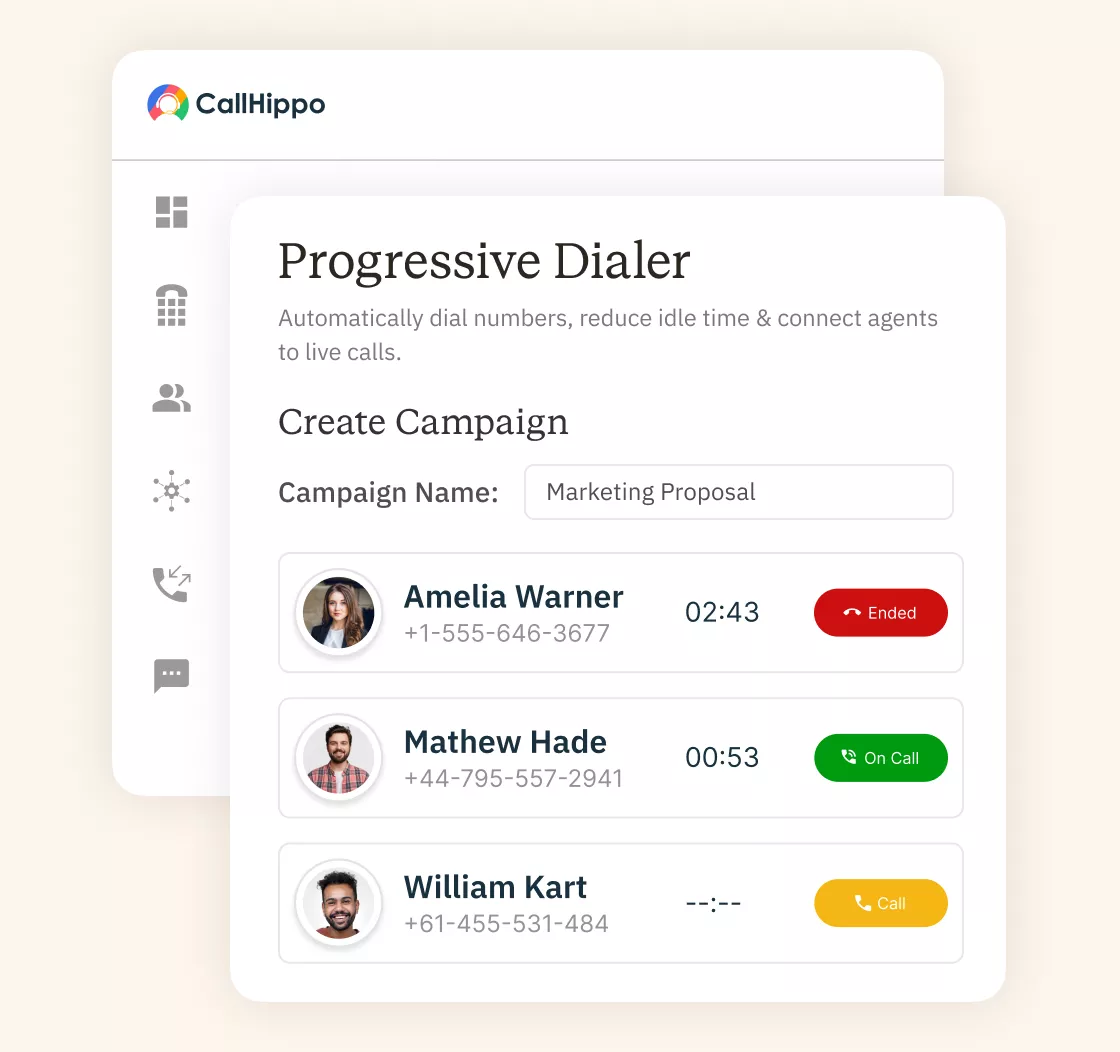







What is a Progressive Dialer?
A progressive dialer is an automated calling system that places outbound calls only when an agent is available. It makes sure you have zero abandoned calls and higher-quality conversations. Your sales team gets to skip all that repetitive dialing busywork and just jump into conversations when they’re actually at their desk and ready to talk.
How to Set Up a Progressive Dialer?
Setting up your progressive dialer software is actually pretty straightforward. Most people get up and start running it the same day they sign up.

Sign up and log in to CallHippo. It has a clean, straightforward dashboard where you can upload your contact lists. You can adjust your basic settings and launch your first campaign. The platform is intuitive, and you don't need technical expertise or IT assistance.

Think about what you're trying to accomplish with your outbound calling. CallHippo's progressive auto dialer gives you flexibility. You can use local numbers to improve answer rates, prioritize your most valuable leads, or organize contacts by customer segment.

Take time to configure how CallHippo manages your calls. We'll make sure calls go to the person who can actually help: based on who's free and what they're best at. Voicemails? We drop those for you. CallHippo works with whatever CRM you've got going: Salesforce, HubSpot, whatever. Everything stays synced without you lifting a finger. And if you need to follow do-not-call rules, just upload your list and set your hours. We'll take care of the rest.
What are the Benefits of a Progressive Dialer For Sales Teams?
A progressive dialer improves agent performance, reduces dropped calls, and increases conversions by only connecting calls when agents are available.

Your agents spend their time actually talking to people instead of staring at a phone screen dialing numbers. More conversations per hour mean better results.

Since the system only connects when someone's ready to answer, customers aren't greeted by awkward silence or getting hung up on.

Everything's encrypted, and the system keeps detailed records of who accessed what and when. Your customer data stays protected, and you've got audit trails.

When agents are ready, and customers don't wait on hold, conversations start better. That momentum leads to higher close rates and more successful outcomes.

The system handles dialing, queuing, and distributing calls automatically. Your team just focuses on what they do best, building relationships and closing deals.

Watch live dashboards showing how campaigns perform, who's performing well, and where things need adjusting. Make smart decisions instead of waiting for end-of-day reports.
How Does a Progressive Dialer Work (Step-By-Step)?
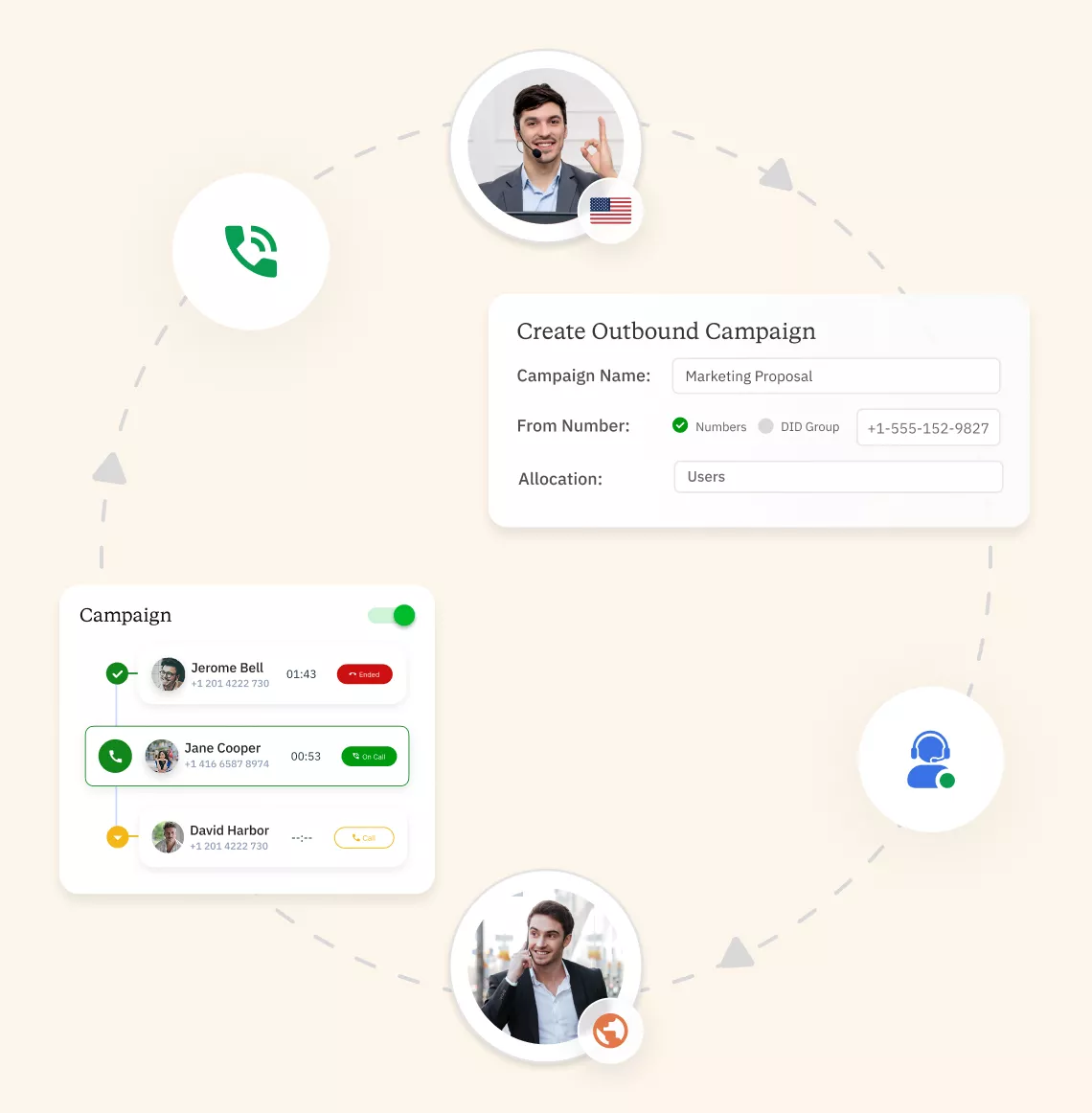
The progressive auto dialer just automates the tedious things really well. Here’s the actual process, step by step.
- Step 1: Queue and Prioritize Contacts
The system organizes your contact list smartly: prioritizing high-value leads, considering time zones, or following whatever criteria you’ve set. Hot prospects get called first while still covering everyone systematically. - Step 2: Auto-Dial When an Agent Becomes Available
The moment an agent wraps up a call, the progressive dialer software kicks into gear and starts the next one. No button clicking needed. Zero downtime staring at the screen. The system watches the agent status constantly and triggers dialing the instant there’s capacity. - Step 3: Live Answer Detection
Nobody wants their agents sitting through endless rings and robotic voicemail greetings in a contact center. Our technology handles that part. It detects whether a live person answered or not, and only connects your agents to real conversations. Voicemails get your pre-recorded message, and calls that don’t connect get automatically queued for a retry. It’s all about keeping your team focused on what matters: talking to people. - Step 4: Next Call Begins
After wrapping the conversation and finishing any notes or follow-up tasks, the cycle starts fresh. The progressive dialing system grabs the next prioritized contact and starts the call. It’s a continuous loop that keeps your team in motion. It maximizes productive calling time while maintaining quality throughout every shift. A progressive dialer works by queuing contacts, monitoring agent availability, and dialing only when an agent is free. It automatically moves to the next call once the conversation ends.
What are the Key Features to Look For in a Progressive Dialer?
Not all progressive dialers are created equal. Here’s what separates the good ones from the rest.

Live dashboards show you what's happening right now: call volumes, connection rates, and who's performing well. No more waiting until tomorrow to see how today went.

Supervisors can listen in, jump into calls, or whisper coaching tips without the customer hearing. Perfect for training new reps and maintaining quality standards.

Adjust dialing speed, prioritize certain contacts, set specific calling hours, or assign particular agents to campaigns. Flexibility to run things exactly how your business operates.

Connects smoothly with Salesforce, HubSpot, Zendesk, and other tools you already use. Customer data syncs automatically, so agents see everything they need during calls.

Smart algorithms rank contacts based on engagement history, lead scores, and conversion likelihood. Your agents reach out to the hottest prospects when they're most ready.

Automatically manages do-not-call lists and respects calling time restrictions. Keeps you compliant with regulations so you avoid fines and protect your reputation.

Every conversation gets recorded automatically for training, quality checks, and resolving disputes. Secure storage makes it easy to find and replay calls whenever needed.

Shows local area codes that match where your prospects are. People answer more often when they recognize the number looks familiar and local.
Pricing
-

 Calling
- 1 Free Phone Number
Get a dedicated standard phone number for each team member at no extra cost. Share numbers across multiple users for collaborative calling.
- Voicemail
- Click to Dial
- Business Hours
Define operating hours for each number to route calls appropriately.
-

 Messaging
 - SMS (Text messages) & MMS
- WhatsApp Business API
 Platform
- 2FA
Add an extra security layer by requiring a verification code in addition to your password.
- Desktop & Mobile Apps
-
Calling
- Unlimited Minutes (Includes Both Landline & Mobile Calling)
Shared pool of free calling minutes for your entire team. Valid for manual dialing to standard US/Canada numbers only.
- Forward to Device Automatically route incoming calls to your mobile or alternative device to never miss calls.
- Ring All Devices Ring simultaneously on all your logged-in devices (desktop, mobile, browser) for every call.
- AI Global Connect View caller's timezone before dialing to reach contacts at optimal times.
- Country Blocking Restrict outbound calls to specific countries to prevent unauthorized international dialing.
-
Messaging
-
100 SMS (Text Messages)
Standard A2P charges apply.
- SMS Templates Create and save message templates for one-click texting with consistent communication.
- Free Omnichannel Inbox


-

 Analytics
- Basic Report Analytics
- Call Logs (1 month) Access detailed records of all calls including duration, outcome, recordings, and participant information.
- Audit Logs Track all account changes and user actions for security, compliance, and accountability.
-
 Integrations
-
ZZapierSSlack50+WWebhook


 Popular
-
Calling
- Unlimited Minutes (Includes Both Landline & Mobile Calling)
Shared pool of free calling minutes for your entire team. Valid for manual dialing to standard US/Canada numbers only.
- Call Recordings Record and store calls for quality monitoring, training, and compliance.
- Multilingual IVR Offer IVR menu options in multiple languages to serve diverse customer bases.
- Call Distribution (Cascading) Route calls to agents in a priority sequence until someone answers.
- Custom Greetings Upload personalized welcome messages for callers to hear when they reach your number.
-
Messaging
-
500 SMS (Text Messages)
Standard A2P charges apply.
-
Analytics
- Reports / Analytics Get detailed insights and summarized analytics on team's calling performance.
- AI Voicemail Transcription Automatically convert voicemail audio to text for faster message review.
- Call Logs (Lifetime)
- Role Based Access Control Assign specific roles with tailored permissions to control what each user can view and manage.
-
Integrations
-
HHubSpotSSalesforcePPipedrive50+ZZoho
-
Calling
- Smart DID Routing Automatically routes calls to the best available agent based on real-time data.
- Multilevel IVR Create multi-step phone menus to route callers to the right department or person automatically.
- Call Blocking Block unwanted callers and spam numbers to keep your team focused on quality conversations.
- Holiday Routing Configure special call handling and greetings for holidays and non-business days.
- CRM-Based VIP Routing Route calls automatically to the correct contact/lead owner based on CRM information.
-
Messaging
-
1000 SMS (Text Messages)
Standard A2P charges apply.
-
 Enterprise
- Single Sign-On (SSO) Log in once to access CallHippo and all integrated tools with your company credentials.
- Custom Integrations Build advanced integrations with your systems—add click-to-call anywhere, sync call data with custom logic, and create workflows specific to your business.
- Dedicated Account Manager Resolve account queries efficiently with dedicated account manager.
- Personalized Onboarding Experience personalized onboarding for a tailored start.
- 24×7 & Phone Support
-
Integrations
-
HHubSpotSSalesforceZZoho50+ZZendesk
Understand More About Progressive Dialer
To get a detailed understanding of a progressive dialer, you must know a lot more than its benefits and features. We have churned out some important information about progressive dialers for you:
Top Use Cases for Progressive Dialer Software
Honestly, progressive dialers pop up in way more places than you’d think. They’re not just for massive call centers; lots of different businesses use them. Here’s where they actually make sense.
Sales & Lead Generation
Your sales team has a list of 500 leads, and they need to actually talk to them. They don’t want to leave voicemails all day. So, a progressive dialer system handles all the repetitive parts: it dials, waits for answers, and handles answering machine detection. This helps your reps focus on actual selling. One call ends, they type a quick note, and the next prospect is already on the line. The whole point is keeping salespeople in conversations instead of doing clerical work. And because agents aren’t rushing between calls and customer phone numbers, they can actually listen and respond properly instead of reading a script like a robot.
Appointment Setting & Confirmations
Medical offices, dentists, repair services: anyone who lives and dies by their appointment calendar needs this. You’ve got appointments to confirm, no-shows to reschedule, and empty slots to fill. The progressive calling system just works through your list while your front desk staff handles whoever answers.
What’s nice is when a customer picks up, your team member is actually there to talk about rescheduling the checkup, not making her wait while the system connects the call. It cuts down on no-shows, too, where people can ask instead of just getting a reminder text they ignore.
Customer Support, Renewals, & Follow-ups
Sometimes you need to call customers instead of expecting them to call. For example, you can call if someone’s subscription is about to expire or you’re following up on people who tried your free trial but didn’t convert. Progressive dialer software lets your support team be proactive without it feeling robotic.
When someone answers, your agent already has their account pulled up, knows their history, and can have a real conversation. It feels helpful instead of salesy. Works great for SaaS companies doing trial follow-ups or subscription businesses, preventing churn before it happens.
Debt Collection & Payment Reminders
Nobody likes making these calls, and nobody likes getting them. But bills need to get paid. Progressive dialers help because they’re not as aggressive as those rapid-fire systems that catch people off guard. When someone picks up, there’s actually a person ready to discuss payment options or work out a plan.
You can prioritize who to call based on how overdue they are. And the compliance is built in, so you’re not accidentally calling someone at 8 PM and getting a fine. It’s still collections, but respectful collections.
Political Campaigns & Nonprofit Outreach
Campaigns and nonprofits usually have volunteers doing calls. A progressive auto dialer makes their job way less painful. Whether you’re trying to get out the vote, raise donations, or spread awareness about your cause, the system just handles the technical things, and there is no need of manual dialing. Your volunteers talk when someone answers. They don’t need a tutorial on phone systems.
You can also segment by voting district or donation history so the right volunteer reaches the right person. And since these calls are really about building connections and sharing messages, the slower progressive approach, where people are ready to listen, makes way more sense than blasting through calls.
Progressive Dialer vs Predictive Dialer
People often confuse these two because they both auto-dial. But they’re actually completely different. Let me break down how they compare so you know which one you actually need:
| Feature | Progressive Dialer | Predictive Dialer |
|---|---|---|
| Dialing Speed | One call per agent, only when they're free. Slower total dials, but every connection has someone ready. | Dials 3-5 numbers per agent simultaneously, gambling most won't answer. Always trying to keep someone on the line. |
| Call Accuracy | Virtually no abandoned calls since it only connects when agents are ready. Clear choice for maintaining good customer relationships. | Predictive dialing regularly creates abandoned calls when customers answer, but all agents are busy. Customers hear silence and hang up, frustrated. |
| Agent Control | Agents get breathing room between calls to finish notes and update CRM. The system waits for them. Less stressful for new people or complex sales. | Relentless pace: next call, next call, next call. Some agents thrive on it; others burn out fast. Better for experienced agents doing quick calls. |
| Best Use Cases | Sales to qualified leads, customer service, appointment booking: anything where relationships matter. Perfect when you're calling people who already know you. | Massive cold calling campaigns where you need pure volume. Market research surveys, political polling: situations where occasional dropped calls don't matter much. |
| Compliance Risk | Way safer, designed to never abandon calls. Easier to manage do-not-call lists. Much smarter choice for healthcare, finance, or heavily regulated industries. | High risk, abandoned calls violate TCPA regulations. Too many can mean serious fines. Requires careful monitoring to stay compliant. |
| Campaign Efficiency | Better conversation quality. Might connect with 30% fewer people, but if those convert twice as well, you're winning. Quality beats quantity for most businesses. | More total dials and connections per hour. Burns through contact lists faster. Good for pure volume, but conversations may suffer from the rushed pace. |
Which One to Choose?
Go progressive if customer experience matters, you’re having complex conversations, compliance is a concern, or you’re calling existing customers. Also better for smaller or less experienced teams. Pick the predictive dialer only if you’re doing massive cold outreach where speed trumps everything, your agents are pros who won’t burn out, and you’re comfortable managing abandoned call rates.
Key Metrics to Measure Dialer Performance
You need to track these numbers, or you won’t know if your progressive dialer is working well or needs adjustments.
Answer rates
What percentage of your dials get a real human picking up? If this number’s low, you’re either calling at a bad time, your caller ID looks suspicious, or your list needs work. Aim for at least 20-30% for business calls, higher for customers who know you. Local presence dialing helps a lot here. Track it by time of day to figure out when people actually answer.
Talk time
How much time do your agents spend actually talking versus sitting around or doing paperwork? Progressive dialers should keep this high, shooting for 45-60 minutes out of every hour. If it’s lower, maybe the system’s not dialing fast enough, or agents are drowning in after-call work. More talk time equals better ROI since you’re paying people to have conversations, not administrative tasks.
Connection rates
This is different from answer rates; it’s about actual conversations, not just someone picking up and hanging up immediately. Shows if your opening works and if you’re calling the right people. Low connection despite decent answers? Your script needs improvement, or you’re targeting the wrong audience.
Lead conversion
The only number that really matters: what percentage of calls get you what you want (sale, appointment, payment, etc.). This tells you if all the calling is worth the effort. Track it by agent and time of day to spot patterns. Low conversion despite good connections? That’s a training issue, or your offer needs work, not the dialer’s fault. Progressive dialing usually helps here because agents aren’t rushed.
Get Started with a Business Phone System You Can Trust
Learn how to quickly buy your virtual business phone number with CallHippo and hear from satisfied customer about how we improved their communication and customer experience.


“Thanks to the CallHippo team, we were able to resolve a tough issue with flagged phone numbers. As an EdTech startup, outbound calls are crucial for us. CallHippo's solution not only improved our attestation score but also boosted our answer rates and overall customer experience.”

Frequently Asked Questions
-
By automating dialing, you can reduce downtime between calls, allowing agents to focus on engaging with prospects for better outcomes.
-
CallHippo provides features like Sentiment Analysis, Topic Extraction, Talk-to-Listen Ratio, and Call Performance Rating to improve communication effectiveness and customer satisfaction.
-
Progressive dialers call one contact per call center agent and wait until they're actually free before dialing. No abandoned calls, ever. Predictive dialers blast through multiple numbers at once, hoping to catch agents between calls: speed first, quality second.
-
Definitely, small teams actually benefit most because you don't need huge call volumes to see results. It's straightforward to manage, keeps your calling quality high, and helps your team with better productivity.
-
Simple, it handles all the repetitive work. No more manually dialing numbers, sitting through busy signals, or leaving voicemails. Your agents just talk to actual people all day. Less time on repetitive tasks means more time closing deals.
-
At minimum, your CRM, like Salesforce or HubSpot, and helpdesk tools like Zendesk. Also, look for analytics platforms and workforce management systems. Good integrations mean your data flows automatically without duplicate data entry.
-
- Built to avoid abandoned calls by design
- Native CRM integrations (Salesforce, HubSpot, Zendesk)
- TCPA-safe dialing with DNC controls
- Real-time analytics without complex setup
Get International Phone Numbers
 Canada Virtual Phone Number
UK Virtual Phone Number
Canada Virtual Phone Number
UK Virtual Phone Number
 US Virtual Phone Number


